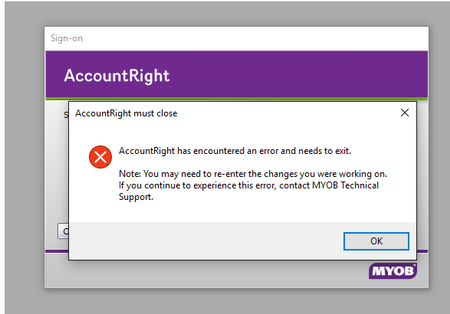
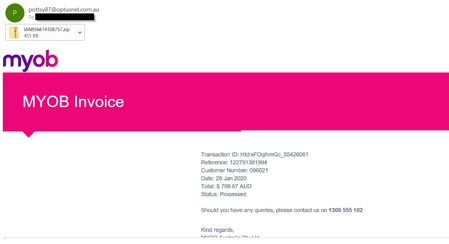
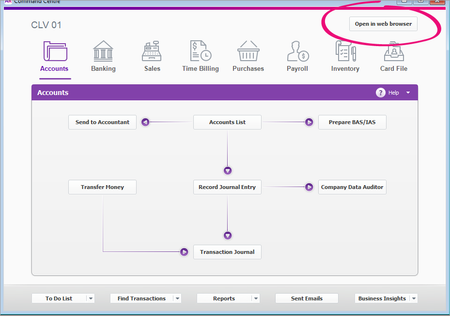
ContributionsMost RecentMost LikesSolutionsAccountRight 2020.4 is now available AccountRight 2020.4 promises to be one of our biggest releases yet. Unable to open AccountRight file Current status: Solutions are available that permanently resolve this issue. Microsoft has recently released a Windows security update that may prevent you from accessing AccountRight company files. There are now a number of options to permanently solve this issue. So here’s what we recommend you do: Upgrade to AccountRight 2016.1.1 The easiest way to overcome this issue and maintain access is to update to the latest release of AccountRight 2016.1.1 on all workstations that use AccountRight. This is available now to all our customers with an active subscription, and will permanently resolve this issue. To access AccountRight 2016.1.1 please update when prompted in your software. Learn about the new features If you’re unable to update to 2016.1.1, there are a number of options available: If you haven’t installed the Microsoft security update yet and can open your files: Open each file, go to Help> Confirm Your Company file and follow the onscreen instructions to confirm them online. If you can’t open a company file: Use the AccountRight Company File Hotfix tool to fix it. The tool has been enhanced so you can fix several files at once. See below for instructions on how to use it. Microsoft fix: Further to the MYOB solutions above, Microsoft has also outlined a process where clients can solve this issue for all AccountRight company files on a system if the Windows update has already been installed. It is quite a technical process, and there are security implications with this fix that we recommend you read and understand before embarking on this path. The Microsoft Knowledge Base article with details can be found here. Issue summary Some clients get the following message and an "InvalidLicenceToken (100007)" message when opening AccountRight desktop company files: Run the AccountRight hotfix tool If you can’t open your AccountRight company file or update to AccountRight 2016.1.1, you’ll need to run our hotfix tool to access to your file. You’ll need to run this tool on all AccountRight company files that you use. Close AccountRight. Download the tool for your version AccountRight 2020.1 and earlier or AccountRight 2020.2 and later (having trouble accessing the download? Right-click and select Save link as) Find the tool that you downloaded and double-click it. When the tool appears, all files found in your AccountRight library (other than the sample files) will be listed. If the your file isn't listed, click the Server Edition tab. Still not listed? Click Custom Location and then browse to the folder containing your company files. Select the files you'd like to update and click Update selected files. When all files have been updated, you can close the tool window. Start AccountRight and open a company file that’s been updated. When the Confirmation window appears, choose to confirm the company file online and then click Next. When complete, close the Confirmation window. You can now continue working with this file. If you updated several files at once, you’ll be prompted to confirm the other files the first time you open them. If you have turned off auto updates for Windows, you can now turn them on. For Windows 7 and 8.1, see the Windows instructions to turn on auto updates. For Windows 10, see the instructions to change how updates are installed. Note: If you restore a company file that was backed up before you applied this solution, you will need to run the tool on the restored file as well. AccountRight 2020.3.1 is now available Stay compliant with the New Australian PAYG tax tables, applicable from 13 October 2020. AccountRight 2020.3 is now available AccountRight 2020.3 includes some great improvements making it more reliable, flexible and easier to use. AccountRight 2020.2 is now available We’ve made the end of payroll year simpler, enhanced security on the backup process, and said goodbye to loading tax tables. These and many other small changes in this release. AccountRight 2020.2: Important details about upcoming release We’re always making improvements to our software and the upcoming AccountRight release will be no exception AccountRight 2020.1 is now available Further bank feeds automation, enhancements to the MYOB Invoices app and In Tray and more in the 2020.1 release of AccountRight Re: Warning – watch out for fake (spam / phishing) emails pretending to be from MYOB Hi everyone, Our Security team have received recent reports of a phishing campaign that is targeting MYOB clients and non-clients with MYOB branded emails. These emails are using MYOB’s invoice template and contain an attachment that appears to be malicious. So far we've found that the emails are being sent from random addresses using Optus email service. Below is an example of one such fake email: We urge you to please follow the tips in our original post, to protect yourself against fraudulent emails. If you're unsure whether an email message from MYOB is genuine or if you’d like further clarification, please forward a copy of the email to [email protected] or reach out to us via this forum, by starting a new post. AccountRight 2019.4 is now available We’re always about finding ways to make AccountRight automatically do the stuff that you’d normally do. Re: AccountRight 2019.3 is now available Hi PowerMyobBI, thank you for your query. I have reached out to our Ecosystems team for more information on this. Will post back, as soon as I hear back from them. Cheers, Suja