GDay53Ultimate Cover UserJoined 15 years ago2598 Posts973 LikesLikes received569 SolutionsView All Badges
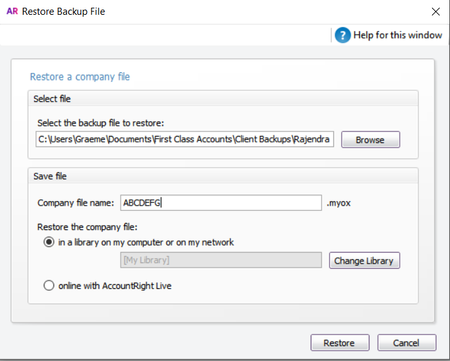
ContributionsMost RecentMost LikesSolutionsRe: Opening Balances entered wrong amounts Thanks for the reply. I tried doing that but it won't let me change opening balances in the Income or Expenses. Thinking I might have to do a General Journal to get rid of the amounts but that won't change the opening Balances. Opening Balances entered wrong amounts I have a new client that has entered wrong amounts in the opening balances. How do you fix that? Re: Change serial number Thank you will look into it. Change serial number Hi been a long time since I was last in the community and I have a question about updating files. Have an old Account Right that has been active since 2004 and the group has now purchased a new MYOB Pro file and we need to upgrade the old file. Is it possible to just update the serial number? SolvedRe: Create a budget Mishka Welcome to the MYOB Community Forum, I hope you find plenty of useful information. The Browser based version still only has about 80% of the functionality of the Account Right Live. If you need to use the Budgets then stay with the Account Right Live. Re: Settle debits Simonev8835 Welcome to the MYOB Community Forum, I hope you find plenty of useful information. You will need to use a clearing account such as Undeposited Funds. Have the bank feed show as going into Undeposited Funds and do the Receive Refund from Undeposited Funds as individual refunds. Re: Prepayments Drew_Hawthorne Welcome to the MYOB Community Forum, I hope you find plenty of useful information. The first Question is where is the amount currently entered in your Opening Balances ? When you created your file you should have entered opening balances from the Balance Sheet from the previous data file (Xero or whatever). If you have not done this then your current file will be out of balance and you will end up with a large amount in Historical Balancing account. You can fix this by Going into your Chart of Accounts in the Liability area and create a new Account and call it NDIS Prepayments. Make sure that you make this account a Credit Card type. Once that is done you go back to the Menu Bar - Setup - Balances - Opening Balances and enter the amount against the new account. Make sure you remove the amount from whatever account is is currently in. Re: Historical Leave Accruals on Payslip Aziza07 Welcome to the MYOB Community Forum, I hope you find plenty of useful information. This happens every year, AccountRight requires a Payroll Category to be used in a payroll year to be able to display it on payslips. You could run a dummy payslip and add 1 to the each of the entitlement catergories and run the pays. Then locate and reverse them so that the 1 is removed from the entitlements so that the correct totals remain. The entitlements should now show on the payslips in future. Do you have Setup>>Preferences>>Reports and Forms>>Include all YTD amounts and Entitlement Balances on Paycheque stubs enabled? If that is not enabled, it will not report the year to date information from payroll categories, not used on that pay. Note: A payroll category does need to have been used in a payroll transaction in the payroll year to show up with that preference enabled. Re: STP and EOY MichelleGPN Welcome to the MYOB Community Forum, I hope you find plenty of useful information. What you need to understand is that when you do a STP report the only thing that is reported is the YTD figures NOT that payruns figures. So if you do a STP report on a payrun from say two months ago and it is accepted then it will reduce the figures back to what the YTD figures were for that payrun. To make sure all your figures reported are the latest up to date figures do a zero payrun with todays date. That way all figures will be updated to the YTD figure as of today. Check by running the Payroll Register Summary Report (NOT the Payroll Activity Report) and comparing that to the figures in the STP. Re: Best way to make an offline read only copy of the file for future reference (eg for payroll reporting) H-TS Welcome to the MYOB Community Forum, I hope you find plenty of useful information. To make a Library copy of your online file, first you need to back-up the file. Then you Restore the file. When you restore the file you can rename the file to whatever you want. During the process there is a tick box to restore "In a library on your computer" make sure this is ticked. And choose the location.