Import Error 5137
I'm trying to do a receive money import to a foreign currency bank account and keep getting this error. Below is a sample of the file. I've tried a number of different iterations. I created the template by exporting the transactions from the previous year. None of the columns I removed had any data in them. I've added the deposit account entry for the 2nd line and the tax code and tax amount for the 1st line trying to see what's missing but can't work it out. My AUD import for another account works fine.
Receive Payment in Different Currency via Import/Export Wizard
AccountRight Premier AU 2026.7.0, build 2026.7.1.21. Multi-currency is enabled. NZD exists in Currency List. Customer has default currency NZD and the invoice is an NZD invoice. Receive Payments imports successfully when Currency Code is omitted, but defaults the payment to AUD. When Currency Code = NZD is included, the import fails with: "SetProperty: Invalid Property Name: CurrencyId for type: MYOB.Huxley.API.Entities.IReceivePaymentEvent." MYOB’s current Receive Payments import specification lists Currency Code as a supported Premier field. Has anyone been able to get this to work. I've tried every possible combination I believe.Importing data of Receive Money
Hi All, I am receiving the following error during import: "Error -19: Unbalanced Transaction" I am trying to import a Receive Money transaction with the following details: Dr: 1-1130 Cash — $110.00AUD Cr: 4-1000 Food Sales — $110.00AUD The total sale amount of $110.00 is GST-inclusive. I have tried multiple import formats and different field combinations, and I have also attempted to adjust the GST amount to balance the transaction. However, I continue to receive the same error. Could you please advise the correct amounts that should be imported if I want to record a $110 GST-inclusive sale in Australia? Any guidance or sample import format would be greatly appreciated. Thank you for your assistance. Kind regards, Karen
Import Function - No longer working
We regularly import data into MYOB, Sales/Purchases/Journals, sometimes hundreds of lines. Imports are run normally 2 or 3 times per week. This morning, 22/05/2026, the import for Purchases imported 12 out of 151 lines, no errors in those 12, but would not allow the log file to be open, and when searching for it, doesn't exist (i.e. was not created). Have attempted another user from a different PC, who ran same import and got 8 out of the 151. Those records 8 are now duplicated (which I expected). Again just stopped without printing to the importlog file. No other users were logged into MYOB during this process.
Retaining records between two files
Hi all, We have a client with some complicated file history, and I'm looking to try and retain records while moving forward with a single company file. We had one file under branch number 001, and had to create two new files in order to split last financial year's payroll reporting - 002 for the first part of the year, and 007 for the second part. The intention was to have these two files be temporary for the purpose of reporting STP for the financial year, and move forward with the "001" file changing branch number at 1 July, meaning all records were retained and all payroll reporting was correct. To create 002, we had MYOB support on the phone and it took a few days to come up with a solution to keep payroll records intact. This ended up being to take a backup of 001, and bring it online stripped of its serial number so it wouldn't affect the original file, then deleting payroll details from after the date we moved to 007. Theoretically, this would mean we had a 001 file with complete records for the financial year and previous, and a 002 file that is exactly the same, but with payroll from the second part of the year excluded. However, when the 002 file was brought online, there was an issue - the 002 file inherited the purchase invoice attachments, and the 001 file no longer has them. This means we have a 001 file with complete payroll history, and a 002 file with complete records attached, and no file with both. The purchase history is years long, so downloading all attachments individually is not feasible, and we don't want to pay for third party software to rectify an issue that was created by MYOB. Is there any way to move forward and have the one working 001 file that contains all records?Import while specifying Tax amount
I tried searching the asked questions already and didn't find someone asking the same question. I have a couple payments from an eftpos provider almost daily, and it's a pain in the butt entering them manually into MYOB as a receive money transaction split into 4 lines. Ideally I'd like to be able to use an import template to be able to make it quicker because then I'd be able to do multiple days in the same upload. The issue here is that the provider is quite often out with GST by about a cent, which means that if I upload with just GST flagged, the GST that MYOB calculates will be incorrect, and I'd like to avoid having to go to each day and manually adjusting the GST amount - especially as we are expecting to be having more of these eftpos terminals come online! Is there a way to have GST flagged in the import journal, while specifying the amount the GST should be? I tried a few ways and it always said the import was unbalanced. Any help would be greatly appreciated!
Importing invoices with Online Payments does not enable BPay for those invoices
Hi, We have come across an issue where if we import invoices through the Import Data function and enable "Allow Online Invoice Payments" during the Import, it enables Online Payments for those invoices except for BPay. If we create an invoice manually, BPay is enabled. Yes BPay is enabled in the settings online, (the desktop opens the webpage to change the settings) and we have tried toggling the switch but to no avail. Regards Damien
Issues with Leave Balance Report & Excel Download
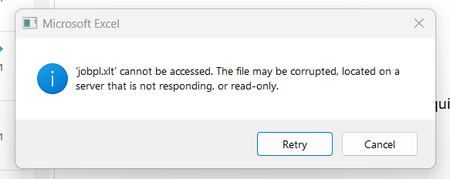
Hi, I’m experiencing two issues with MYOB: Leave Balance Report Accuracy Every time I run the leave balance report (summary), parental leave figures are often incorrect and appear randomly wrong, while other balances seem fine. Even though the employee card shows the correct balance, the report still generates incorrect results. Excel Download Issue Suddenly, I can no longer download reports in Excel format (see attached message). This issue only affects my login—my two colleagues can still download Excel files as usual. I haven’t changed any settings and have restarted multiple times without success. IT confirmed it’s an MYOB issue and advised me to contact MYOB directly. Could you please assist? Thanks, Indigo