Receive Payment in Different Currency via Import/Export Wizard
AccountRight Premier AU 2026.7.0, build 2026.7.1.21. Multi-currency is enabled. NZD exists in Currency List. Customer has default currency NZD and the invoice is an NZD invoice. Receive Payments imports successfully when Currency Code is omitted, but defaults the payment to AUD. When Currency Code = NZD is included, the import fails with: "SetProperty: Invalid Property Name: CurrencyId for type: MYOB.Huxley.API.Entities.IReceivePaymentEvent." MYOB’s current Receive Payments import specification lists Currency Code as a supported Premier field. Has anyone been able to get this to work. I've tried every possible combination I believe.
Import Error 5137
I'm trying to do a receive money import to a foreign currency bank account and keep getting this error. Below is a sample of the file. I've tried a number of different iterations. I created the template by exporting the transactions from the previous year. None of the columns I removed had any data in them. I've added the deposit account entry for the 2nd line and the tax code and tax amount for the 1st line trying to see what's missing but can't work it out. My AUD import for another account works fine.
MYOB Reports Print with Faded Text or Incorrect Alignment — How Can I Troubleshoot This?
Hi everyone, I’m looking for some advice about print-quality issues when printing reports or invoices from MYOB. Sometimes a report looks fine on screen, but the printed copy has faded text, unclear details, or alignment issues. I’m trying to figure out whether the problem comes from the report format, PDF settings, or the printer itself. Before changing any MYOB settings, I’d like to test the printer separately using a printer test page to check text clarity, grayscale, color output, and alignment. A few questions: Has anyone experienced print-quality issues with MYOB invoices or reports? Is it worth exporting the report to PDF first to check whether the issue occurs before printing? What should I check first if the PDF looks correct but the printed document does not? Could printer settings such as scaling or print quality affect invoice alignment? I’d appreciate any suggestions from people who regularly print invoices, statements, or financial reports through MYOB. Thanks in advance!
MYOB over calculating Super amounts
Hi Everyone, I noticed whilst processing the payroll this week that the Superannuation amounts are being calculated around 12.74% and not the standard 12%. Everything in the backend is set correctly and all employees have been assigned correctly, we have not issues last week.40Views0likes1Comment
Automatic Reminder sent for Invoice Already Paid
We have received a response from a customer to an automatic reminder that was sent out over the weekend, indicating that they had already paid the invoice. Except, when I scroll down, the invoice is showing as paid on the reminder. How was this even sent out? It wasn't like they just paid it on Friday and we hadn't reconcile the banking yet, this was paid over a week ago and we reconcile the debtor banking on a daily basis.
"Column chooser" improvements
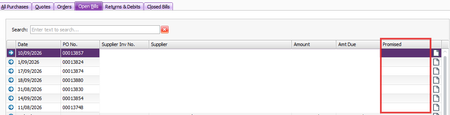
Employee List: Add start date column. We can add termination date but not start date. The number of times I have to do a full export of cards to get an employee list with start dates is too high. Purchase Register: The "due date" would be far more useful than "promised date". At least it doesn't require any extra data entry. It's just an empty column. To find a due date from the purchase register, we have to open the invoice, and then click into the terms. Full customisation for all (or even most) available data fields would be wonderful.MYOB terminating
Good morning, MYOB ARL Desktop terminates when creating a new vendor card and attaching an invoice. It doesn't do this if there is no attachment. MYOB ARL Desktop terminates when deleting a general ledger account code which hasn't been used at all. MYOB ARL returns to the main purchase or main banking menu when attaching a document. This bug has been reported for many months, is a total waste of time and would love MYOB to fix in the next release update. Thank you, Bronwyn