Reminder: Changes to MYOB AccountRight offline mode
****15/06/26 Hi all, I'm updating this post to let you know that we have updated our help information to make it easier for customers to understand the process of moving online. Particularly, the step around updating your serial number in product seems to catch a few people. Please check out the information here. It is important to note that these steps will only work until the 17th June when the changes to offline mode take place. We will update the help again with the process for going online after the 17th once the change has gone through. Hi everyone ---------------------- A reminder was emailed to our customers this week, and I am posting an update here as well for any who might have missed it or not yet received it. From 17 June 2026, MYOB AccountRight desktop app (PC edition) will only work with company files stored online. Offline mode will no longer be available, and from version 2026.5 (PC edition) you’ll no longer be able to open, edit or save files stored locally (in My Library or Network Library). *You'll still be able to view offline backups in previous AccountRight versions for audit requirements AccountRight desktop isn’t going anywhere. The only change is that your company file will need to be online to receive product and security updates, support, and online services. If you’re currently using an offline AccountRight file with an active subscription, you need to move your file online before 17 June 2026 to continue to access AccountRight . There’s no additional cost to move your existing subscribed file online. If you're not ready to move online by 17 June 2026, MYOB AccountRight Server Edition is a temporary solution that supports working offline for the short-term. Please note, Server Edition will only support offline files from version 2026.5. To access online files, you will need to download and install the latest version of MYOB AccountRight PC edition or login to MYOB AccountRight in the browser. Why are we making this change? The offline version of MYOB AccountRight desktop is built on technology that no longer meets today’s performance standards. Moving online will: Improve performance, reliability and security, such as 2FA and regular online back-ups Ensure MYOB AccountRight is built on current, supported technology Deliver faster and more frequent improvements, including stronger AI capabilities Align with industry best practice and evolving needs of our customers We remain committed to supporting your business far into the future. Our focus is shifting to investing in our next generation of online products and modern technology that reflects the evolving needs of our customers, delivering solutions that save time, increase efficiency, and improve collaboration between small businesses and their advisors. We’ve put together an overview of what’s changing and how to move your file online linked here Please note, that any SME customers who need to take action will be communicated with via email on Tuesday 21st April. FAQs 21/04 There is a legal requirement for businesses to keep records for 7 years – can I access an old back up for these purposes? Yes. You can continue to meet your 7-year record-keeping obligations with your existing offline backups. Here's how: For audit/view-only purposes – You can restore older backups in any AccountRight PC edition version prior to 2026.5 to view files. These versions remain available on our website at myob.com/downloads. For active files – If you have an active subscription, you can access prior years directly from your browser without restoring a backup. How can I view an old offline file after this change? To open an old offline file, customers can download a previous version of MYOB AccountRight PC Edition and use that to open, access, or interact with an offline file. PC Edition We currently host previous versions of MYOB AccountRight on our website, and we have no immediate plans to change that. Please note that due to monthly automatic software updates, you will need to download and reinstall that previous version of PC Edition if you want to access the offline file on an ongoing basis. Server Edition If you need to interact with old offline files on a regular basis, downloading and installing Server Edition will enable you to have offline access and it won’t be impacted by our monthly automatic updates. We strongly encourage customers to move their files online to ensure access to future features and security enhancements. In both cases (Server Edition and older versions of the PC Edition) there are risks. At some point, this software will be phased out, and the file will need to be moved online. After 17 June 2026, Server Edition will only receive bug fixes, not any future features or security enhancements. For perpetual licence holders, for now, you will continue to be able to access your file offline using one of the above-mentioned options. What happens to my specific version of an AR offline file? MYOB AccountRight Classic / V19 Can be opened in Classic/V19. The file will fail confirmation and become read-only, but you can still view files for audit purposes. MYOB AccountRight PC Edition From version 2026.5 onward, there will be no offline capability. Older versions remain available for download on our website, and backups can be restored to view and edit, provided you have an active licence (perpetual licence or current paying SaaS licence). Important: MYOB AccountRight auto-updates to the latest version each month, so if you do install an older version of PC Edition, this old version would need to be re-installed if you needed to access an offline file again in future. MYOB AccountRight Server Edition From version 2026.5 Server Edition will be offline-only. However, MYOB AccountRight Server Edition is not a long-term solution. At some point, this software will be phased out, and the file will need to be moved online. After 17 June 2026, Server Edition will only receive bug fixes, not any future features or security enhancements. How do I view previous years' data for an active file with a subscription? In MYOB AccountRight desktop You can override your current online live file by restoring an old backup OR download an old version of PC edition or install Server Edition and restore the backup locally (offline) In MYOB AccountRight browser – If your primary need is to view historical data for audits or reporting, the browser version is the simplest, most future-ready method. If you can’t see previous answers about installing PC or server edition You don't need any backup. Simply change the date range and you can view previous years' data directly. Financial year restrictions on reports have been removed — for example, you can now generate profit and loss comparative reports from 2012–2020 via browser (which is not possible in desktop). I upgraded from V19/Classic to the latest offline version, what does this change mean for me? We have three options available for you to consider: Move your file online. Take advantage of online capabilities that MYOB AccountRight has to offer. These include: Automatic cloud backups protecting your data without manual effort Live bank feeds that are more up to date Multi-user access — multiple people can work in your file at the same time Faster access to the latest software updates as soon as they are released Improved performance and upcoming AI-powered features Move to Server Edition – This retains offline access and interaction with your file for now. Please note: AccountRight Server Edition is not a long-term solution. At some point, this software will be phased out, and the file will need to be moved online. After 17 June 2026, Server Edition will not receive any future feature or security enhancements and will only receive the bug fixes. Return to Classic – You can view files in read-only mode for audit purposes, but you will not be able to edit offline.21KViews0likes417CommentsMYOB Secure Invoicing Upgrade: update and Summary 11/03
Hi everyone, Due to a high number of comments (and MYOB replies) about Secure invoicing, I am posting a summary of the change, frequent questions/complaints and the answers from MYOB to make it easier for everyone to find this important information. I will also be archiving the previous discussions on the forum so that this new post becomes easier for customers to find. It is a long update, but in the interest of transparency, fairness and to avoid any concerns around censorship, I am doing my best to make sure everything is covered. The Secure Invoicing upgrade began with a small test group of customers in October 2024, and we have continued to roll this out to more customers in small batches since then. We are some time away from this being released to all customers, so don’t worry if you have not heard of it or seen any communication from us. What is the Secure invoicing upgrade? Secure invoicing is an important upgrade being rolled out this year to customers who send invoices on MYOB subscription plans. From MYOB Business Lite, through to AccountRight Premier. The upgrade adds multiple layers of security for your business, plus automation features designed to help you save time and accelerate cashflow. The Secure Invoicing ecosystem is a combination of the secure distribution of invoices using MYOBs trusted software (Email, SMS, CopyLink) and the ability to accept secure payments. Secure invoicing includes: Always-on fraud monitoring for transactions and payment activity Secure payment methods MYOB verified badge End-to-end secure invoice distribution Additional questions/objections to this: Why is online payments combined with secure invoicing? + Online payments should be separate / I don’t want online payments + I’m happy to have additional security with invoicing but I don’t want to have payments. The distribution of invoices using MYOB software, fraud monitoring and secure payment of invoices is combined into a single MYOB Secure invoicing ecosystem to provide the best possible protection for businesses and consumers. Although these features are combined, you have the flexibility to adjust settings to suit your preferences around the secure payment methods. Learn more about changing your settings here Is this the same as e-Invoicing? No – e-Invoicing is an ATO initiative, similar to this but it is only for the digital exchange of invoice information directly between a supplier’s and buyer’s accounting systems, regardless of the software they use. You can learn about e-invoicing here. MYOB Secure invoicing is for all business using MYOBs software, and applies regardless of whether the invoice is being sent to a business or a consumer. Why is MYOB making this change? Cyber security is a constantly evolving landscape with new threats emerging daily. MYOB continuously develops and invests in solutions to meet these challenges, but security is a shared responsibility and requires vigilance from everyone. Financial losses from online fraud and cyber scams cost Australians over $2 billion in 2023. Scam reports from businesses rose by 28%, resulting in $29.5 million in losses. Small businesses, with fewer resources for risk mitigation, were hit hardest, reporting nearly $12 million in losses from false billing—the most common scam. MYOB understands that falling victim to a cyber scam can have very real consequences. That’s why we have developed and will continue to invest in secure invoicing, in addition to other essential security measures like Multifactor Authentication (MFA) and inactivity login timers. Additional questions/objections to this: Is there a legislative/legal mandate that MYOB is adhering to for this change? No, the Secure Invoicing upgrade is a decision MYOB has made to protect business and consumers across Australia. There has been reference to MYOB complying with legislation as part of the verification process and this is still also true when it comes to the Secure payments component. To comply with anti-money laundering legislation, we must verify certain documents in line with KYC (Know Your Customer) regulations. Read more here. What do I have to do? Customers are required to verify their business as part of the upgrade process. This includes identity verification of all ultimate beneficial owners (typically any individual with 25% or more ownership or voting rights for a company) Find out more about verification here Additional questions related to this: I don’t want to give sensitive information to MYOB + How is my data being stored and treated All information will be handled in accordance with our Privacy Policy, which can be accessed here: www.myob.com/au/privacy-policy. For further peace of mind, our current system for verification erases documents after 30 days and does not store them indefinitely. What happens if I don’t want to verify my business and/or I don’t want to upgrade? Customers who do not complete the business verification and upgrade to secure invoicing will be restricted from utilising the MYOB platform for distribution of invoices. This means that distribution of invoices using the secure methods of email, copy link and SMS will be unavailable. Customers can continue to send their invoices themselves however and will need to use a ‘Print to PDF’ option, then manually email the invoice themselves through Outlook, Gmail etc. Additional questions related to this: If I can no longer email invoices through my software, will I still be able to email payslips and other information? Yes the restrictions only apply to the distribution of invoices. There is no restriction to emailing other items. What are the fees and charges for the online payments feature? The fee for secure payments is 1.7% of the invoice value + 25c transaction fee. **Updated 07/10/2026 This only applies if the invoice is paid by a secure payment method. For example, if the recipient of the invoice still chooses to transfer the money to you via bank transfer, there are no fees. But if they paid via Bpay, Visa, Mastercard etc then the fees apply. Please note that there is flexibility with the fees. You can decide whether the fee is paid for by you or by the person paying the invoice (surcharging). *Please note, BPAY fees are unable to be surcharged to the customer. You can also choose whether you want to have BPAY enabled or disabled You can choose whether you want to have secure payments enabled or disabled *Please also be advised, that after completing the secure invoicing upgrade, the secure payments feature will be enabled on by default. Find out more about the fees and charges here Why should I use online payments? (spoiler, this hasn’t been asked yet, but it’s important to know) Using the online payments feature has multiple benefits to you and your business. Get paid faster – the sooner a customer receives an invoice, the quicker they can pay you. But how much of a pain is it to copy a BSB and Account number into your banking app and make a transfer, add in the reference etc. The Pay now button in the invoice makes payment quicker and easier helping you get paid faster. Getting paid faster helps increase cash flow to your business Your customers have more choices in how they pay you. They can now choose to either pay by EFT as they have in the past or they can utilise their credit facilities to benefit them. Better security – online invoice payments use several layers of protection to identify fraudulent behaviour. Peace of mind – A network of verified businesses means fewer risks and safer transactions, so clients can invoice with confidence, and customers can pay knowing they’re interacting with a trusted business. Save time – get automatic notifications when payment is made on an invoice. Payments are automatically recorded in your software and the invoice closed off. Less time chasing payments and debtors. Read all about it here Additional questions/complaints related to this: I don’t want to use the service Why should I verify if I am going to turn payments off afterwards MYOBs position is that Secure payments not only protects businesses and consumers from fraud but it supports businesses in getting paid faster, increase available cashflow and saving time chasing debtors or reconciling. We recommend and encourage customers to keep this feature enabled Thank you for taking the time to read and understand this change more. If you have a question, you are still welcome to reply to this post or start a new discussion in the forum. Kind regards, Mike/MYOB16KViews2likes326CommentsWarning - Watch out for fake MYOB Support sites
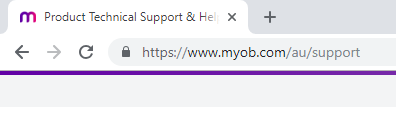
Hi everyone, We’ve been made aware of some of our clients falling prey to a scam, that involves companies impersonating MYOB Technical Support. Client often arrive at these sites through a Google search, and contact them. Once in contact with representatives of these sites, clients are asked to give team viewer access of their workstations to these representatives and later asked to pay a fee for support. To ensure you are in fact on our genuine website, just double check which website domain you are on as on your web browsers address bar as shown below: We recommend Clients to visit https://www.myob.com and navigate from within the portal to get additional information about our products, services and support. Our Technical Support number can be found on: https://myob.com/contactus For all your support needs, we encourage you to use this Forum or our extensive online Help articles. We have a dedicated team of MYOB Support Specialists (MYOB Moderators), and some very generous community members who are always happy to assist with your queries. Here are some examples of fake sites:11KViews0likes1CommentEnhanced security measures are live - 27/11/24 (Update 19/12/24)
Hi everyone, Update 19/12/24 - Are you still there? Hello Community members and followers of this security updates thread! Its been a few days since we last spoke. There is a great update coming through already for the inactivity timeout changes in the browser. AND its releasing Today the 19/12/24. Users in the browser will now be provided with a warning message 5 minutes prior to the inactivity timeout. This will show at the top of the window with "Are you still there?" and provides a clickable option to confirm "I'm still here" - example image below Update 05/12/24: Session Inactivity Lock for AccountRight Desktop App We've consulted with the ATO and have been able to agree that AccountRight Desktop can be excluded from the 30 minute inactivity lock requirement. We can confirm this feature has now been removed from the desktop app. While the inactivity lock is no longer in place on the AccountRight desktop app, we strongly encourage everyone to implement sensible security measures on your individual devices. This includes setting up automatic timeouts and using password-protected logins for added protection. The 30-minute inactivity lock will remain in place for MYOB Business and MYOB AccountRight in the browser, in line with ATO requirements. Previous update to this post (27/11/24) The changes for inactivity went live today on the 27th November. Specifically for AccountRight, many customers encountered unexpected crashing/freezing of the software after entering their password to sign in again. Work in progress would also be lost due to the crash. I want to assure everyone that this is not the expected behaviour associated with the inactivity timeout. You can expect the screen to blur and a message pop up. Click sign in again as [user]. Enter your password and you will be back to continue where you were (no loss to work in progress) As a result of the crashing, we have temporarily disabled the inactivity timeout for AccountRight, you will need to close and re-open AccountRight for this change to take effect. Thank you for the feedback, examples and information provided on these issues today. We are continuing to investigate before it is enabled again. I’m updating this post (2:30pm AU 21/11/24), as there have been a lot of comments and engagement in the change. With over 100 comments on the post, we are starting to get the same questions being asked, and answers being missed so I hope to summarise the change and key questions/feedback here. The change/s and timeline September 30 th > MYOB implemented 2FA being required at least once every 24 hours Some initial feedback came through about the 2FA prompt caused customers to lose work in progress MYOB has implemented a fix based on feedback and 2FA is prompted on the first login each day to avoid loss of work November 27 th > you'll be asked to sign back in after 20-30 minutes of inactivity (announced November 19 th ) This announcement on inactivity is driving a significant amount of feedback and discussion that I will summarise below What’s changing: From Wednesday 27 November 2024, you’ll be asked to sign back in after 20–30 minutes of inactivity. After this time, your screen will become locked and blurred. To continue working, you'll need to sign back in with your username and password. This applies to the following MYOB software: MYOB Business, MYOB AccountRight and AccountRight browser (online files only), MYOB Connected Ledger, MYOB Business Payroll Only and MYOB Practice. Browser: Desktop: What do you need to do? When you’re presented with the Are you still there? message we recommend that you click Sign in using [existing email] to return to work in progress. Note* 2FA is not required as part of signing in again and your email will automatically be pre-filled Will I lose my work when the screen is greyed out? If you sign back into your account using your existing email, you won’t lose any work in progress and can continue where you left off. However, if you choose to sign in to a different account, your work will not be saved. If you click Back or Reload, or if you don’t sign back in after 12 hours, you'll also lose work in progress. How does the inactivity screen work between Browser and Desktop? When you are logged into both the Browser and Desktop at the same time, each session will operate independently. This means that if you are inactive in the Desktop version, you can remain active in the Browser version. The inactivity timeouts for these sessions are separate from one another. When signing back in after inactivity, do I have to enter my email, password and do 2FA? No, your email will be automatically pre-filled when signing back in using your existing email to both the desktop and browser software. Users will be required to enter their password only. 2FA is still a 24-hour requirement and not required for signing back in after an inactivity timeout. Can I opt out of the new inactivity or 24-hour 2FA security measures? No, as these are mandatory compliance changes in line with industry best practice, they cannot be disabled Why am I being asked to login or do 2FA multiple times a day? Based on scenarios described in the forum + a known issue that MYOB is currently working to resolve, this could be for one of the following reasons. Closing AccountRight using the ‘x’ is currently causing 2FA to be prompted when re-opening the software even if it is less than 24 hours. This was recently discovered as a bug/regression with the last AccountRight 2024.10 release and the team are releasing a fix to this asap. This has been resolved* Opening multiple instances of AccountRight. This seems to something multiple customers are doing when they have multiple files they work on. Instead of switching between files (no login would be required) they are all opened concurrently and each instance of AccountRight that is opened will require a login Is this an MYOB decision or required by the ATO? And subsequently, why do New Zealand customers need to adhere to ATO requirements? Yes, both the 24 hour 2FA and the inactivity timeout changes are mandated requirements from the ATO. This requirement seeks to minimise the opportunity for unauthorised users to access Taxation, Accounting, Payroll, Business Registry or Superannuation related information. Read more on the ATO website here if interested New Zealand customers, although not bound by the same requirements set by the ATO, will share the same security measures as our Australian customers so that MYOB is providing best practice security to all customers. MYOB has also published help articles that explain the changes and can be found below For Australian customers here For New Zealand customers here9.2KViews6likes273CommentsMYOB AccountRight Command Centre Changes
The Command Centre will be available to all AccountRight customers in the May release. Following an extended early access program, we've taken on board feedback around the design and have implemented these changes in the final release. This update is part of our commitment to continue investing in and improving the AccountRight desktop experience. The updated Command Centre is designed to make navigating through AccountRight smoother. The new buttons are all about reducing friction. Instead of digging through menus or clicking through multiple screens, users can now jump straight to key tasks - like allocating bank transactions or reviewing overdue invoices - with a single click. It’s a small detail, but it makes a huge difference, especially for clients who are short on time or only log in to do one or two things. By lowering the effort it takes to complete these repetitive actions, you’re spending less time navigating, and more time doing. You can find more information about the update and these changes here! Update 28/5: Hey everyone, we've published a guide to setting up user access management permissions to restrict access to command centre tiles. The full guide can be found here. Update 16/5: Hey everyone, quick update. We've heard some feedback that the dynamic tiles on the command centre aren't updating properly. We've introduced a refresh button on the command centre that you can click for the dynamic tiles to update. If you continue to experience an issue you can reach out to the team for further assistance from your My Account Dashboard. Cheers, Amanda.7.9KViews0likes325Comments