A simpler way to upload, review and record documents
We’re introducing Uploads (Beta) in MYOB Business - a simpler way to upload, review and record bills, receipts and other documents. The beta is actively improving, and your feedback can help shape it. How to switch it on Sign in to MYOB Business in your web browser. Open Uploads. Look for the in-product banner inviting you to try Uploads (Beta). Select Try it now and follow the prompts. Uploads (Beta) is available to eligible customers on MYOB Business Lite, Pro and AccountRight when using the browser platform. AccountRight desktop is not included. What you can expect Uploads (Beta) brings your document and extracted details together for review. You can create a bill or Spend Money transaction, link a document to an existing transaction, match suppliers and use line-item matching as it becomes available. The beta is actively improving, so features will continue to be released progressively. You can switch back to Classic anytime, in either direction, with no lost work. Need help or want to share feedback? For product guidance, check the in-product release notes in Uploads. If you’re using the beta, we’d also like to hear what’s working well and where the uploads workflow could be easier. Your feedback helps us shape what comes next.79Views0likes2CommentsIn Focus: practical AI and smarter ways to stay on top of business
This quarter’s In Focus brings together the latest updates across MYOB, with practical tools designed to help you save time, reduce admin and stay one step ahead. From instant answers with Ask Iris to earlier BAS support with AI BAS, plus a clearer view of what needs your attention in Action Centre, these updates are built to make the day-to-day feel easier. You can also explore MYOB Connector (Beta), which lets you connect your MYOB data to Claude and ChatGPT so you can ask questions where you already work. Take a look at what’s live now, what’s coming next and how MYOB is continuing to invest in practical tools that help businesses stay on top of the work that matters. See what’s in focus!9Views0likes0CommentsA new home for our Community is on the way
A new home for our Community is on the way Our Community is moving to a new platform in early November Hi everyone, For the past 19 years, this Community has been a place where members share knowledge, solve problems and support each other. That's a remarkable history, and it's built entirely by you: the members who ask questions, share advice and keep the conversation going every day. Thank you. We're writing to let you know that, in early November, the Community will be moving to a new platform. What isn't changing The platform may be new, but the Community itself is the same. Its purpose, the peers you learn from and the expertise you rely on are all coming with us. Your member profile will be migrated to the new platform. Existing Community content, including the discussions and answers built up over the years, will be migrated too. The URLs & your bookmarks, we will still be community.myob.com A short read-only period To move everything across safely, the Community will be read-only for approximately 3–4 business days while the changeover takes place. During this time you'll still be able to browse and search existing content, but you won't be able to post, reply or send messages. If you have a time-sensitive question, we'd recommend posting it ahead of the read-only period. We'll confirm exact dates in a follow-up announcement. What you need to do Nothing right now. Keep using the Community as you normally would. We'll share everything you need to know well before the change. What to expect from us We'll keep you updated every step of the way: Before the end of October: a post explaining what will be different on the new platform. Before the Community goes read-only: an announcement confirming the dates and what to expect. Once the new Community is live: welcome videos to help you get started. Looking ahead We're looking forward to what the new platform makes possible, including improved search that brings Community content and Help articles together, and better ways for us to share announcements and keep you informed. Questions or feedback? We'd love to hear from you. Please share any questions, thoughts or feedback about the move in the comments below. We'll be monitoring this post and responding as quickly as we can. Thank you for being part of this Community, now and for the next chapter. Mike Community Manager, MYOB123Views1like2CommentsMYOB Assist is landing in New Zealand: one app for on-the-go admin
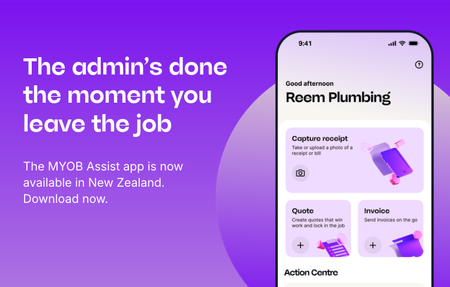
The MYOB Assist app brings receipt capture, quoting and invoicing together in one supported app, helping you keep everyday admin moving from your phone. With MYOB Assist, you can quote on site, send invoices on the go and capture receipts as they happen. Access to the app is included at no extra cost with eligible MYOB subscriptions and syncs with your online MYOB software. The MYOB Capture and MYOB Invoice apps will retire in New Zealand on 23 November 2026. If you use either app, you’ll need to download MYOB Assist to keep working on the go. Your data won’t be lost when the MYOB Capture and MYOB Invoice apps retire. It remains stored securely online in your MYOB file. For more information about this change, including FAQs, visit our MYOB Assist information hub. For setup and support, head to our MYOB Assist help content.23Views0likes0CommentsSame AI Assistant, same answers, new name: Ask Iris
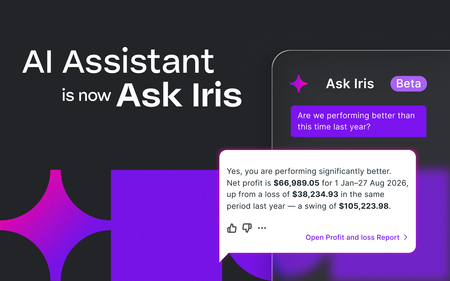
Same AI Assistant, same answers, new name: Ask Iris Hi everyone, You may have noticed a new name in MYOB Business. AI Assistant is now Ask Iris. What's changed? Just the name and the look. Ask Iris is the same assistant you've been using, and you'll start seeing the new name wherever you've used AI Assistant in MYOB Business. What's staying the same? Everything else. All the functionality and features are exactly as they were, so there's nothing you need to set up, update or relearn. Keep using it just as you have been. Haven't tried it yet? Now's a great time to try it when you next log in to MYOB Business. Just type your question in plain language and Iris will find the answer for you. Here are a few to get you started: What was my total income last month? What are my biggest expenses this month? Do I have any overdue customer invoices? Want to learn more? Visit our support page for more details on Ask Iris: Ask Iris support page We'd love to hear what you think. Share your feedback, questions, or favourite ways of using Ask Iris in the comments below.26Views0likes0CommentsMYOB Connector: Ask Claude or ChatGPT about your business
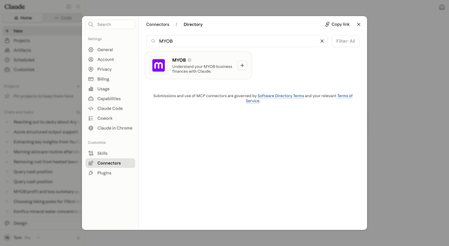
Hi everyone! Great news! You can now ask Claude or ChatGPT questions about your business and get read-only answers straight from your real MYOB data, right where you are already working. It’s rolling out now to selected customers. What is our connector in Claude and plugin in ChatGPT? The connector/plugin is a way to link your Claude/ChatGPT account to another platform like MYOB, so it can look up real information for you and answer questions directly, instead of you having to copy and paste details back and forth. It's entirely optional to make the connection, but if it's useful to you, connecting means your MYOB numbers show up right there, in context, so you can get insights about your business whenever you need them. Once connected, ask things like "what's my profit and loss looking like?", "what are my expenses this month?", or "who owes me money?" No exporting reports, no screenshots, no switching apps. It adds up to real time back for you. Every minute not spent hunting for a report, re-uploading a CSV, or flicking between apps is a minute back in your day. How to connect: Connect MYOB to Claude Navigate to the Connectors directory in your Claude account. Find and open MYOB, then click Connect. Enter your MYOB username and password. Click Continue. Connect MYOB to ChatGPT Navigate to the Plugins in your ChatGPT account. Find and open MYOB and then click Connect. Enter your MYOB username and password. Click Continue. A few things worth knowing: Staged rollout - The connector in Claude and plugin in ChatGPT are both in beta for customers in Australia. If you are interested in trying this before the wider rollout, join the waitlist. Completely optional - If you are part of the beta you can connect whenever suits you, or skip it for now. Read-only - Claude or ChatGPT can see your data to answer questions, but can't make any changes to your books. No new login needed - connect with your existing MYOB details. Check out this pagefor more information. As always, we'd love your feedback as you try it - leave your comments on this post!837Views0likes13CommentsRBA card surcharge changes are coming
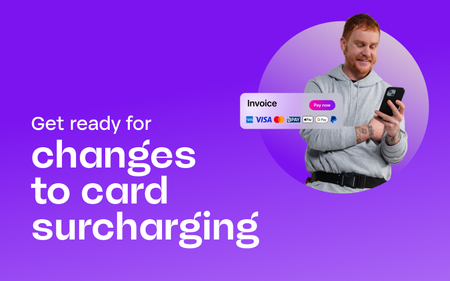
You may have seen the recent announcement from the Reserve Bank of Australia (RBA) about changes to surcharging that will affect how businesses manage card fees. If you accept card payments, here’s what you need to know and how we’ll help you prepare. What’s changing From 1 October 2026, eftpos, Visa, Mastercard and Amex will be introducing new rules to no longer permit businesses to surcharge card fees on domestic payments, including debit, prepaid, and credit cards. For businesses, this means card fees can no longer be passed on to customers as a surcharge on any payments made after the changes take effect. Get across the changes in our free webinar Join our free webinar, RBA surcharge changes: what to expect from 1 October 2026, to understand what these industry changes mean for your business. We'll walk through practical steps you can take to prepare, what to expect in MYOB, answer common questions, and share resources to help you get ready. Date: Thursday 10 September 2026 Time: 12pm AEST Where: Online webinar Save your spot What this change means for MYOB Business and MYOB AccountRight We're updating the invoicing and payment workflows to ensure our invoicing feature remains a simple, secure and compliant way to accept payments online. This includes removing surcharging functionality, enhanced reporting how your customers pay you, and edge case handling (as with recurring invoices). This change is worth planning for, and we’ll keep you updated as more details become available. We’ll share guidance on what it may mean for your MYOB settings and payment experience. Keep an eye on the Community or visit the Surcharge Change hub for updates. We’ll keep things clear, practical and focused on what your business needs to do next. For more information, you can also see the ACCC guidance on card surcharges and the relevant MYOB Invoicing Service Terms and Conditions or MYOB Tap to Pay Terms and Conditions.549Views0likes8CommentsMYOB Secure Invoicing Upgrade: update and Summary 11/03
Hi everyone, Due to a high number of comments (and MYOB replies) about Secure invoicing, I am posting a summary of the change, frequent questions/complaints and the answers from MYOB to make it easier for everyone to find this important information. I will also be archiving the previous discussions on the forum so that this new post becomes easier for customers to find. It is a long update, but in the interest of transparency, fairness and to avoid any concerns around censorship, I am doing my best to make sure everything is covered. The Secure Invoicing upgrade began with a small test group of customers in October 2024, and we have continued to roll this out to more customers in small batches since then. We are some time away from this being released to all customers, so don’t worry if you have not heard of it or seen any communication from us. What is the Secure invoicing upgrade? Secure invoicing is an important upgrade being rolled out this year to customers who send invoices on MYOB subscription plans. From MYOB Business Lite, through to AccountRight Premier. The upgrade adds multiple layers of security for your business, plus automation features designed to help you save time and accelerate cashflow. The Secure Invoicing ecosystem is a combination of the secure distribution of invoices using MYOBs trusted software (Email, SMS, CopyLink) and the ability to accept secure payments. Secure invoicing includes: Always-on fraud monitoring for transactions and payment activity Secure payment methods MYOB verified badge End-to-end secure invoice distribution Additional questions/objections to this: Why is online payments combined with secure invoicing? + Online payments should be separate / I don’t want online payments + I’m happy to have additional security with invoicing but I don’t want to have payments. The distribution of invoices using MYOB software, fraud monitoring and secure payment of invoices is combined into a single MYOB Secure invoicing ecosystem to provide the best possible protection for businesses and consumers. Although these features are combined, you have the flexibility to adjust settings to suit your preferences around the secure payment methods. Learn more about changing your settings here Is this the same as e-Invoicing? No – e-Invoicing is an ATO initiative, similar to this but it is only for the digital exchange of invoice information directly between a supplier’s and buyer’s accounting systems, regardless of the software they use. You can learn about e-invoicing here. MYOB Secure invoicing is for all business using MYOBs software, and applies regardless of whether the invoice is being sent to a business or a consumer. Why is MYOB making this change? Cyber security is a constantly evolving landscape with new threats emerging daily. MYOB continuously develops and invests in solutions to meet these challenges, but security is a shared responsibility and requires vigilance from everyone. Financial losses from online fraud and cyber scams cost Australians over $2 billion in 2023. Scam reports from businesses rose by 28%, resulting in $29.5 million in losses. Small businesses, with fewer resources for risk mitigation, were hit hardest, reporting nearly $12 million in losses from false billing—the most common scam. MYOB understands that falling victim to a cyber scam can have very real consequences. That’s why we have developed and will continue to invest in secure invoicing, in addition to other essential security measures like Multifactor Authentication (MFA) and inactivity login timers. Additional questions/objections to this: Is there a legislative/legal mandate that MYOB is adhering to for this change? No, the Secure Invoicing upgrade is a decision MYOB has made to protect business and consumers across Australia. There has been reference to MYOB complying with legislation as part of the verification process and this is still also true when it comes to the Secure payments component. To comply with anti-money laundering legislation, we must verify certain documents in line with KYC (Know Your Customer) regulations. Read more here. What do I have to do? Customers are required to verify their business as part of the upgrade process. This includes identity verification of all ultimate beneficial owners (typically any individual with 25% or more ownership or voting rights for a company) Find out more about verification here Additional questions related to this: I don’t want to give sensitive information to MYOB + How is my data being stored and treated All information will be handled in accordance with our Privacy Policy, which can be accessed here: www.myob.com/au/privacy-policy. For further peace of mind, our current system for verification erases documents after 30 days and does not store them indefinitely. What happens if I don’t want to verify my business and/or I don’t want to upgrade? Customers who do not complete the business verification and upgrade to secure invoicing will be restricted from utilising the MYOB platform for distribution of invoices. This means that distribution of invoices using the secure methods of email, copy link and SMS will be unavailable. Customers can continue to send their invoices themselves however and will need to use a ‘Print to PDF’ option, then manually email the invoice themselves through Outlook, Gmail etc. Additional questions related to this: If I can no longer email invoices through my software, will I still be able to email payslips and other information? Yes the restrictions only apply to the distribution of invoices. There is no restriction to emailing other items. What are the fees and charges for the online payments feature? The fee for secure payments is 1.7% of the invoice value + 25c transaction fee. **Updated 07/10/2026 This only applies if the invoice is paid by a secure payment method. For example, if the recipient of the invoice still chooses to transfer the money to you via bank transfer, there are no fees. But if they paid via Bpay, Visa, Mastercard etc then the fees apply. Please note that there is flexibility with the fees. You can decide whether the fee is paid for by you or by the person paying the invoice (surcharging). *Please note, BPAY fees are unable to be surcharged to the customer. You can also choose whether you want to have BPAY enabled or disabled You can choose whether you want to have secure payments enabled or disabled *Please also be advised, that after completing the secure invoicing upgrade, the secure payments feature will be enabled on by default. Find out more about the fees and charges here Why should I use online payments? (spoiler, this hasn’t been asked yet, but it’s important to know) Using the online payments feature has multiple benefits to you and your business. Get paid faster – the sooner a customer receives an invoice, the quicker they can pay you. But how much of a pain is it to copy a BSB and Account number into your banking app and make a transfer, add in the reference etc. The Pay now button in the invoice makes payment quicker and easier helping you get paid faster. Getting paid faster helps increase cash flow to your business Your customers have more choices in how they pay you. They can now choose to either pay by EFT as they have in the past or they can utilise their credit facilities to benefit them. Better security – online invoice payments use several layers of protection to identify fraudulent behaviour. Peace of mind – A network of verified businesses means fewer risks and safer transactions, so clients can invoice with confidence, and customers can pay knowing they’re interacting with a trusted business. Save time – get automatic notifications when payment is made on an invoice. Payments are automatically recorded in your software and the invoice closed off. Less time chasing payments and debtors. Read all about it here Additional questions/complaints related to this: I don’t want to use the service Why should I verify if I am going to turn payments off afterwards MYOBs position is that Secure payments not only protects businesses and consumers from fraud but it supports businesses in getting paid faster, increase available cashflow and saving time chasing debtors or reconciling. We recommend and encourage customers to keep this feature enabled Thank you for taking the time to read and understand this change more. If you have a question, you are still welcome to reply to this post or start a new discussion in the forum. Kind regards, Mike/MYOB16KViews2likes326CommentsPayday Super and the 7 business days: what to know about processing times
Hi everyone! We’re seeing more questions about whether super payments are reaching employee funds within the new Payday Super timeframe. If you’re feeling a bit anxious about that, you’re not alone. This is a major industry-wide shift from a quarterly super process to a much tighter one tied to each payday. From 1 July 2026, super contributions need to reach an employee’s super fund within 7 business days of payday. That is a big change from the old quarterly rhythm, so it’s natural that businesses, payroll teams, clearing houses and super funds are all adjusting to the new pace. It’s also important to keep the ATO’s first-year compliance approach in perspective. The key theme is genuine effort and prompt resolution, not perfection on day one. Employers who are trying to do the right thing and who fix issues quickly are not the primary focus of compliance action in the first year. What matters most for employers The most practical steps are still the most important ones: Submit super on or as close to payday as possible. Remember the timing starts from when the payrun is recorded and this needs to be before 4pm to count as day 1. Make sure employee fund details are accurate and up to date, because errors are one of the most common causes of delays and rejected payments. Check payment status in MYOB and act quickly if something needs attention. Leave enough time for the full payment journey, not just the authorisation step. Why a payment may not appear in a fund straight away A payment reaching a super fund and appearing in an employee’s account are not always the same moment. After a payment is authorised, it still moves through bank and clearing house processing. Once it reaches the fund, the fund may still need time to reconcile and allocate that contribution to the member account. That means there can be a gap between payment being sent and the contribution being visible in the employee’s super account. On the fund side, allocation timing can still affect what people see and when they see it. It is also worth noting, that it is reasonable to expect that there will be late payments, the system as a whole is adjusting to this change. Regardless of the bank, software, clearing house, super fund etc involved. On comparisons with other providers We know some customers are comparing processing times across different providers right now. What’s worth remembering is that end-to-end timing depends on more than the payroll software alone. Bank cut-offs, clearing house processing, fund receipt, fund reconciliation and employee fund detail accuracy all play a part. So while comparisons are understandable, the more useful question is whether you’re authorising promptly, using correct employee fund details, and checking statuses early enough to fix issues fast. When to get support involved As a whole, please give the system time to adjust to this change. You only control payment and authorisation, and the ATO's first-year approach is based on genuine effort - so there's no cause for alarm right now. If it's been a few weeks and you're still seeing issues or have concerns, that's the point to reach out to support rather than waiting it out further. Helpful links MYOB Payday Super support hub Make superannuation payments Set up Pay Super ATO Payday Super resources ATO Practical Compliance Guideline PCG 2026/11.5KViews0likes21CommentsMYOB Capture and Invoice apps will stop working on 29 September 2026
On 29 September 2026, MYOB retired the MYOB Capture and MYOB Invoice apps in Australia. The new MYOB Assist app replaces both apps, bringing mobile receipt capture, quoting and invoicing together in one supported place. It is included at no extra cost with eligible MYOB subscriptions. What you need to do Download MYOB Assist from the App Store or Google Play. Sign in with your MYOB email and password For more information about this change, including frequently asked questions, head to our support page to learn more.83Views0likes0Comments