ATO Lodgement Errors
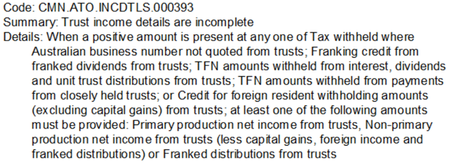
Hi We're trying to lodge a 2024 Trust Income Tax Return in MYOB AE and it is being rejected with the following validation errors: Errors Code: CMN.ATO.GEN.XML01 Fields: Summary: The message did not pass XML validation. Please contact your software provider. Details: If the 'nillable' attribute is false in the schema, the 'xsi:nil' attribute must not be present in the instance. Code: CMN.ATO.GEN.XML03 Fields: Summary: A field contains invalid data (such as letters in numeric or date field). Details: The value specified for an item does not match the item type (value = "", item type = Decimal, uniqueID = http://www.sbr.gov.au/ato/trt:AssetsInventoriesTotalA) Hint: The string '' is not a valid Decimal value. I have tried deleting the return and re-entering - same issue. Any other ideas? The only details I can find online for these errors talk about STP finalisation.... ThanksSolved4.9KViews1like17Comments
Unit Trust Validation Error
Hello, trying to validate a 2024 unit trust tax return and it's bringing up a validation error TRT 433088 Type of trust must be a deceased estate - Code 059. It is not a deceased trust and all labels describing trust type (U), tax payable (N) and beneficiary codes (35) are correct, with none indicating a deceased estate is involvedSolved4.5KViews0likes6Comments
Removing spouse details
Hi everyone How to remove the spouse details from the tax return in MYOB tax? the client does not have his spouse anymore but her details are still existing from the previous year. I checked the delete schedules but there is no schedule for spouse details there. So how do you remove her please... ThanksSolved900Views0likes1Comment
V23 Error
Message: "Invalid $ value (cannot be negative) E627 refer help for item and description" - in the details section is talks of dollars and cents in whole dollar fields but there are none in the return other than the franking credits and foreign tax credits which have always allowed dollars and cents. I am unable to complete the return but I am unable to locate the position in the return of the error. Please advise how to fix this?899Views0likes2Comments
Other Income Category 4 Tax Return Error
Hello, we are receiving an error on a tax return in relation to "Other Category 4 income is incomplete". IITR.730295 is the reference. The only income in this category is coming from the Distributions Received from Managed Funds area (from Pre-fill information). There are no incomplete lines. The return was completing prior, but now it is not, even though this Other Income item has not change. Has anyone had this issue? ThanksSolved799Views0likes3Comments2024 Individual Tax Return - Aust Govt Pension
Hi all I have an individual client who has on her ATO Prefill Report a Carers Payment that should prefill to item 6 and the ATO has a certainty indicator of "Y". The first issue - the amount does not prefill. That's fine as I could just enter it, however that brings me to issue number 2... Issue Number 2 is that the amount is actually exempt and therefore does not need to be included in her return. When we leave it out of the return it is rejected when we try to lodge because the ATO has the certainty indicator. When I try to enter it with a zero amount and the Benefit Adjustment Reason as "O" (Other), it won't let me complete the reason field (it is just greyed out) and, obviously, I can't complete the return as I need to have a reason in there if I choose "O". Has anyone had experience with this issue??Solved401Views0likes3Comments
Great News! Extended Hours for EOFY Support!
Hey everyone, We know the End of Financial Year (EOFY) can be a busy time, and we want to make sure you have all the support you need! For those who might not have heard, we've extended our opening hours to give you even more flexibility during this period. That's right, we're open longer to help you with any last-minute queries, support requests, or assistance with installation of the new 2025.0 update! From the 28th of June to the 20th of July we are open Mon-Sun. Please see below for our contact hours for phone and chat during these dates: Phone: Mon-Friday 9am-5pm Sat-Sun 9am-5pm Chat: Mon-Friday 9am-7pm Sat-Sun 9am-5pm You can find all our updated contact details and extended hours on our Contact Us page or you can access our new chat bot MOCA via MYOB Practice or now from within AE/AO with the new 2025.0 update! Please visit this page on how to chat with us via MYOB Practice. Wishing you a smooth and successful EOFY! Cheers, Aiden from MYOB400Views2likes4Comments