Single Touch Payroll Reporting Patch 4.78.0.3 released
We're getting in touch to let you know that an additional patch is required for the latest MYOB PayGlobal 4.78 release to resolve a Single Touch Payroll (STP) reporting issue. Without this patch, the following may occur: In some employee scenarios, including working holiday makers and inbound assignees, single touch payroll (STP) reporting is incorrectly classifying deductions, which may result in them being reported incorrectly to the Australian Taxation Office (ATO). Patch 4.78.0.3 is now available, which resolves this issue. Please note that this patch supersedes 4.78.0.2. You can view the release notes here. Next steps Patch 4.78.0.3 will resolve the issue for new STP report submissions. If you have reported submissions using an earlier version of 4.78 (including 4.78.0.2 patch), you should re-submit using version 4.78.0.3. If you have any concerns about meeting your STP reporting timeframes, please advise the ATO. MYOB PayGlobal Online customers We'll upgrade your solution to the latest version with patch 4.78.0.3 included. This version will be deployed by 8pm AEST, Tuesday 30 June 2026. There is no system outage for this deployment, so you can operate as normal. MYOB PayGlobal On-premise customers If you have upgraded your Test or Production environments to version 4.78 (including 4.78.0.2 patch), please apply patch 4.78.0.3 as soon as possible. If you've not upgraded to version 4.78 – please upgrade to the latest version 4.78.0.3. Download patch from here How to apply a patch instructions - here We apologise for any inconvenience this issue has caused.55Views0likes0CommentsSingle Touch Payroll Reporting Patch 4.78.0.2 released
We're getting in touch as we’ve identified that the most recent MYOB PayGlobal version update 4.78 for Single Touch Payroll (STP) reporting may contain the following: Incorrect STP category totals affecting some Working Holiday Maker, foreign employment income and inbound assignee employee records, which may affect the accuracy of your STP reporting. Warning messages appearing when modelling/syncing new employees. Super Guarantee Risk calculation rounding that could cause false positive risk flags. Patch 4.78.0.2 is now available, which resolves these issues. You can view the release notes here. Next Steps Patch 4.78.0.2 will resolve these issues for new STP report submissions. If you have reported submissions using version 4.78, you should re-submit using version 4.78.0.2. If you have any concerns about meeting your STP reporting timeframes, please advise the Australian Taxation Office. MYOB PayGlobal Online customers We'll upgrade your solution to the latest version with patch 4.78.0.2 included. This version will be deployed by 12pm AEST, Saturday 27 June 2026. There is no system outage for this deployment, so you can operate as normal. MYOB PayGlobal On-premise customers If you have upgraded your Test or Production environments to version 4.78, please apply patch 4.78.0.2 as soon as possible. If you've not upgraded to version 4.78 – please upgrade to the latest version 4.78.0.2. The patch is available on the downloads page - here We apologise for any inconvenience this issue has caused.66Views0likes0Comments
Recording now available – MYOB PayGlobal Australian EOFY Webinar
AU EOFY 2026 webinar – recording and resources Our AU EOFY 2026 PayGlobal webinar has been and gone, but the goodness lives on in the recording and slide deck below: 🎥 Webinar recording: Watch the AU EOFY 2026 PayGlobal Support Webinar 📑 Slide deck: Download the AU EOFY 2026 PayGlobal Support Webinar slides Thank you again to everyone who joined us for our first LIVE MYOB PayGlobal AU EOFY support webinar – we appreciate your time and engagement. We’re getting ready for the 2026 End of Financial Year – and we’re here to help you get ready too. Join us for the MYOB PayGlobal EOFY Webinar on Wednesday 27 May at 11:00am AEST. This free live session is designed to help you set up for success in the new financial year and feel confident about the upcoming changes in your MYOB PayGlobal system. In this session, we’ll cover: The 2026 roadmap Key priorities for MYOB PayGlobal in the year ahead How upcoming changes will support your payroll and HR processes Upcoming product changes Important EOFY-related updates in MYOB PayGlobal New and enhanced features to make processing easier and more efficient 2026 EOFY support packages What’s included in each support option How to choose the right level of help for your business Highlights from previous EOFY seasons Common pain points we’ve helped customers resolve Tips, tricks and best practices to streamline your EOFY processing How we're connecting with you Logging and tracking tickets via the support portal Your go‑to spot for announcements and Q&A with the community forum There will also be live Q&A via chat, so you can ask questions and get answers from the MYOB PayGlobal team. Event details Date: Wednesday 27 May 2026 Time: 11:00am – 12:00pm AEST Format: Live online webinar (Microsoft Teams) Cost: Free 👉 Register here: MYOB PayGlobal EOFY Webinar – Microsoft Teams event If you handle payroll, HR, or finance in your organisation and use MYOB PayGlobal, we strongly recommend attending this session to ensure you’re fully prepared for EOFY 2026. We look forward to seeing you online!160Views0likes0CommentsPreparing for Payday Super and Qualifying Earnings (QE) in MYOB PayGlobal
From 1 July 2026, Payday Super will change how employers calculate and report super guarantee in Australia, using Qualifying Earnings (QE) instead of ordinary time earnings (OTE) as the main basis for STP and super liability reporting. We’re releasing updates to MYOB PayGlobal in two stages so you can prepare and then go live confidently: Product Changes Payday Preparation release Release Date: by 31 March This release gives you new tools to review and prepare your current setup ahead of Payday Super, including: To ensure this change is as seamless as possible for you, a new “Use in Super Qualifying Earnings” flag on allowances, automatically set to Yes where Use in Super OTE = Yes today. A new “Super Qualifying Earnings” column in Transaction View to help you validate and compare QE against your existing OTE base (for pays with a payment date on or after 1 July 2026). A new “Employee subject to industrial instrument” field on Employee Super Fund records, to support more detailed / custom super calculations in the EOFY release. An updated Super Settings screen that makes it clearer how your Maximum Earnings Base (MCB) is applied when determining whether you need to pay super guarantee. Australian EOFY / tax release Release Date: late May/early June This release will complete the end‑to‑end Payday Super support in PayGlobal, including: STP submissions that report QE and related super liability amounts for the 2026–27 tax year onwards. STP Manager and selected reports updated to show QE‑based amounts, including updates to SAFF and super reports where applicable. What you should do next Once the preparation release is available, we recommend that all Australian PayGlobal customers using STP: Review your configuration for Payday Super (QE) Work through our step‑by‑step Help Centre guide to check how you currently calculate super, confirm whether you’re using standard OTE configuration, and identify any allowances, bonuses or commissions that may need to change for QE. You can do this yourself, or work with the MYOB Professional Services team via a Payday Super review package if you think your setup is more complex, uses custom configuration or would simply like some support managing this change. Confirm how you pay super today If you pay super using files generated from PayGlobal, understand how updated QE amounts will appear in your reports. If you use a clearing house or other third‑party service, check with them that your payment process and timing will still meet Payday Super requirements. MYOB is not responsible for the configuration or compliance of third‑party clearing houses or services. Get ready for changes to the Maximum Earnings Base (MCB) From 1 July 2026, the MCB will be assessed against annual QE rather than quarterly OTE, which may change when higher‑earning employees reach the cap. Our dedicated article explains how this works in PayGlobal and what you should review for employees close to the cap. Where to get help Australian Tax Office – Paying super on payday Payday Super in PayGlobal – Additional resources Payday Super review packages – Online customers – Payday Super packages On‑premise customers – Payday Super packages1.1KViews1like0CommentsAustralian tax year‑end made easier: MYOB PayGlobal packages explained
Tax year‑end can sneak up fast – especially when you’re juggling roster changes, leave, super changes and day‑to‑day payroll queries. The MYOB PayGlobal tax upgrade packages are designed to take the heavy lifting off your team, so you can roll into the new financial year confident your solution is compliant, clean, and ready to go. This post walks through what the packages actually do for you, what’s included in each level, and what’s new this year. Important: This article explains how MYOB PayGlobal supports Australian tax and Payday Super. It doesn’t constitute tax, payroll or legal advice. Your organisation remains responsible for meeting your obligations and confirming your settings with your advisors and the ATO. What are the MYOB PayGlobal EOFY packages? Each year, MYOB releases an update with the latest supported Australian tax changes, superannuation updates and product improvements. The tax upgrade packages bundle that software update with a set of fixed‑scope services, delivered remotely by MYOB PayGlobal consultants. Tax packages – at a glance We’ve got different packages to help businesses of all shapes and sizes manage year‑end: Essentials – MYOB manages your core product tax software upgrade and runs essential payroll database health checks to ensure you’re set up for tax time. Optional add‑on: Holidays & Calendars – keep your payroll in sync with the correct public holidays and pay calendars, so the right rules and entitlements are automatically applied. Optional add‑on: End of Year Reporting & Balancing – MYOB PayGlobal experts help you run and reconcile your key payroll, STP and super reports, so you can close the year off cleanly and confidently. The Works – everything above in one comprehensive package. Essentials – your foundational tax upgrade The Essentials package is the foundation most customers start with. It’s aimed at teams who want MYOB to handle the core upgrade work and run key checks over the database. 1. Database health check We run a structured health check on your MYOB PayGlobal database to catch common data and configuration issues that can cause grief at year‑end, and give you clear lists of records to review and clean up, such as: Health check area What it covers (AU focus) Employee identity & contact data Employee Checks plus duplicate address/TFN/bank/tax-number checks, and long-inactive or very old employees. Tax & STP coding STP checks, termination reasons, tax code overrides and ETP processing items that can impact STP Phase 2/EOFY. Visas & work eligibility Visa records, including overlapping dates and tax coding alignment with visa conditions. Wages & minimum entitlements Minimum Wage Check to highlight employees whose current rates may fall below new national minimums. Super & Payday Super configuration & checks Super and STP allowance mappings, RESC vs salary sacrifice, and OTE vs SG checks for SG and super reporting. Allowances, deductions & costing structures Rarely used allowances, deductions, cost centres and job codes that may be candidates to expire or hide. User access, security & ESS usage Dormant PayGlobal/ESS users and missing employee mappings for security and access clean-up. Database size & maintenance Large/high-growth tables and overall table sizes to plan archiving/purging and improve performance. You’ll receive a summary of what we’ve found and recommended actions, so you know what really needs attention before EOFY. For additional information about the health check, see the MYOB PayGlobal help centre. 2. Tax software upgrade installation Next, we upgrade you to the supported Australian tax release for the new year: Refresh and upgrade a Test database (where applicable). Install the new tax‑ready MYOB PayGlobal version. Upgrade the Live database once test checks are done. Ensure the scheduler and key background jobs keep running as expected. Where in scope, upgrade Employee Self Service (ESS) to a compatible version alongside the core upgrade. 3. Australian tax and compliance preparation As part of Essentials, we also help you get ready for the coming financial year: Apply the latest supported tax & super settings. Confirm key parameters such as tax year dates, thresholds and relevant configuration flags in line with the release notes. Run minimum wage checks so you can identify employees who may need rate adjustments to maintain compliance. Update paid parental leave to align with the national minimum wage. Update employee related Superfund values (where applicable) The goal is to minimise last‑minute surprises in the first pay of the new financial year. *Note this work does not include updates for salary packaging or defined benefit scenarios, please reach out to your Account Manager if you need assistance in these areas. 4. Australian superannuation & Payday Super readiness With Payday Super and Qualifying Earnings (QE) changes coming into effect, Essentials includes an allowance review, so you’re not starting from a blank page: Confirm how your system is currently configured for Super Guarantee (SG) Provide clear output you can use to review which allowances and payments are currently flagged for super. This doesn’t replace a full Payday Super review package, but it does mean your core setup has been reviewed in the context of the new rules and tools, and you have a clearer starting point. For more advanced scenarios and support, we recommend booking a dedicated Payday Super review package. 5. MYOB PayGlobal report review – report upgrade content Alongside the tax changes, MYOB is continuing to modernise MYOB PayGlobal’s reporting. The Essentials package includes support to modernise selected reports: Modernising standard reports – more standard reports are being moved off legacy components, improving stability, security and long‑term support. These updates are delivered as part of the standard software provision, at no additional cost. Helping you modernise custom reports – as part of Essentials, MYOB will: Identify selected standard‑based custom reports that can be automatically uplifted to the new supported format, and when a redesign or alternative tool (such as SSRS or Power BI) is likely to be required instead. Attempt to update eligible custom reports to the supported format where technically possible. Provide a summary of updated reports, so you can run your own validation and confirm the content and results still meet your business requirements. Where a custom report can’t be upgraded cleanly, or you identify issues after uplift, work with Support or Consulting Services on remediation or a rebuild (this sits outside the fixed‑price package). Even where a report appears to upgrade successfully, it’s essential that you review and validate the output before relying on it in production. This gives you a clear, supported pathway to keep both your standard and custom reporting aligned with ongoing MYOB PayGlobal reporting modernisation work. For more information, see the MYOB PayGlobal help centre. *Note: This report upgrade work does not include ESS, SSRS or BI report redesigns, which can be scoped separately. Optional add‑ons Depending on how much help you want at year‑end, you can add extra services on top of Essentials. Holidays & Calendars This add‑on is all about getting your new year schedule into MYOB PayGlobal before you need it: Add one year of public holidays, covering up to 2 years setup in advance Add one year of payroll calendars, usually covering up to five pay period types (weekly, fortnightly and monthly) This is a simple way to avoid last‑minute scrambling when you realise next year’s calendars or holidays aren’t configured. End of Year Reporting & Balancing This add‑on is aimed at teams who want help closing off the current year cleanly: Support with end‑of‑financial‑year reporting in MYOB PayGlobal, including core payroll and STP reports. Help to balance and reconcile your key payroll, super and tax reports, so final figures match what you’re sending to the ATO and other stakeholders. This can be especially useful if you only go through this process once a year and don’t want to relearn the process every time. The Works – everything in one bundle If you want a “set and forget” option, The Works bundles everything into one package: Essentials (tax upgrade + health checks + core compliance preparation) Holidays & Calendars End of Year Reporting & Balancing It’s designed for organisations who want MYOB to manage the full Australian tax year‑end, from upgrade through to reporting and calendars, with a single booking and fixed scope. How to book or ask questions Keep an eye out for communications. We’ll share more information about the software release upgrade and upgrade packages to take the stress out of this year’s EOFY. If you’d like to discuss your options, we’re here to help: Reach out to your MYOB Account Manager or PayGlobal Support, and/or Post a question here in the Community with a brief description of your environment (Online/On‑Prem, complexity, any specific concerns around super/Payday Super, STP or custom reports). That will help us – and other customers – share the most relevant advice and experiences for your situation. So, here’s to a stress‑free, well‑prepared EOFY with MYOB PayGlobal 🎉200Views1like0CommentsNew Mondayised ANZAC Day Public Holiday for NSW (AU)
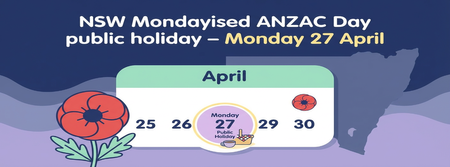
Do you have any employees based in New South Wales? The NSW Government has announced an additional public holiday for ANZAC Day on Monday 27 April 2026 (and again in 2027 when ANZAC Day falls on a weekend). You can read the full announcement from the NSW Government here: NSW Government release for Mondayised Anzac Day To make sure your NSW employees are paid correctly, you’ll need to set up this new public holiday in MYOB PayGlobal. You will also need to adjust any existing leave requests covering 27/04/2026. See the ‘Where to find additional information’ section of this post. What you need to do in MYOB PayGlobal Create the new public holiday Go to Organisation > Entitlements > Holidays. Rightclick the list of holidays and click Add Record. The Add Holidays window opens. Enter the relevant details for the new ANZAC Day Monday public holiday (for example, code, description, date, statutory flag). Click Save + Close to create the new holiday. Add the holiday to the appropriate Holiday Group(s) Go to Organisation > Entitlements > Holiday Groups. Doubleclick the relevant holiday group and click Edit to open the Edit Holiday Groups window. Rightclick the list of holidays and click Add Record. On the Details tab, select the new holiday in Holiday, and choose Public Holiday as the Reason. Click Save + Close to add the new holiday to the group. Repeat these steps for any other Holiday Groups that should include this new public holiday. Where to find more information: If you’d like more detail, including how this might affect other payroll activities (like new starters, terminations, or existing leave requests), please see our help article: Adding a Public Holiday in MYOB PayGlobal68Views0likes0CommentsHow are you preparing MYOB PayGlobal for Payday Super?
Development work is already underway to ensure MYOB PayGlobal supports Payday Super and the associated superannuation reporting and payment changes. As part of this, we’re validating that we’ve covered all the reporting and payment scenarios our customers use today, and we’d love your help by sharing how you currently work and what you see changing. In particular, we’re keen to hear about: How you currently manage super How are you producing and submitting your SuperStream files today? Which clearing houses or super providers are you using? Are there any custom steps or workarounds in your current process? What you expect to change with Payday Super Have your providers shared any timelines or new requirements yet (e.g. SAFF changes)? Are you expecting to change providers or gateways? Which parts of your current PayGlobal process do you think will be most impacted? Where you think you’ll need the most support Specific reports, file formats or integrations Process changes inside PayGlobal Anything you’re uncertain or concerned about Please feel free to reply in this thread with as much or as little detail as you’re comfortable sharing — even a high-level overview of your setup and anticipated changes is really helpful for us. If you’re open to providing a bit more detail, we’ve put together a short 3–5 minute questionnaire to capture your current setup and any known or expected changes related to Payday Super: 👉 MYOB PayGlobal Payday Super Reporting Questionnaire Your input will help us understand what different organisations are planning, and ensure we focus our PayGlobal support and guidance on the areas that matter most to you. For more information regarding Payday Super: Australian Payday Super Changes269Views3likes0Comments