AO HELP Repayment Calculation Incorrect?
Hello, Having an issue in AO where I'm not convinced the HELP repayment is being calculated correct. Screenshot attached of the estimate however they have a HELP debt plus $28k of exempt fringe benefits. Shouldn't the adjusted taxable income for the HELP repayment be $87k and therefore a HELP repayment should be included?Solved165Views0likes3Comments
Great News! Extended Hours for EOFY Support!
Hey everyone, We know the End of Financial Year (EOFY) can be a busy time, and we want to make sure you have all the support you need! For those who might not have heard, we've extended our opening hours to give you even more flexibility during this period. That's right, we're open longer to help you with any last-minute queries, support requests, or assistance with installation of the new 2025.0 update! From the 28th of June to the 20th of July we are open Mon-Sun. Please see below for our contact hours for phone and chat during these dates: Phone: Mon-Friday 9am-5pm Sat-Sun 9am-5pm Chat: Mon-Friday 9am-7pm Sat-Sun 9am-5pm You can find all our updated contact details and extended hours on our Contact Us page or you can access our new chat bot MOCA via MYOB Practice or now from within AE/AO with the new 2025.0 update! Please visit this page on how to chat with us via MYOB Practice. Wishing you a smooth and successful EOFY! Cheers, Aiden from MYOB402Views2likes4CommentsGuide: Workstation Installation for Accountants Office
Hello everyone. We've published a quick guide to completing a workstation installation for Accountants Enterprise on your workstation. These instructions apply to the following products: AO Tax (NZ) AO Practice Manager (NZ) AO Practice Manager (AU) AO Workpapers (AU) AO Statutory Reporter (AU) AO Tax (AU) If you've installed MYOB Accountants Office (AO) on a client server or peer-to-peer network you'll need to run a workstation installation to allow the workstations on your network access to the latest MYOB AO. Before you begin: Make sure you're logged onto the workstation as an administrator. Disable User Account Control for the duration of the install. If you change settings, make sure to reboot the workstation prior to continuing. Enable linked connections - make sure to reboot the workstation after applying this setting. Ensure any anti-virus programs have been disabled that may be operating on the workstation. To run a workstation installation for Accountants Office (AO): Open Windows Explorer and navigate to: \\servername\MYOBAO\AOSQL\WorkstationInstall, where: servername is the name of the server or computer on which you performed the server installation. Double-click on setup.exe. The Licence Agreement window appears. Follow the prompts to continue installation. Click Finish. The workstation installation is complete345Views0likes3CommentsBorrowing costs grid in Rental schedule closes Tax Return
We are having an issue with Desktop tax, from within the Rental Schedule when we click on borrowing costs and click to add the dissection grid or use Alt +S it closes the tax return. All other items seem to be find adding grid.358Views0likes3CommentsAustralian Tax FAQ's (DESKTOP + ONLINE)
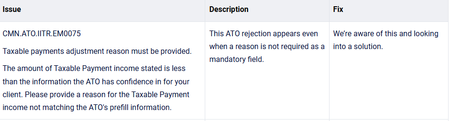
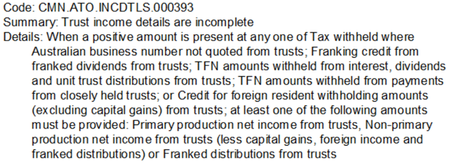
Hello everyone! We've collated a list of frequently asked questions users have posted on the Forum for your convenience. Check them out below! GENERAL What do I need to do before starting a new tax year? (DESKTOP) Where can I view the tax tables and thresholds for 2025? (DESKTOP + ONLINE) Is there a guide to using online MYOB Practice? (ONLINE) How do I reschedule agent reports for the new year? (DESKTOP) SOFTWARE/INSTALLS Where do I find the 2025 installation guide? (DESKTOP) How do I know what changes were done in the latest update? (DESKTOP) How do I backup my practice software? (DESKTOP) How do I get the latest version? (DESKTOP) Can I update to the latest version on Windows 10? (DESKTOP) Is there a guide I can follow to complete a workstation installation of AE? Is there a guide I can follow to complete a workstation installation of AO? TAX RETURNS Can I move from AO to online and roll over my returns from desktop? (ONLINE) How do I make sure depreciation assets roll over from desktop to online return? (ONLINE) How do I make sure I'm getting activity statements sent to clients for review using the portal? (ONLINE) How do I prepare a tax return from MYOB Practice? (ONLINE) How do I exclude tax returns from rolling over to the next year? (DESKTOP) Getting a blank screen when trying to do tax returns, how do I fix this? (DESKTOP) What can I expect to see if I pre-fill a tax return? (DESKTOP) TROUBLESHOOTING ERROR MESSAGES I'm getting tax validation/authentication errors, how do I know what to fix? (DESKTOP + ONLINE) How do I fix a Status Code 400 error when trying to do returns online? (ONLINE) How do I fix SQL server does not exist or access denied' error when opening MYOB. (DESKTOP) How do I fix 'machine name not unique' error when opening Tax? (DESKTOP) How do I fix foreign income tax offset not calculating properly in a trust return? (DESKTOP) How do I fix a tax return stuck on 'transmitting' in the lodgment manager? (DESKTOP) I've just done my tax upgrade and now when I try to run an estimate, nothings happening. How do I fix this? (DESKTOP) I'm running into an error installing AE/AO, how do I know what to fix? (DESKTOP) Can someone please give me a list of any known issues for the 2025 financial year? (DESKTOP + ONLINE)451Views1like0Comments