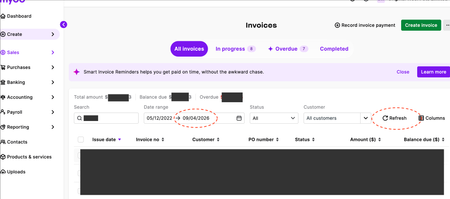
Date range frustrating new update
The update has introduced a bit of friction. Previously, the “reset” button would also reset the date range, which made the process quicker. Now, while the new “refresh” button updates the data, it does not reset the date range as expected. As a result, there is an extra step required to manually go back into the date filter and reselect options like “last 3 months.” It would be more efficient if the refresh function also reset the date range to "all time", or if there were an option to enable this behaviour. Please see the thread on the community page here showing users' frustration: Date range new update | MYOB Community It would be much appreciated if this could be fixed ASAP as it's very frustrating and not a nice user experience at all. Thanks heaps!174Views3likes2Comments
Record Button Change to "OK"
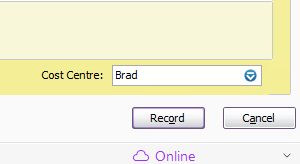
AR Desktop Can we please have the "Record" button change to "OK" following a print preview? It used to happen with AR Premier. It is difficult to know if the sale or purchase has been recorded because the button stays as "Record" until next time you go into it. Before Print Preview After Print Preview Same, same
Searchable Account Name, Account No, Item Name and Item No
It will be a big help to stop keep opening up Account Chart, as you cannot remember the account number of an expense, asset or etc, by enable the search combined. So you don't separate the account search by number, or name, but anything that you put in on the account field, will short list those possible accounts that you want to use, this function is only available when you open up the "account list", it will be great to have this extended to when you are entering transactions in the sales (service), purchases, spend and receive money, journal etc. same thing goes to entering itemise sales or purchases, you can just search my wording, either you only remember partial item no, or descriptions, it will all show120Views4likes2Comments
Font Size
The working population is getting older, the population in general is becoming more myopic. Why ever did MYOB remove font sizing from their program years ago. It would help reduce typos. Most other types of software suites have this facility. Changing the windows screen resolution does not fix the problem. Ever heard of the science of Ergonomics? A resize font option would deliver an ergonomic productivity improvement to a large cohort of your customers. Good Ergonomics makes good economic sense.Reduce wasted screen space
Hi MYOB , When will you work to make the reports in Business usable? So much of the screen real estate is wasted with all sorts of messages and details at the top of the screen that don't scroll which results in the size of the report window so small it can become close to useless as you need to constantly scroll up and down to see the results. On the many occasions that I have commented to MYOB staff about this, the stock reply is "yes, that will be fixed". When? I thought that was one of the reasons that the Business menu was supposed to be moved to a vertical list on the left of the window that could be minimised. It has not helped in any significant way. For reference, I have attached two screen shots of a balance sheet, one from MYOB and the other from Xero. Which would you prefer to work with?155Views3likes2Comments
Make Ship To section on invoices Optional and Editable
Hello, Can you please make the Ship To section optional on the Sales Invoice Template? Most of the Ship To address is the same as the Bill To address. It looks silly to have the same information appeared twice on the invoice. Thank you. Sunny101Views1like2Comments