🟣 CA FAQ — "Accountants Office will expire in x days" message in AO Classic
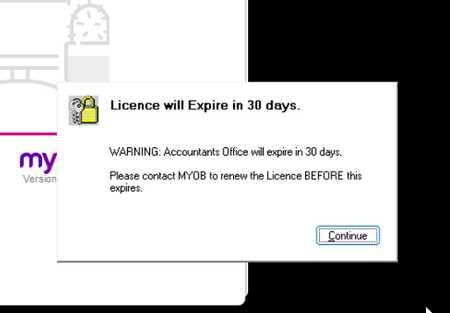
If you are an Australian customer and use AO Classic, you may be recently encountering the below message when launching the software. To resolve this, we will need to update your licence file (MYOBPS.MYL). Please send this file, which is located in your Accountants Office DATA folder (usually X:\MYOBAO\Data or C:\MYOBAO\Data) to [email protected]📨 Please include your client ID in the subject line, and the Licensing team will return the amended file with instructions on how to reload it into your system. Read more about this here: Error: "Licence will expire" Please reach out to the Client Accounting team if you have any questions. Scott Client Accounting MYOB172Views0likes0Comments🟣 CA FAQ — My client has cancelled their MYOB Business or AccountRight file, why can I no longer access it in CA?
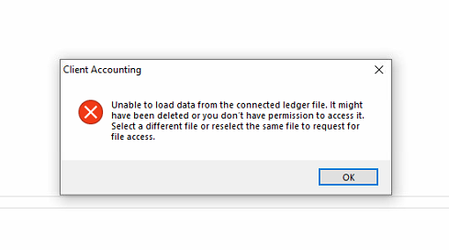
If an MYOB Business or AccountRight file configured in AE/AO has been cancelled, you will likely encounter an error when trying to open the Client Accounting tab, similar to the screenshot below: This is because the ledger data is stored in the underlying online file, not within AE/AO itself. You will be unable to open this client in Client Accounting unless it is reconfigured (for example, to an AE or AO Ledger), or the file is temporarily reinstated. To reconfigure, please contact the Client Accounting team via support channels, and we can assist you with this. To reinstate the file, the Owner of the subscription will need to contact our MYOB Business or AccountRight teams. Please note that there may be limitations on whether this can be done, dependent on how long ago it was cancelled. 🟣 Bonus: To help prevent issues like this, we recommend that practices ask clients to notify them if they plan to cancel a file subscription. Scott Client Accounting MYOB105Views0likes0Comments🟣 CA FAQ — I have created a new period in AE/AO (MYOB Business file), why do I have an out-of-balance?
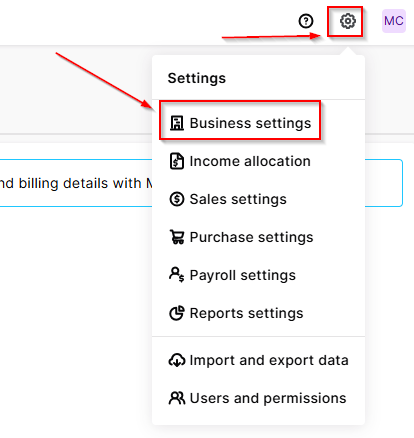
If you have a client in AE/AO configured to an MYOB Business file, you may notice that after creating a new workpaper period, there is an out-of-balance in the Balance sheet (even if you have chosen to roll forward in the Trial balance / Workpapers window). This is because Client Accounting does not automatically roll forward the underlying MYOB Business ledger — this will need to be done as a separate step in the file itself. To resolve this, open your browser and navigate to https://app.myob.com/ Open the relevant client file Navigate to Settings > Business settings > Financial year Select Start new financial year Jump back into AE/AO Open the current workpaper period Under the Tasks menu, select Refresh ledger balances This should resolve the out-of-balance, and you're good to go! ☑️ Scott Client Accounting MYOB167Views0likes0Comments🟣 CA FAQ — I've set up a new employee, but they can't access Client Accounting
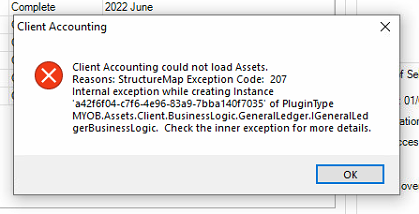
If you have recently set up a new user account for an employee in AE/AO, they may encounter an error referring to "StructureMap Exception Code: 207" when launching the Client Accounting tab for a client. This error message looks scary, but it has a simple solution! 🕵️ They are running into this because Cashbook access has not yet been enabled for the employee. To enable this, do the following: Head over to, and sign into cashbook.myob.com.au (AU) or cashbook.myob.co.nz (NZ) using a different MYOB account (not the affected user's account, but any other account will do) In the drop-down box in the top right corner, click Manage firm users On the list, find the employee that is encountering the error and toggle the button under Access to ON 🟩 That's it! Now the user will just need to close and reopen the client in Client Accounting, and it should load without issue. You can read more about this process here: Error: "Client Accounting could not load Assets. Reason: structure map exception code 207..." when clicking on Client Accounting tab 🟣 Bonus: You can also launch Cashbook via AE/AO directly by clicking the Launch AE/AO ledger button under the Ledger menu in the Workpapers/Trial balance tab. Scott Client Accounting MYOB190Views0likes0CommentsCA FAQ - Error: Roll forward is currently in progress when try to rollover AE reporter
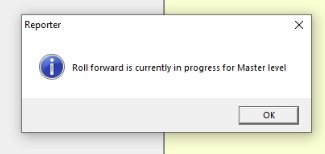
"Just rolled AE Reporter into the new financial year? You might get hit with this classic: 'Roll Forward is currently in progress for... level.' Don’t panic — it just means the system thinks someone’s already mid-rollover at one of the Reporter levels. AE’s basically saying, ‘Hold up, I’m not done yet!’" In MYOB Accountants Enterprise (AE) Reporter, you may experience one or more of the following errors: Roll forward is currently in progress at Master level. Roll forward is currently in progress at Practice level. Roll forward is currently in progress for <ClientCode>. These errors occur if the system identifies that a rollover at any of the Reporter levels is in progress. This is indicated by the existence of lock files in the Reporter folders. Lock files have the extension .ldb, .lcr, .rlcr, .lck, or .rlck (for example, Company.rlck). To successfully open Reporter, simply delete the lock files for the Reporter level where the error occurs. Location of the reporter folders as below: Roll forward is currently in progress at Master level If you're using ... Navigate to ..... AE Accounts M:\MYOB\bin\Reporter\Master AE MAS M:\SOL64\Reporter\Master or M:\MYOBAE\AESQL\TAX\Reporter\Master MAS with MYOB AO M:\MYOBAO\AOSQL\Tax\Reporter\Master for example where M:\ is the installed location of your software Roll forward is currently in progress at Practice level If you're using ... Navigate to ..... AE Accounts S:\Data\MYOB AE MAS M:\SOL64\Reporter\Modified or M:\MYOBAE\AESQL\TAX\Reporter\Modified MAS with MYOB AO M:\MYOBAO\AOSQL\TAX\Reporter\Modified for example where M:\ is the installed location of your software and S:\ is the database location of your software. Roll forward is currently in progress for <Client> If you're using ... Navigate to ..... AE Accounts S:\Data\MYOB\ AE MAS S:\S6CLIENT\<ClientCode> or M:\MYOBAE\AESQL\S6CLIENT<ClientCode> MAS with MYOB AO M:\MYOBAO\AOSQL\S6CLIENT\<ClientCode> for example where S:\ or M:\ is the database location of your software. You can read more about this here: Error: "Roll forward is currently in progress..." Happy Reporting! Sandy Client Accounting MYOB152Views0likes0Comments🟣 CA FAQ — I've rolled over Reporter, where have my reports gone?
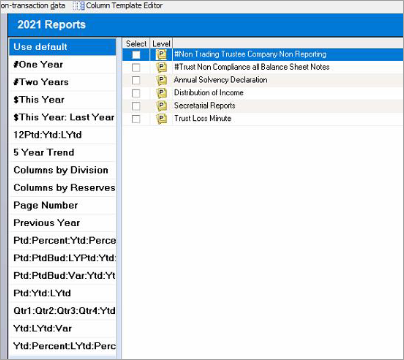
If you have rolled over a client in AE Reporter to the latest financial year, you may encounter a blank Reports list. 🔍🧐 Don't panic! This is because Reporter has been rolled over, but you haven't (yet) installed the master reports for that financial year. To resolve this, you'll need to update Reporter to the latest version: Head over to, and sign into https://www.my.myob.com.au/ (AU) or https://www.my.myob.co.nz/ (NZ) Hover over My Products, click Downloads Select MYOB Reporter MAS / MYOB Reporter Accounts (AU) or MYOB Reporter (NZ) from the drop-down Product list Download the latest update (as of writing, this would be 3.5.8 — AU or 3.5.5 — NZ) Run the update per the Install guide (AU / NZ) This will place down the latest master reports on to your system, and you're good to go! 🥳 You can read more about this here: Reports missing from AE Reporter 🟣 Bonus: Please ensure you are selecting the correct Install and Database file paths when running the installation. The setup wizard may not default to the correct locations. These are commonly the Tax or Sol64 folders (Install), and the S6Client folder (Database), but always double-check. Happy reporting! 📝 Scott Client Accounting MYOB217Views1like0Comments