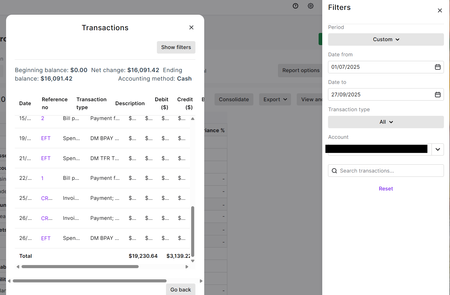
Reports Account Drill-down
When drillling into an account in either Balance Sheet or Profit & Loss in MYOB Business (since the last update in Sept 2025), all we can see is very narrow columns that do not show any amounts. We just see the $ sign - see attached snip. I sincerely hope this will be corrected and revert back to how it was, when we could see the history of each account in detail221Views5likes6Comments
Sales Invoice Report with both due date and paid/closed date
Hi, There are a lot of sales reports but neither I nor the live chat support team, were able to find one that allowed me to modify it so both due date and closed date could be shown on the same report. Some reports allowed the due date, others allowed the paid/closed date but none of them allow both. My boss wants me to report on the average number of days overdue our overdue invoices go. I can get the daily snapshot from the to do list but again, if I 'print' the list to export it, the number of days overdue column disappears anyway, so I have to manually type the numbers into excel/calculator. But if I forget one day, then the data is gone. The report isn't back-date-able. I know I can also add a 'days to pay' column on some reports but I couldn't find any where I could get the due date as well to even do a calculation of overdue days. Since different customers have different payment terms, the number of days to pay is a useless stat for this purpose. Very happy to be proven wrong if this feature already exists. I don't even need the value of the invoices, just the difference between due date and paid date. I looked at both the desktop and browser versions of AccountRight.309Views4likes4Comments
Item Sales Reports
Required field NOT available in AVAILABLE COLUMNS When preparing an ITEM SALES REPORT you cannot add the field that takes the "Description" from the actual invoice. The ITEM Description is available bit often this is edited or enhanced on the actual invoice. To work around this I have to export all the item sales into an external database which is extremely cumbersome. It would also be good if you were able to have self taylored groups of reports in CUSTOM REPORTS Cheers Geoff Young NB Attached report created in MS access242Views4likes6CommentsExtracting data from myob online
I asked the question … “Is there a way that I can just download "all" transactions that have been entered or uploaded into MYBO (Business Lite) as a csv file. I don't want these summarised or grouped in anyway, just the raw data” I got advised that this is not currently a function of myob I find this extremely hard to believe … there are functions to customise reports , why are these not available for all data, across all transactions, and all fields stored in myob. When I raised this question, even the myob Moderator suggested this would make life a lot easier .. so why is it that this function is not available. Does anyone else think it would be useful ? Download all transactions as csv | MYOB Community183Views3likes1Comment
Sales Register
I would like a 'ship to 'column in the sales register report. I do work for large builders that have multiple sites. This would help us identify the purchase order locations especially in orders. I now add the info to the PO. But that looks unprofessional later on invoices148Views3likes3Comments
General Ledger (detail) report to include GST column
Hello. I need to provide financial figures on an expense account that includes the GST included for each item. I have tried the insert/modify tab but there is not option to include the column for the GST amount. Can anyone help or suggest a work around please?Solved3.7KViews3likes1Comment