Quotes (Early Access Program) - Win work on the spot, with just one tap.
Hey Solmates 👋 We think this one deserves a spotlight of its own. Quotes is now one of our most requested features, and today, we’re excited to share that we’re getting ready to open a small Early Access Program (EAP) for Quotes in Solo. Starting in mid-June, we’ll open Quotes to a small group of EAP users. We’re excited to hear about what’s working, what needs improving, and what will make Quotes genuinely useful for Solmates. What’s new? Win more work, on the spot - Create unlimited professional quotes from your phone in a few taps, add photos or attachments where you need, and fire it off! One smooth flow - Once the job's done, convert to an invoice and get paid your way. Turn accepted work into an invoice with just one tap. Sharp and polished templates - Consistent branding settings across quotes and invoices will help you spend less time juggling tools and admin, and more time winning work. What’s happening If you’re onboard with giving practical feedback that helps our teams shape what comes next, we’d love to hear from you! During the EAP, you’ll be shown prompts in Solo, asking you about your experience with Quotes. We encourage you to use them extensively! That feedback goes straight to the designers and engineers working on the feature, who are ready to make sure that Quotes is ready for all Solmates 💜 Get involved If you’re reading this and thinking “Yes please, I want Quotes!”, reach out in the Solo app by tapping More > Chat with us and mention “Quotes”. We’ll help get you registered, and setup for success. We’re very excited to get this into your hands! 🙌💜213Views5likes0CommentsRelease drop: your feature roundup is here.
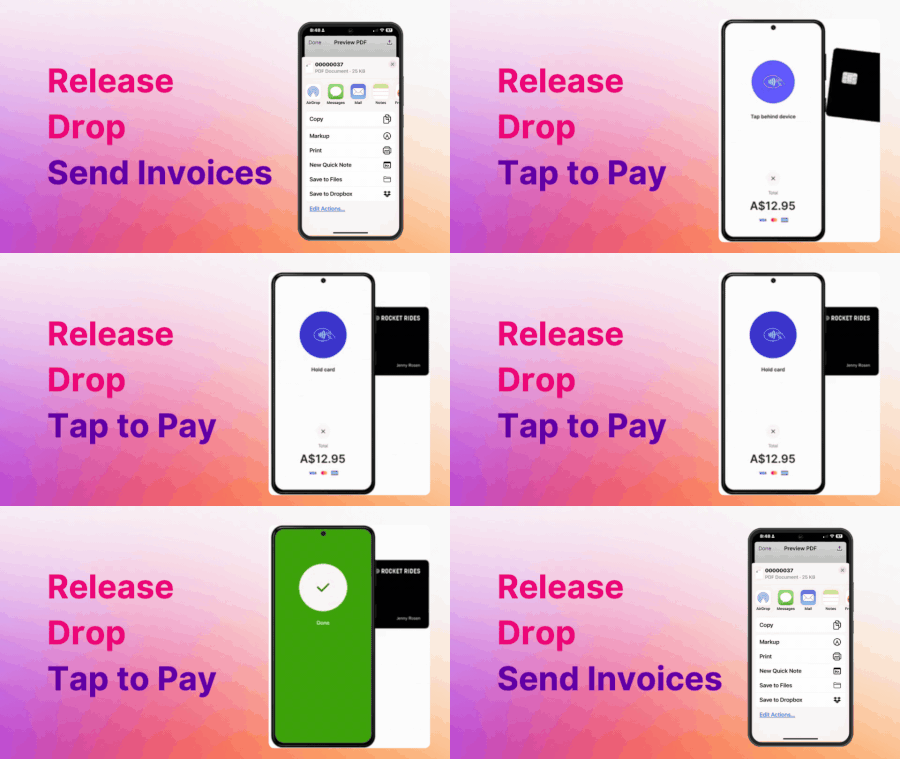
Hey early birds! It’s been a month since you jumped on board to help us build this app. Your feedback has been golden, thanks. Here’s how we’ve turned what you've shared so far into action. Tap to Pay: an EFTPOS in your pocket Important: Android only. Apple support coming soon. Invoices? Nice. But how about just holding out your phone, taking a payment, and having our app take care of the rest? Nicer. We've set up tap to pay so you can get paid on the spot—no extra hardware required. It’s as simple as Tap. Pay. Done. Just fire up tap to pay to take payments from card, mobile, or wearable, the accounting side of things is all logged in real-time. Learn how to get started with tap to pay Need to know: Some banks limit card taps over $100, so have a backup plan—like sending an invoice- if they pull out a classic plastic card Google Wallet and Apple Pay have no limits There's a small fee: 30 cents + 1.6% per transaction You asked, we delivered We're in our ideas hub every day, turning your suggestions into reality—one line of code at a time. Here’s what we’ve rolled out from your ideas list so far Share invoices everywhere You wanted more ways to share invoices, so now you can. Text, email, WhatsApp—whatever works for you. Just load up a preview of your invoice and then hit share. Set and forget invoice due dates We saw a a bit of a time-waster; setting an invoice due date every time. Now we remember how much time you give customers to pay, so you don't have to. No need to set it unless you want to make a change. Filter and find invoices and expenses We fixed that annoying bug that made invoices disappear and added better search and filter options. Now, finding and filtering is a breeze. The bug hunt continues We’ve cleaned up a bunch of other little bugs to keep things running smoothly. Let us know about anything unexpected or strange looking and we'll take a look for you. Keep the questions and feedback coming Ask questions here and vote on feedback or tell us what you think so that we can stay laser focused on building a great app for you.234Views4likes3CommentsIntroducing Solo Money – a new way to manage your business, right inside Solo
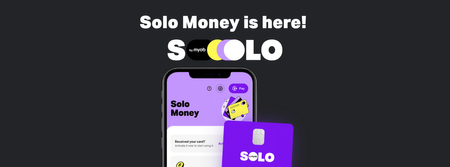
A new version of Solo is now available in the Apple App Store and Google Play Store. Update Solo to access the newest release. Hey Solmates! Something new has landed in Solo! A business bank account designed to help you keep your business finances sorted all in one place. Solo Money is now available for eligible Solo customers to apply for! What is Solo Money? Solo Money is a business transaction account built into Solo. Take a break from the app juggle - Solo’s got accounting, payments AND banking all in one place. That means: A dedicated business account With Solo Money, you don’t need to sift through your personal bank statements trying to find that pesky business transaction. Tracked transactions AI smart matches money coming in and out of your business items. You hold the cards You can put expenses on the business account with your Solo Business Debit Card—both digital and physical. Who can apply? Solmates who: Have an active ABN Are 18 years or older Are a tax resident of Australia only Are registered as one of the following: Sole trader, private company directly owned by individuals or Partnership (with only individuals as partners) You can apply in minutes - jump into the Solo app and hit Solo Money to get started. I already use connected accounts. Can I still apply for Solo Money? Absolutely! Nothing changes for connected accounts with the launch of Solo Money – you can still link up to 2 connected accounts, separate to a Solo Money Account. What about fees? There are no monthly account keeping fees* as long as: You’ve made at least one transaction in your Solo Money Account in the last 6 months, or Your balance has been $500 or more in the last 6 months. Ready to get started? It takes minutes to apply! Just jump into the Solo app and hit More > Solo Money if you’d like to proceed. You’ll need your ABN, business details, driver’s licence or passport. It’s free to set up a Solo Money Account *. *If your account has a balance of less than $500, a fee of $10 per month will apply unless you make at least one transaction in a 6 month period (other than transactions initiated by us, such as crediting interest or debiting fees and charges). Other fees may apply. See terms and conditions for full details.311Views3likes0Comments🚀 Release 3 is Here!
Hey, Solmates! Big update alert! This one’s packed with features we think you’ll love; Connected Accounts is finally here, and we’re doing our happy dance 💃 Connected Accounts is Live! Tracking invoices and expenses just got a whole lot smoother. Less manual work, more automation. Connected Accounts – Link up to two bank accounts for a full money overview. Smart-Matching & Categorisation – Payments automatically match invoices and expenses—just review and approve. Safe & Secure – Secure connection keeps your data protected. Easy Setup – Get connected in just a few taps. Tap Connect to Your Bank on the home screen and follow the prompts. Remember to finish off by making your first transaction. 🏆 Pro Tip! To finish setting up your connected account you will need to make a transaction. No transactions on the horizon? Buy yourself a little treat to get the ball rolling. More Cool Features Tap to Pay Just Got Bigger – Android customers can now enter their PIN. This means your customers can now Tap to Pay on larger invoices. Expense Refunds – Easily track and manage refunded expenses. Record Income – Record income that isn’t linked to an invoice. Action Hub - Upgraded home screen with to-do lists that actually get done. Home screen glow-up - because your to-do list deserves action, not procrastination. Hubs - Updated Money in and Money out hub to make it easier to find all your transactions (not just the overdue ones😉) 🎬Tell us what you think We’re so excited to roll out Connected Accounts! If you have any questions about these new features, drop us a line! Our community leads are here to help! Comment below or open your Solo app and tap More >> Digital Assistance 😊💡 Love these new features? Share what new features you are loving below! 👇514Views2likes3Comments