Blog Post

The AccountRight Blog
2 MIN READ

Accounting on the go - free with your subscription

Merrin's avatar
Merrin
Former Staff
11 years ago

We’ve taken some of the best features of AccountRight and made them mobile. AccountRight and your smartphone now give you the ability to manage your accounts and cashflow on the go.


The new MYOB OnTheGo app is available to download from the Apple App Store (AU) (NZ) and Google Play (AU) (NZ).


What can you do with the app?


Well, when you pull up for a job, first check the OntheGo app to see if the client owes you any money. No? Great, get out there and do your best work.


When you finish up, you can simply invoice your client on the spot. No need to jot down what you’ve just done and wait until next time you’ve got your computer open to create an invoice. You can even email it straight to your client from your phone. So handy for saving you from all that “Oh, I never got that invoice from you” hassle.


See how easy it is to invoice on your phone.


UVUQPkgHBfA


Received a call about some new work? Create a new contact in AccountRight, and when it comes time to visit, the app will sync with your phone’s map software and give you directions.


DKPywCIHvww


Best of all, any changes you make are updated in real time, so the moment you change anything, it’s in your online file, so anyone else you work with has access to the information you enter via the OnTheGo app.


Visit the MYOB website (Australia) (New Zealand) for more information, or download the app and see if it changes the way you do business.


Updated 10 years ago
Version 2.0

13 Comments

  • Merrin's avatar
    Merrin
    Former Staff
    11 years ago

    Hi Bernie,


    Glad to hear you've downloaded the app and are enjoying it.


    Love the ideas, so please do add them to the Ideas Exchange, so others can add their voice to them.


    Thanks for dropping us a line.


    Merrin 

  • ClaudiaR's avatar
    ClaudiaR
    Contributing Cover User
    11 years ago

    hi guys


    The app on the go is a wonderful idea!


    It will be great for us; I just tried it and the invoicing works fine but I was unable to add a freight charge to an invoice. Is there a particular way to do this? Please help


    Kind regards

    Claudia

  • Merrin's avatar
    Merrin
    Former Staff
    11 years ago

    Hi ClaudiaR,


    Glad to hear the app will be useful for you.


    There's no separate field for freight in the OnTheGo app. So, if you're looking to charge freight, there's a couple of work arounds that might help. Although, I will confess, neither is the most elegant solution. 


    I'm assuming you're already using the frieght field in AccountRight at the moment, and have it all set up, in which case:


    1. You can create the invoice in the App, then add the freight charge to the Freight field from within AccountRight before emailing it to a client. It does mean opening AccountRight to add the freight charge though.

    2. You can add the freight charge as line on the invoice. Note that if you add it to the invoice, it will appear as a line in the invoice, rather than in the dedicated freight section.

      If you want to track the freigh cost, you'll need to select the account that you use to track freight for that line.

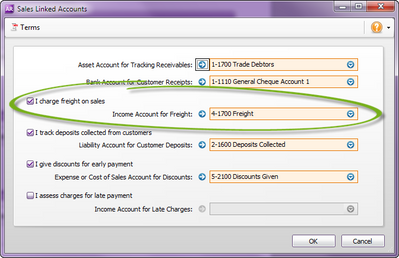
      (If you're not sure which account you use to track freight, go to Setup > Linked Accounts > Sales Accounts. The freight account is listed under I charge freight on sales.
      freight.png

      If you use Service invoices, you can select simply select your freight account when you create the freight charge on the invoice. 

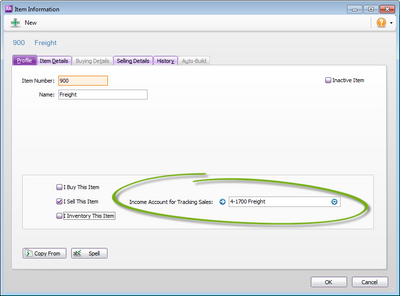
      If you use Item invoices, you'll need to set up a freight item with the freight account already linked, like below.
      freight_item.png


    Hope this helps.


    Please drop me a line if you have further questions.


    Thanks,

    Merrin