Forum Discussion

JoanEllen's avatar
JoanEllen
Experienced User
2 years ago

MYOB has lost all transactions from 20 April - why does this keep happening?

Would someone PLEASE help with this ongoing problem. I backed up MYOB yesterday so I have a copy of yesterday's datafile which hopefully has yesterday's transactions intact. But I'm unable to upload this to you.


I opened our MYOB datafile this morning and reconciliations only go back to 20 April. I reconcile daily.


I tried 2 different ways of opening the datafile - the usual way through RECENTLY OPENED COMPANY FILES in the MYOB window, and also through OPEN A COMPANY FILE, and clicking on our datafile in MY Library.


Both attempts bring up the same datafile, which has only recorded to 20 April.


I can't keep re-entering transactions each time this happens. 


Would MYOB please investigate this properly. I tried attaching yesterday's backup here but got a message the file was too large.


I've attached yesterday's logfile, which contains terms like "Failed to grab lockfile" and "thread was being aborted". This was in an ARCHIVES folder for some reason.


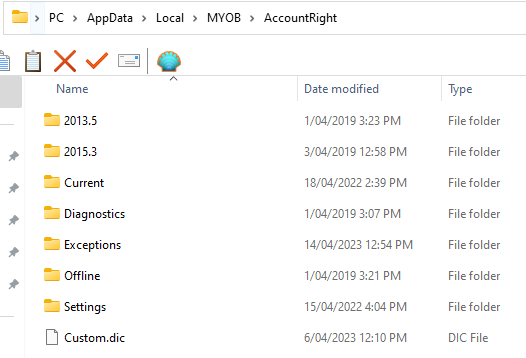
I've also attached a screenshot of the MYOB appdata window as there seems to be nothing there from the last year.


PLEASE help with this as it takes up so much time having to re-enter everything.

16 Replies

Replies have been turned off for this discussion
  • JoanEllen's avatar
    JoanEllen
    Experienced User
    2 years ago

    Thanks again Gavin and I do appreciate your working on a Saturday.


    Yes, it's possible when I installed MYOB PC edition 2022 I chose Public Documents as the default folder possibly because we once had a network in the office and that was the existing file location. So is it advisable to change the file location to MyAccountRight - the usual one for PC edition?


    Yes, we have an IT person we can ask but would prefer a MYOB / IT specialist. I've emailed you just now asking you to refer someone.


    We crashed again today, so I've included today's log, as well as the 25 April log again.


    You should be paid Gavin!


    Thanks again.

  • JoanEllen's avatar
    JoanEllen
    Experienced User
    2 years ago

    Thanks Gavin. The only processes that are running that I'm aware of are OUTLOOK (to send invoices), GMail (3 accounts open - I need to do this), and recently since October last year we use COUPA online to upload invoices for a particular customer, but this problem happened before then. I really need to use all of these to do my work.


    We don't have a server. It's just standalone desktop.


    On the task manager the only icon really is Google Workspace Sync (synced). Have you came across instances where Google syncing interfered with MYOB to the extent that this could cause a lot of data? 


    Our antivirus is Windows Security, which while it does live scans shouldn't interfere with MYOB. I don't really want to turn this off either.


    Can I ask if MYOB's IT Dept told you this? And which items on the report specifically lead them to believe some software was interfering? I'm asking because I know this is the stock standard response to everyone who is losing data and MYOB freezes.


    There would be a hullabaloo if Google had been found to be disabling software. I'm trying not to be sceptical here.


    Thanks Gavin.


  • JoanEllen's avatar
    JoanEllen
    Experienced User
    2 years ago

    Yes I will thank you Gavin. I appreciate the time and effort you have put into this and I'm very grateful to you for helping to clear away a lot of the confusion. Kudos to you and I'm sorry that your efforts aren't recognised the way they should be. I'll phone the person you recommended and I'll go from there.


    Thanks very much once again.

  • Celia_B's avatar
    Celia_B
    MYOB Staff
    2 years ago

    Hi JoanEllen 


    We'll really glad to know that  gavin12345 has helped you with the issue. If you need assistance don't hesitate to reach out to us on Community Forum Live chat or send us a private message and we'll be happy to assist you.


    Cheers, 

    Cel

  • JoanEllen's avatar
    JoanEllen
    Experienced User
    2 years ago

    Thanks Celia. I did reach out on community forums but no-one from MYOB helped. Only Gavin12345 helped.

  • Celia_B's avatar
    Celia_B
    MYOB Staff
    2 years ago

    Hi JoanEllen 


    Sorry that you had that experience.  And I understand your frustrated but were happy to assist you. Please let us know if you need further assistance. If you would like to provide further feedback you are welcome to do so via Feedback & Complaints channel on the Contact Us page on our website 


    Please feel free to post again.


    Regards, 

    Cel