Forum Discussion

INTHEHILLS's avatar
INTHEHILLS
Experienced Cover User
7 months ago

Email Automatic Attached PFD Invoice

Customers are no longer receiving and attached PDF Invoice when you email an invoice.

Has there been a change with the new verification?

What are the steps so it is automatic attaches a PDF Invoice via invoice app and laptop 

 Automatic attached PDF Invoice

Is this a security feature change


3 Replies

  • Isaiah_C's avatar
    Isaiah_C
    MYOB Moderator
    7 months ago

    Hi InTheHills​,


    That’s a bit of a hassle, isn’t it? Thanks for pointing that out. Let’s get you sorted quick smart so your customers aren’t left PDF-less!

    Here’s the lowdown:


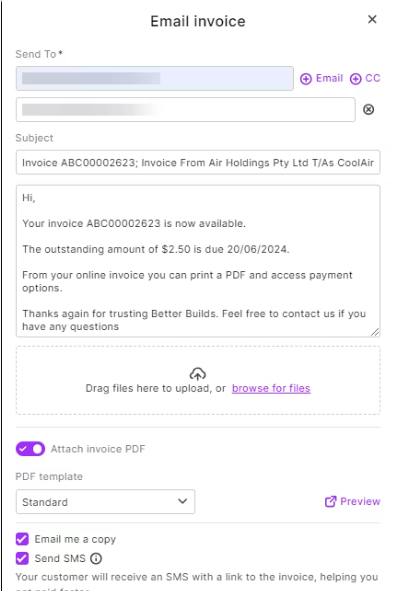
    • For MYOB Business: Make sure the "Attach invoice PDF" option is turned on. Once it’s ticked, your invoices will have their trusty PDF buddies automatically attached when you fire out those emails.
    • For AccountRight: Good news here! It’ll send the PDF as an attachment automatically when you email an invoice. But, if you’re feeling fancy and want to attach any extra files (like a terms document or maybe a cheeky promotional flyer), all you’ve got to do is click on the "Attach" option before hitting send. Easy as pie!
    • On the Invoice App: Easy-peasy! PDF attachments are automatic, so you don’t need to lift a finger. It’s all taken care of for you like a champ.


    As for whether this is a new security feature or process, nope, it’s nothing to do with security changes. Your PDFs just need the green light from some settings to tag along. Email, SMS or print sales for more tips and tricks


    Regards,

    Sai

  • INTHEHILLS's avatar
    INTHEHILLS
    Experienced Cover User
    7 months ago

    Thanks Sai


    What do you mean Make sure the "Attach invoice PDF" option is turned on?

    As was working in the past and now its not, since change of security

     Do we need to turn on with every new customer email address and then will be automatic.

  • Isaiah_C's avatar
    Isaiah_C
    MYOB Moderator
    7 months ago

    Hi InTheHills,


    Before sending an invoice, you’ll want to have a quick squiz to make sure the "Attach invoice PDF" option is ticked. Think of it as giving the invoice a little nudge to make sure it plays nice and slides into the email as a PDF. But don’t worry, you won’t have to keep doing this every time! Once you’ve ticked it, the system takes the hint. It'll attach PDFs to future invoices automatically. 


    Regards,

    Sai