Forum Discussion

paddyr's avatar
paddyr
Contributing User
2 years ago
Solved

AccountRight Import General Journal Error

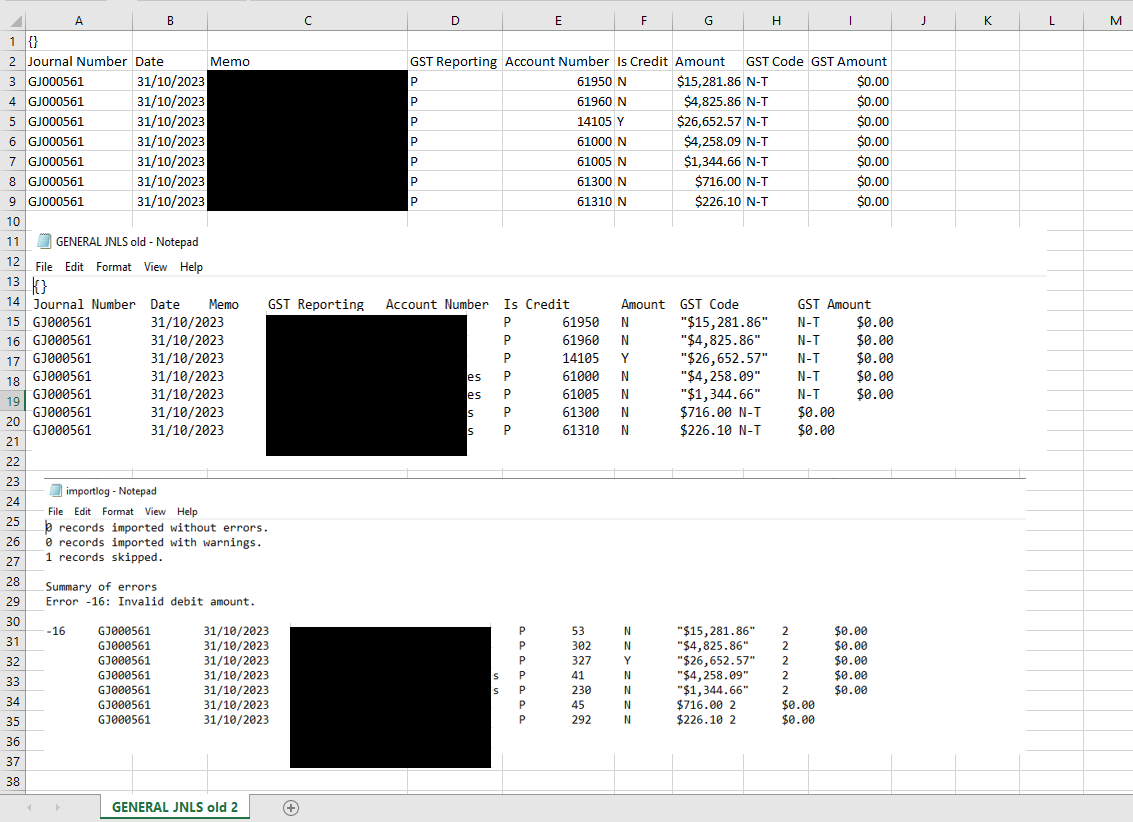
Hi there i have a similar issue where i have downloaded an existing  General Journal in the required template , maintained the format, upaded the data for a new Jnl and I get the attached ( Snip of Excel file format, txt file and error log) . i cant see why its not seperating the last two lines for the GST code. I did have an issue formatting values where the two decimal places are .00 but im not sure this is a pre requisite? I've blacked out the Memo section for privacy. any help would be appreciated. I tried also using the Sample download template, to no avail. thanks

Paddy

  • Hi paddyr , Excel puts quotes around amounts with commas when it saves as text, so I suggest you format the amount column as general (or as number with 2 decimal places but NO commas) before you save it as a txt file. 

1 Reply

Replies have been turned off for this discussion
  • Mike_James's avatar
    Mike_James
    Ultimate Cover User
    2 years ago

    Hi paddyr , Excel puts quotes around amounts with commas when it saves as text, so I suggest you format the amount column as general (or as number with 2 decimal places but NO commas) before you save it as a txt file. 

Looking for something else?

Search the Community Forum for answers or find your topic and get the conversation started!

Community home

Level up your skills using MYOB software.


Find help guides and technical solutions for all MYOB products here

Explore video tutorials for our software at the MYOB Academy here


Dig into MYOB Academy for free courses, learning paths and live events to help build your business with MYOB.