Forum Discussion

georgieh's avatar
georgieh
Experienced Cover User
6 days ago

Allocating payments to invoice from Browser bank feed

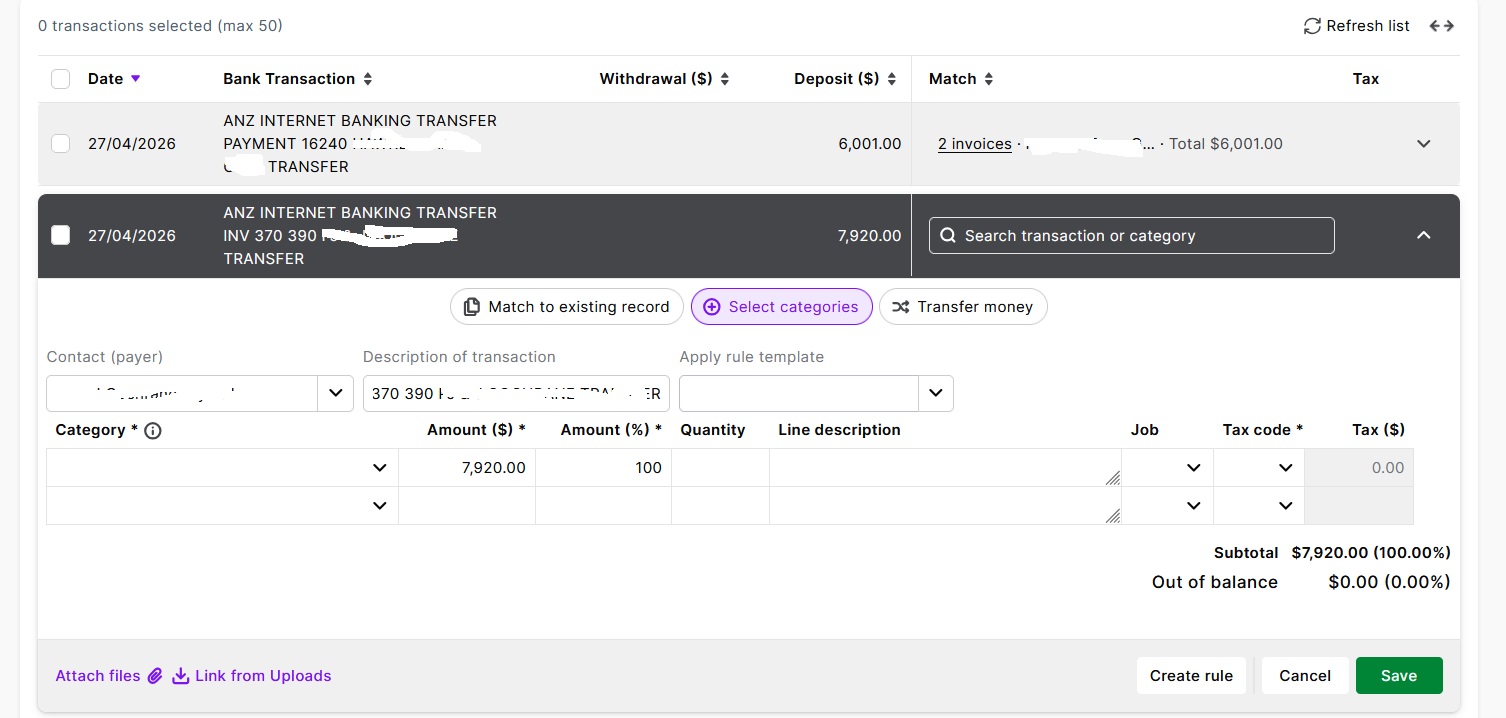
I am trying to allocate invoice payments from the bank feed screen on the browser, without having to go out and use "Record Invoice Payment". This is easy on the desktop.


Even when I put in the customer name, I don't see any invoices to allocate the money to (see screenshot). Where am I going wrong?

1 Reply

  • Doreen_P's avatar
    Doreen_P
    MYOB Moderator
    5 days ago

    Hi georgieh,


    Love that you’re trying to do it all straight from the bank feed. On the bank feed line, instead of just typing the customer name, click “Match to existing record”. That will open up a list/search where you can find the open invoice for that customer and match the payment directly from the bank feed screen.


    Cheers,

    Doreen

Looking for something else?

Search the Community Forum for answers or find your topic and get the conversation started!

Community home

Level up your skills using MYOB software.


Find help guides and technical solutions for all MYOB products here

Explore video tutorials for our software at the MYOB Academy here


Dig into MYOB Academy for free courses, learning paths and live events to help build your business with MYOB.