Forum Discussion

VT3's avatar
VT3
Experienced User
1 year ago
Solved

Bank transaction allocation issue

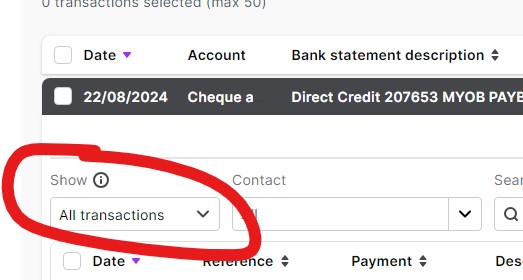
Every time I go to allocate something, I need to manually change this to ""Close matches". How can I have it remember that setting so I don't need to do it for every allocation?

Asked this question 2 years ago and didn't hear back - Bank transaction allocation issue | MYOB Community


  • Hi VT3,


    Thanks for your reply! You can request the "Close Matches" feature to be saved as a default setting by posting your suggestion on the  MYOB Business Idea Exchange. This platform allows users to share their ideas for feature enhancements and improvements. 


    Feel free to get in touch if you need more help.


    Cheers,

    Princess

3 Replies

  • Princess_R's avatar
    Princess_R
    MYOB Moderator
    1 year ago

    Hi VT3,


    Thanks for your reply! You can request the "Close Matches" feature to be saved as a default setting by posting your suggestion on the  MYOB Business Idea Exchange. This platform allows users to share their ideas for feature enhancements and improvements. 


    Feel free to get in touch if you need more help.


    Cheers,

    Princess

  • Princess_R's avatar
    Princess_R
    MYOB Moderator
    1 year ago

    Hi VT3,


    I understand that you want the "Close matches" option to be the default when you're on the match transaction screen. Currently, the system automatically selects possible matches based on the information from the bank transaction, such as the amount. If the amount matches a transaction, the system will show the "Selected transactions" option by default. There isn't an option to save "Close matches" as the default filter for matching bank transactions at this time.


    Feel free to get in touch if you have other questions or concerns.


    Cheers,

    Princess

  • VT3's avatar
    VT3
    Experienced User
    1 year ago

    Thank you for your reply. 
    How can I request the Close Matches be saved as a default setting?

Looking for something else?

Search the Community Forum for answers or find your topic and get the conversation started!

Community home

Level up your skills using MYOB software.


Find help guides and technical solutions for all MYOB products here

Explore video tutorials for our software at the MYOB Academy here


Dig into MYOB Academy for free courses, learning paths and live events to help build your business with MYOB.