Forum Discussion


SamaraM
3 years agoFormer Staff
Hi all
ASanders0210 - By default, when a file is upgraded, if your employee had banking information in the Original MYOB Essentials, their Payment method will be set to Electronic. This can be changed under; the Payroll menu > Employees > employee Payment details tab.
Andrewtao - My apologies, here are the same instructions for Essentials: How do I recreate a bank file?

Andrewtao
3 years agoContributing User
SamaraM Hi Samara,
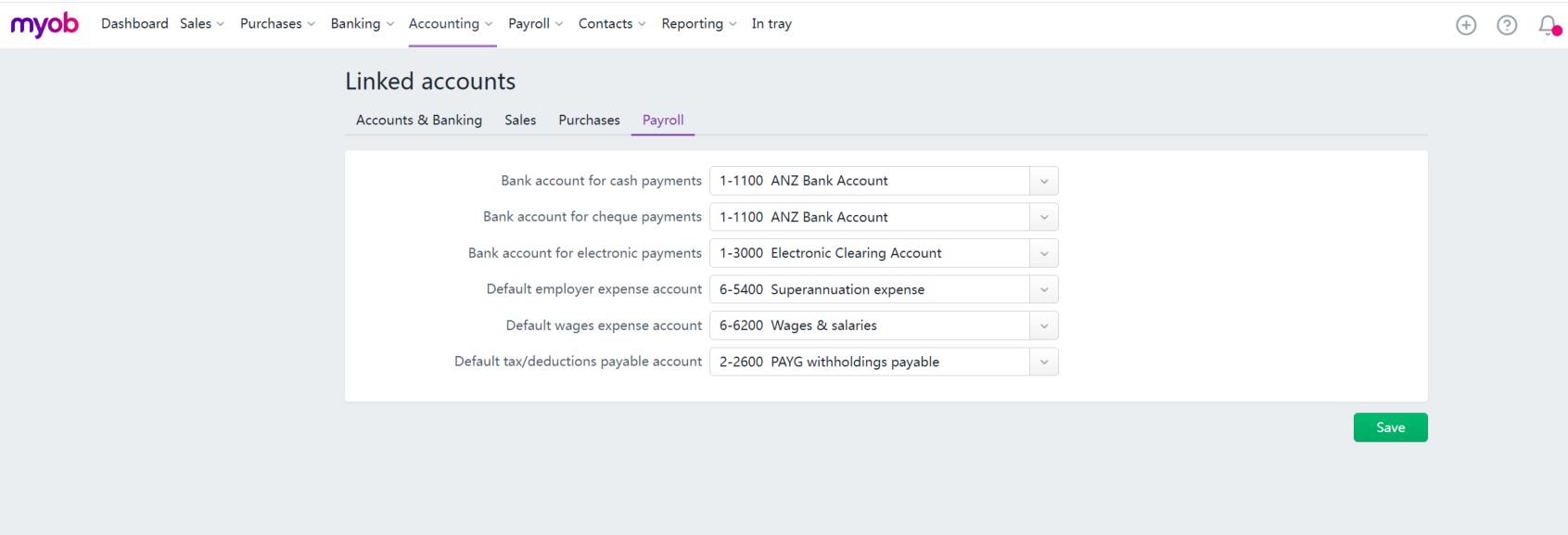
Since the electronic payroll payment always auto-linked to back account 1-1000, I inactivated 1-1000 and reversed the payroll run and re-did it. After downloaded the bank file, I went to the bank transactions list and checked. Guess what? The payroll bank transaction found a possible match. I opened up, it was the electronic payment I've just done. I ticked the box and saved it. The issue solved!
Conclusion:
As you pointed out, the payroll run I've done before linked to a wrong bank account for some unknown reason and that's why automatch failed. After I inactivated the wrong bank account, it operated back to normal. I still have no idea why this would happen. But anyway, the issue solved. Hope this could help other users who are also stuck in with this automatch issue.
Looking for something else?
Search the Community Forum for answers or find your topic and get the conversation started!
Learn, solve, grow
Level up your skills and find answers across all MYOB products