Forum Discussion


Genreve_S
1 year agoMYOB Moderator
Hi Ezkii,
Totally get how this can be confusing. You’re not doing anything wrong.
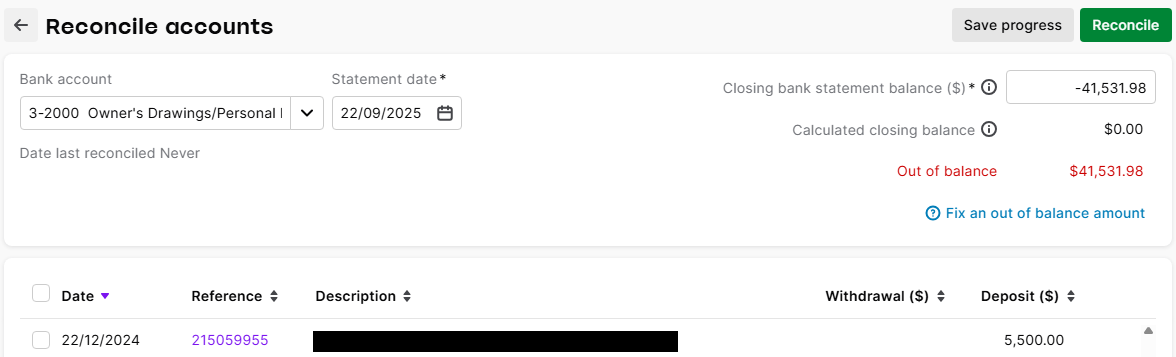
It’s just how the software shows equity. Equity accounts are credit by nature, so they’ll often show up as a negative number on the reconciliation screen. That doesn’t mean your equity is actually “deposit”, it’s just the software showing the credit side of the ledger.
Regards,
Genreve
 Ezkii1 year agoContributing User
Hi Genreve_S,
Thank you for your reply, I appreciate it.
That is good to know. The only problem I have now though is that whenever I try to reconcile the 'Owners Drawings', 'Owners Funds Introduced, & 'Sales' accounts the balances are out.
So instead of selecting the items and the figure goes closer to a balance of $0 it actually ends up doubling the out of balance figure. (i.e. My $41k out of balance becomes $82k out of balance once I select all the items to reconcile.
Thank you again for your help with this.
Kind regards,
Ez
- Doreen_P1 year agoMYOB Moderator
Hey Ezkii,
When the out‑of‑balance doubles as you tick items, that’s usually a sign of incorrect records, like a journal entry posted straight to a category. Give the Exceptions dashboard a quick check to flag anything off, especially in Owners Drawings, Owners Funds Introduced, and Sales. If you find journals or cheeky duplicates, recode them, undo the reconciliation of the affected lines, fix the coding, then re‑run the recon so the out‑of‑balance starts heading back toward zero rather than doubling. You can also reach out to our team so they can dig deeper and see what's going on behind the scenes. You can contact them on Live Chat via our virtual assistant, MOCA, or by submitting a support case via MyAccount.
Cheers,
Doreen
- Ezkii1 year agoContributing User
Thank you for your advice Doreen, much appreciated.
I have run the Exceptions Dashboard and other than a couple of non-standard tax codes on some transactions, which is all fine, everything else seems to be ok.
I will have another run through the Journals to double check as well. If i have no success I will have a look at MOCA.
Thanks again for your help.
Ez
- Mike_James1 year agoUltimate Cover User
Hi Ezkii, the bank reconciliation screen is designed for reconciling bank accounts (and credit cards) to external documentation such as a bank statement. Other accounts do not have independent external documentation. The issues you raise (ie payment/deposit switch and doubling of differences) could be expected, and I suggest that there is no need to use a bank reconciliation process for any other type of account.
- Ezkii1 year agoContributing User
Hi Mike,
Thanks for your post. I think you are right. I have combed over these for many more hours than I probably should have and everything looks in order.
I'll take your advice and just skip the reconciling of those accounts.
The P&L reporting is accurate (it seems to be anyway) which is all that really matters.
Thanks again for the advice.


Looking for something else?
Search the Community Forum for answers or find your topic and get the conversation started!
Learn, solve, grow
Level up your skills and find answers across all MYOB products