Forum Discussion

5 Replies
- Doreen_P2 hours agoMYOB Moderator
Hi JacintaAp,
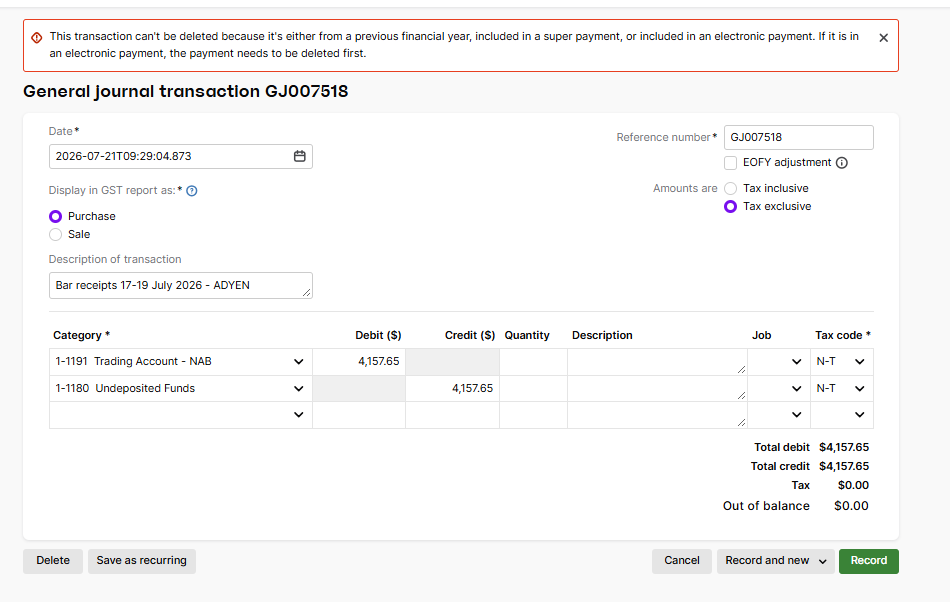
The message from the screenshot explains why the general journal can’t be deleted. It means the journal is either from a previous financial year, linked to a super payment, or included in an electronic payment. If it’s part of an electronic payment, the grouped payment needs to be deleted first. If it relates to a previous financial year or super payment, it may need to be reversed or corrected instead of deleted so the audit trail and payment records remain accurate. It’s worth checking with your accountant before changing a prior-year or super-related entry. You can find more detail in Deleting a transaction and Changing or fixing electronic payments.
Cheers,
Doreen
 JacintaAp1 hour agoContributing User
Hi Doreen,
Thank you, the screenshot shows the date is within the current financial year and this was unchanged by me - so we can rule that out.
The transaction lines show that this is not related to Superannuation in any way - so we can rule that out.The transaction is a General Journal and so is not part of any electronic payments - so we can rule that out.
I am now left with a question unanswered having addressed each of the possibilities raised in the screenshot MYOB error label and each of the possibilities raised in your response.
I hope the community have any ideas on where to head to next?- Mike_James1 hour agoUltimate Cover User
Hi JacintaAp , does your user access role allow delete/reverse?
- JacintaAp54 minutes agoContributing User
Hi Mike,
Yes, and the month of July is unlocked. Some GJ can be deleted and some like this cannot.
I am trying to fix mistakes made by a predecessor.  Genreve_S51 minutes agoMYOB Moderator
Hi JacintaAp,
Thanks for clarifying those details, and thanks to Mike for raising user access as another possibility. Please check that your user role allows transactions to be deleted.
As you're using MYOB Business and have ruled out the previous financial year, super payment, and electronic payment options, could you also check whether the journal is linked to a bank transaction that has been matched, allocated, or reconciled?
If so, try removing the bank match or allocation first, then open the journal from Accounting > General journals and try deleting it again.
If you still can't find the link or the deletion doesn't work, it's best to reach out to our support team so they can investigate the file further.
Regards,
Genreve


Looking for something else?
Search the Community Forum for answers or find your topic and get the conversation started!
Learn, solve, grow
Level up your skills and find answers across all MYOB products