Forum Discussion


Celia_B
2 years agoMYOB Staff
Hi H-TS,
Thank you for the update. Could you please confirm, after you edit the recurring transaction, have you tried to copy a recurring transaction? I replicate this and it works on my end. After following the steps on editing schedule, click the recurring transaction List then click Create a copy. Select the card the copied template to and enter a name for the recurring transaction. then click Save.
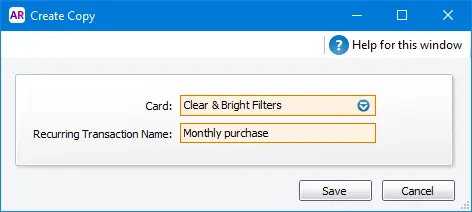
Please let me know how you go on with this. If you have already taken the above steps and the issue persists, I will continue to communicate with you via private message to gather additional information.
Thank you,
Cel

H-TS
2 years agoTrusted User
Thanks again. I'm not sure we're talking about the same thing although I appreciate you trying to help.
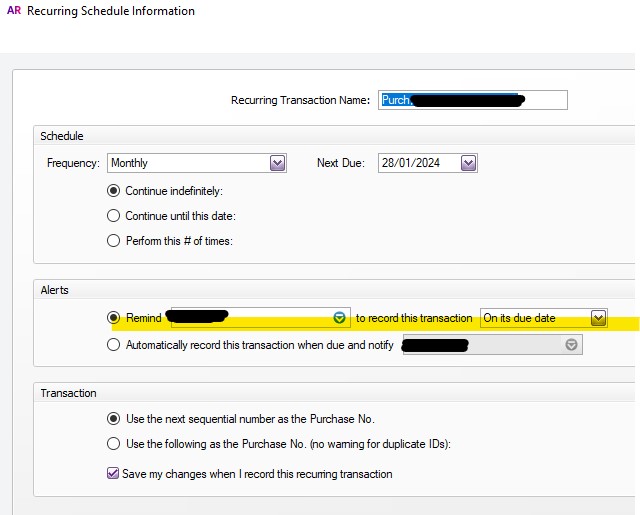
What I mean is, the name in this field changes to my name whenever I click on 'edit schedule' of any recurring transaction, regardless of whose name is there before I try to edit.
It should stay as whoever it was saved as previously.
Making a copy and opening the copy results in the same thing. My name is always in that field even though the reminders are currently set to go to other people. I should be able to edit schedules on other transactions rather than asking each person to edit their own.
- Celia_B2 years agoMYOB Staff
Hi H-TS,
I am sorry to hear you still have the issue after following the steps that I provided. When you add a name on the recurring transaction for advice, it reverts to another. I checked on this issue with our team. As of this moment, it is not possible to provide you with the workaround as this has been raised to our relevant team for investigation. but rest assured that this will be looked after by our team to investigate. Please accept our apologies for the inconvenience.
Meanwhile, if you have questions or concerns, please contact us again or create a new post. Rest assured that one of our Community Forum moderators will be happy to assist you.
Kind Regards,
Cel
- Celia_B2 years agoMYOB Staff
Hi H-TS,
We hope this message finds you well. Rest assured that this issue has been looked up by our team. If you still have other questions or concerns, please contact us again or create a new post. Rest assured that one of our Community Forum moderators will be happy to help.
Kind Regards,
Cel
- H-TS2 years agoTrusted User
Thanks again Celia_B
Does that mean it should have been fixed now, or have they simply looked at it? Were they able to replicate and confirm the issue?
- Celia_B2 years agoMYOB Staff
Hi H-TS,
We appreciate your patience and understanding on this issue. The team review the issue and has already been escalated to our developers. There is currently no time frame for when the fix would be available, but rest assured that this is looked at as a priority and we'll provide communications and updates once the issue has been resolved. Apologies for the inconvenience.
Kind Regards,
Cel
Looking for something else?
Search the Community Forum for answers or find your topic and get the conversation started!
Learn, solve, grow
Level up your skills and find answers across all MYOB products