Forum Discussion

Basketball's avatar
Basketball
Experienced Cover User
1 year ago

Re: Adding PayNow button to customised sales invoice

Hi Shella,

Thankyou for the link.

However, I am still not clear on the following:

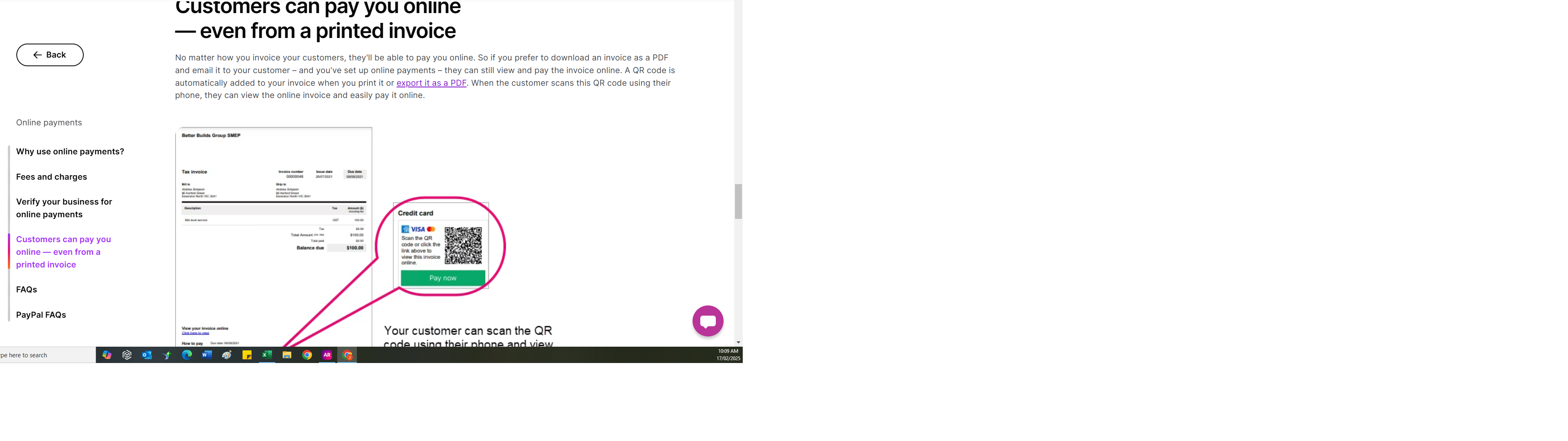
  • OK, so once verification process is complete, where does the PayNow button appear on the invoice please.  I have attached a screenshot form the page you have referred me too and it talks about a link & pay now button/QR code will automatically appear on the invoice.  But can we control where it appears if using our own customised invoice?
  • If we are not yet using bank feeds for our company file, will the customer payment still be recorded in MYOB, or do we need to manually enter it? Ie do we need to be using bank feeds for the Online payments entries to be done by MYOB

Thanks

4 Replies

  • Earl_HD's avatar
    Earl_HD
    MYOB Moderator
    1 year ago

    Hi Basketball,

    Please see screenshot attached; this is an example of how the PayNow button will appear on the invoice. Currently, you can only customize the PDF copy of the invoice.


    Regards,
    Earl
     

  • Basketball's avatar
    Basketball
    Experienced Cover User
    1 year ago

    Thanks for your response Earl,

    So, to be clear (& based on the fact that we mainly use the Desktop version of MYOB), please let me know if I understand correctly:

    • we don't have to change any fields on our customised invoice.
    • The Pay Now button/QR code will only really appear on the invoice summary as part of the email sent, as opposed to the actual invoice?
    • The customer will then have the opportunity to view the invoice attached to the email?

    Thanks in advance


  • Genreve_S's avatar
    Genreve_S
    MYOB Moderator
    1 year ago

    Hi Basketball


    Yes, the bullets you have regarding the pay now button are all correct. There won't be any further customisation need in the invoice template.


    Regads,

    Genreve