Invoice shows zero balance / unbalanced transaction and no payment has been applied


Hi JHealKW,
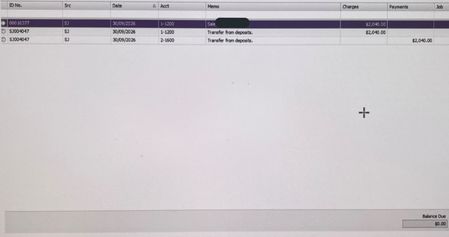
Thanks for sharing the screenshot, and I can see why this looks confusing. Based on the transaction history, the invoice appears to have been fully settled: the $2,040 sale is offset by a matching $2,040 Transfer from deposits entry, and the Balance Due is $0.00. In AccountRight, a Transfer from deposits is created when a customer deposit has been recorded against a sales order and that order is later converted to an invoice. AccountRight transfers the deposit to the invoice, so it may not appear as a separate standard payment transaction.
If the deposit has been applied incorrectly or needs to be removed, it should not be deleted directly from the invoice. The invoice needs to be reversed first, following the steps in here: Customer deposits on sales orders.
Regards,
Earl

Hi Earl,
Thanks for your reply and I do understand how deposits work in Myob.
The problem in this instance is that there was no such deposit.
And reversing the invoice simply creates a credit, however there is no physical money for that credit as a payment did not occur.
Regards, Judy

Hi JHealKW,
Thanks for clarifying. The screenshot shows transaction SJ004047 as a $2,040 Transfer from deposits, moving the amount from 2-1600 to 1-1200. To check the transaction details and what it relates to, click the arrow to the left of SJ004047.
If the transfer from deposits was recorded against a sales order that has since been converted to an invoice, you won’t be able to delete the transfer directly. You’ll need to reverse the invoice first, then deal with the resulting credit and deposit depending on whether the deposit should be refunded or retained. See Customer deposits on sales orders.
If you are still having issues with the transfer from the deposit transaction. I recommend reaching out to our support team so they can help.
Regards,
Genreve
Search the Community Forum for answers or find your topic and get the conversation started!
Level up your skills and find answers across all MYOB products


