Forum Discussion

DebWright's avatar
DebWright
Contributing Cover User
2 years ago
Solved

Unable to change the payment method 'pay from account' on wage transactions

Hi Celia_B 

Good Day! This is in regard to the issue that I posted last time and I would like to seek for your help and assistance. 

I've been trying to change the Pay from account from Electronic Clearing to the bank account (Cash at Bank) for some processed payroll transactions as I was informed by my client that she's not yet using the electronic payment method/ABA file (client has just started processing payroll for this account). Unfortunately, the payroll transactions are linked to electronic clearing accounts instead of actual bank account and MYOB won't allow me to change the payment method and the bank account where I can able to clear the electronic clearing account balance and also for me to reconcile the transactions. I'm trying to reverse the transaction but the error code Code: SingleTouchPayrollServiceError (100106) appears.


They said that the file must be corrupted but could you please help me fix it or please let me know how can I move the amounts from the electronic clearing account to the Bank account? Or could you please suggest how I can reconcile the transactions for the month including these wages transactions from the reconcile account tab and also to clear the electronic clearing account and transfer the balance to the Bank account?

I'm looking forward to your reply.

Thank you so much.

  • hi DebWright Celia_B 


    If you can not edit the transaction due to the super being paid for these people it is BECAUSE you have used the pay liability window to process them and not as suggested with a spend money or general journal.


    The easiest way to maybe do what you want is to record an entry for each person. So for J Ormsby enter a spend money transaction dated 5/4/23, tick electronic payment , make the amount NEGATIVE $1,820.00 and allocate to the cash at bank account.


    Then go to prepare electronic payments, tick the negative amount and positive amount, with the pay from account being the cash at bank.  okay the warning you get regarding a negative disbursement.


    Click bank file and cancel out when it wants to save the file after it says it will record the transaction.


    You should then see the amount disappear from the prepare electronic payment screen and then it will appear in your bank rec to reconcile.


    Do the same for the other employees.


    Please let me know how you go with it. 


20 Replies

Replies have been turned off for this discussion
  • Celia_B's avatar
    Celia_B
    MYOB Staff
    2 years ago

    Hi DebWright 


    I just simply want to know how you go about this issue. If you need further assistance with this, please feel free to post again and we're happy to assist. 
     

    Thanks. 

    Cel

  • Celia_B's avatar
    Celia_B
    MYOB Staff
    2 years ago

    Hi Julie_A_C 


    Thank you for your post. 


    If you were asking for the Superannuation from April 1 - June 30, this will be process on July 28, 2023. 


    Let me know if you have more questions or clarifications feel free to post again. I'm happy to assist.


    If my response has answered your inquiry please click "Accept as Solution" to assist other users find this information.


    Cheers, 

    Cel


  • Celia_B's avatar
    Celia_B
    MYOB Staff
    2 years ago

    Hi Julie_A_C 


    Thanks for getting back to us and provide an update on the issue.


    As for this concern, We recommend to speak to your accountant regarding the issue. since we cannot recommend to delete not unless to check on the account itself. 


    Feel free to post again if you need further assistance in the future. We're happy to assist you . 


    Thanks, 

    Cel


  • Celia_B's avatar
    Celia_B
    MYOB Staff
    2 years ago

    Hi Julie_A_C 


    May I know how you go about this issue. If you need further assistance in the future, please feel free to post again. We're happy to assist you. 


    Regards, 

    Cel

  • DebWright's avatar
    DebWright
    Contributing Cover User
    2 years ago

    Hi Julie_A_C Celia_B 

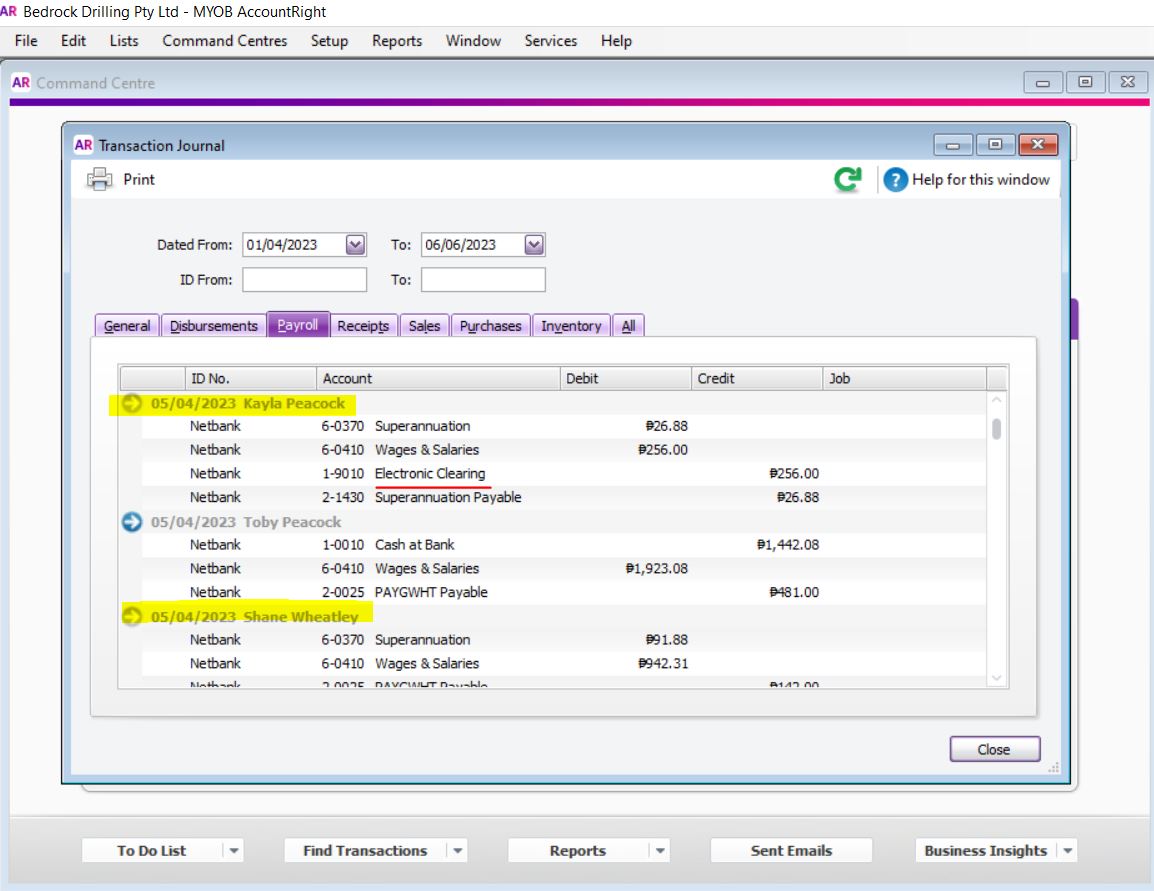
    Thank you so much for your response. I believe you are right as I realized that the only transactions that I'm unable to edit are those with superannuation payable that have been paid by my client as shown below.

    However, could you please let me know how (steps) how I can delete the pay liability entries for me to able to change the payment from account for these greyed transactions shown? The only option I have is to reverse the transaction and it won't still let me edit or change the payment from account.

    Am I missing anything? Apologies for the inconvenience and appreciate your help.

    Thank you so much.

    Best Regards,
    Zhenna

  • Celia_B's avatar
    Celia_B
    MYOB Staff
    2 years ago

    Hi DebWright 


    Thank you so much for getting back to us and sharing an update on the issue. I understand that this issue is far too long. sorry for the inconvenience. 


    I understand that you wanted to delete the pay liability entries. In this matter, If there are amounts showing on the Pay Liabilities window which have been paid, it means they may have been incorrectly paid using a Spend Money or General Journal transactions. To permanently remove this amounts, you'll need to process them through Pay Liabilities window, then record a reversing general journal transaction. 


    You can check on this Help Article: Removing paid amounts from the Pay Liabilities window. This contains more information and guide you on the process.


    We're always here to help. Don't hesitate to post again if you still need further assistance with this. 


    Regards, 

    Cel


  • DebWright's avatar
    DebWright
    Contributing Cover User
    2 years ago

    Hi Julie_A_C Celia_B 

    I really appreciate your help. I already created the spend money transaction, entered a negative account and ticked the electronic payment and allocated it to cash at bank account. However, when I opened the Prepare Electronic Payments, I realized that the Cash at Bank account is not available in the 'Pay From Account', the only one showing is the liability account as shown below. 

    Is there anything I should do so the Cash at Bank should appear and be used in the pay from account? And so I can do the next steps which is to tick the negative amount and positive amount, with the pay from account being the cash at bank?

    Sorry and thank you so much for your help, patience, and understanding.

  • Julie_A_C's avatar
    Julie_A_C
    Ultimate Cover User
    2 years ago

    Hi DebWright 


    Sounds very strange that you haven't got the option there, but check that the account type for cash at bank is set up as account type.


  • DebWright's avatar
    DebWright
    Contributing Cover User
    2 years ago

    Hi Julie_A_C Celia_B 

    Thank you so much! This is to inform you that I was able to clear the negative amounts in electronic clearing account and reconciled the transactions as well.

    You are amazing! Thank you so much for your help!

  • Doreen_P's avatar
    Doreen_P
    MYOB Moderator
    2 years ago

    Hi DebWright 


    Thanks for updating us.


    Thanks for letting us know about this. Glad to hear that the issue has been resolved. Please feel free to post if you need further assistance. We'll be more than happy to assist.


    Best regards,

    Doreen