Forum Discussion


Genreve_S
2 years agoMYOB Moderator
Hi MM,
Thank you for your prompt response. Apologies for the delay.
The latest screenshot you've provided appears to be from the bank feeds window. If the transaction we're trying to remove is a duplicate of another transaction from the right side of the window, we can create a bank feed ticket to request the removal of any potential duplicates. However, if this transaction isn't a duplicate of any other bank feed transactions, I strongly recommend ensuring that the transaction that should match this isn't marked as checked in the reconcile account window or a part of a previous reconciliation. This is because the transaction will not disappear from the bank feed window without anything matched to it.
Please don't hesitate to reach out if you need any further clarification.
Thanks,
Genreve

MM99
2 years agoContributing User
HI Genreve
thanks for your reply.
Yes - two entries appeared in the bank feed window, that was my initial problem.
MYOB posted one when I used "pay Super" and Westpac posted one in the auto bank feed.
Both the enties automatically appeared in the bank feed window.
I used one of the entries to reconcile the bank - and the other is still sitting in the bank feed window.
see screen snip attached
You mention creating a 'bank feed ticket to request the removal of any potential duplicates', can you let me know the steps to do this please.
MM
- Genreve_S2 years agoMYOB Moderator
Hi MM99,
Thank you for your prompt response and for sharing the screenshot. It's quite helpful.
From what I can see, if one transaction is appearing in the Bank Feeds window and the other is visible in the Reconcile Accounts window, it's unlikely that they are duplicates. My suggestion would be to deselect the transaction from the Reconcile Accounts window first. Then, check if the two transactions can be matched in the Bank Feed window. Once matched, you can return to the Reconcile Accounts window to proceed with your usual reconciliation.
I hope this helps. If you have any more questions or need further assistance, feel free to ask.
Thanks,
Genreve - MM992 years agoContributing User
Hi Genreve
They are definately duplicates.
only ONE payment out of the bank for $4794.24 but TWO entries appeared in MYOB (one via "pay super" and one via the bank feed).
I have undone all the bank recs back to pre the superpayment and re-done (redacted file attached) so you can see the issue. The bank feed entry has been reconciled, BUT the MYOB 'pay super" entry is showing as an unpresented cheque.
I have also attached the screen snip of the journal posted by "pay SUPER".
really hoping we can get closer to a resolution of this issue soon.
MM
- MM992 years agoContributing User
All
I have given up trying to find a rational solution for what is obvioulsy a BUG in Account Right.
I have deleted an entry that came in on the bank feed - it really rankles that I had to manually adjust the bank transactions, but I could see no other way to fix the duplicate entries.
- Genreve_S2 years agoMYOB Moderator
Hi MM99,
Thank you for your update. I can certainly understand your perspective.
From your previous note, you mentioned there were two bank feed transactions in the bank feed window. However, the screenshot you provided seems to indicate that there's only one transaction of $4,794.24 in the Bank Statement column.
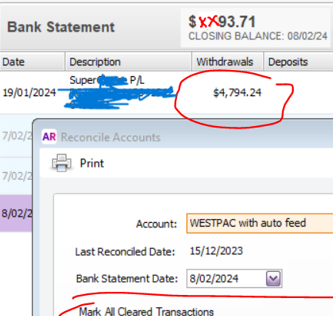
If there's only one transaction in the Bank Statement column of the bank feeds window, this suggests that there aren't any duplicate bank feed transactions, which means there's no need to create a bank feed ticket.
When you're in the reconcile accounts window, please ensure that only one transaction of this amount is displayed. If there are two, you can manually remove one. It's advisable not to delete the one processed from the Pay Super window (PS000001) and to leave it unchecked. Afterward, you can return to the bank feeds window, match the PS000001 transaction to the bank feed transaction, and proceed with the usual reconciliation.
Please feel free to point out if my understanding is incorrect. If there's anything I've overlooked or if you need further assistance with this, don't hesitate to let us know.
Thanks,
Genreve
Looking for something else?
Search the Community Forum for answers or find your topic and get the conversation started!
Learn, solve, grow
Level up your skills and find answers across all MYOB products


