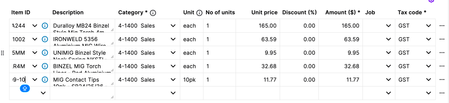
ContributionsMost RecentMost LikesSolutionsRe: Description Field Still Broken – Auto-Expand Regression Unresolved Since September (Any Update?) Just an update — Support closed my case again despite the issue being unresolved and the fix still unscheduled. Tagging a file is not a solution. Closing cases for regressions MYOB introduced simply removes visibility and stalls progress. Can MYOB please keep support cases open until the defect is actually scheduled? Other users: please comment if this affects you — visibility seems to be the only way MYOB prioritises regressions. Re: Description Field Still Broken – Auto-Expand Regression Unresolved Since September (Any Update?) Thanks, Mike — but this still leaves one critical issue unanswered. MYOB introduced this regression in a UI update. It breaks a core workflow used by every business. It’s confirmed as a defect. And yet — after two months, it still isn’t scheduled for a fix. So just to be absolutely clear: Is MYOB currently leaving this regression with no scheduled fix despite it affecting every invoice, quote and sales order? Customers can accept delays. What we can’t accept is a MYOB-introduced bug being left unscheduled indefinitely. A simple, transparent answer is all we’re asking for. Re: Description Field Still Broken – Auto-Expand Regression Unresolved Since September (Any Update?) Thanks for confirming, Mike. If it’s officially recognised as a bug/defect/regression, then the natural follow-up question is: Why has a regression introduced by a MYOB update still not been scheduled for a fix after two months? This isn’t a minor edge-case. It affects every invoice, quote, and sales order created by every user. It was working, MYOB changed something, and the feature broke immediately after that update. So the concern isn’t whether MYOB acknowledges the defect — it’s why there is zero timeline and no scheduled fix for something MYOB itself unintentionally removed. When regressions go unscheduled indefinitely, it creates the impression that stability issues introduced by updates are not being prioritised. Can you clarify: What criteria a regression needs to meet for engineering to actually schedule it? And whether this specific defect is expected to remain unscheduled for the foreseeable future? Customers just want confidence that when MYOB breaks something, it is treated with urgency, not left open-ended. Re: Description Field Still Broken – Auto-Expand Regression Unresolved Since September (Any Update?) Thanks, Doreen. I appreciate the update, but the part that’s hard to reconcile is this: This isn’t an enhancement — MYOB broke a previously working feature during a UI update. The description field used to auto-expand. A MYOB change removed that behaviour. So it’s a regression caused by MYOB, not a feature request from customers. Given that, it’s difficult to understand why: there’s no ETA, it isn’t being treated as a priority, and customers are effectively told it will be fixed “whenever it fits the schedule”. When MYOB introduces a defect that affects every quote, invoice, and sales order, the expectation is that it’s addressed with urgency — not placed into the general backlog. To keep things simple, can you confirm two things: That this is classified internally as a regression, not feedback. Whether engineering has actually scheduled the fix, or if it’s still unscheduled. We’re not asking for miracles — just accountability for a defect introduced by an update, and some clarity on when customers can expect it to be resolved. Re: Spend Money – Quantity field not functioning (Case 02666678) — longstanding issue, still not fixed Thanks for the reply, but this doesn’t address the issue I’ve reported. I’m already aware that: The Amount field can evaluate expressions (e.g. 2*5 → 10), and The Quantity field can be used for things like km, litres, etc. The problem is that on Spend Money, the Quantity field is not actually being used in the calculation at all. At the moment: If I enter Quantity = 2 and Amount = 5.00, the line still posts as $5.00, not $10.00. In other words, Qty × Amount ≠ Line Total — Qty is effectively ignored. That means: We have to manually pre-calculate everything in the Amount field (which defeats the whole point of having a Qty field there in the first place). It’s inconsistent with how quantity/amount behaves elsewhere in MYOB and in pretty much every other accounting system. It creates real risk of under- or over-stating spend if someone assumes Qty is being honoured. This is why I raised it as a bug / design defect, not a training question: Either Qty should be part of the calculation logic, or If MYOB’s position is that Qty is “for reference only”, that needs to be clearly documented in-product — and frankly, that’s not fit-for-purpose for most businesses actually using it. Can you please confirm this has been logged with product/engineering as a defect in Spend Money behaviour, not just filed as “feedback”? Happy to provide a simple example/file if that helps, but you can reproduce this in seconds in any file: Go to Spend Money Enter Qty = 2, Amount = 5.00 Observe that the transaction still only records $5.00, not $10.00. This is the core of the issue. Re: 3 Months Ongoing – Major Regression Breaking Customer Search & Bulk Emails (Looking for Others Affected) Update on this issue – now affecting 340 contacts and growing Posting an update because this problem has escalated far beyond what was originally reported. When I first raised this, the issue only seemed to affect contacts alphabetically after a certain point in the list. That was already concerning — but the situation has now significantly worsened. What’s happening now The cutoff point in the alphabetical list keeps moving further up. As of today, around 340 contacts in our file are affected. These contacts do not appear when: Searching existing invoices, quotes or sales orders Using bulk email for invoices/statements All affected contacts still appear normally in the Contacts list. Why this is serious This is a growing and unpredictable issue that directly impacts: Access to historical sales documents Ability to bulk-email customers Basic AR workflow Day-to-day operations relying on contact search Every day, more contacts become undiscoverable through standard search in sales screens, which effectively cripples core functionality. Additional context MYOB’s documentation does not state any limit on the number of contacts in a file. There is no mention of a maximum number of results the sales search can return. This behaviour therefore appears to be a defect, not an expected limitation. Request to MYOB This needs to be recognised as a high-impact regression. It is expanding over time and affecting a critical part of the software. Please escalate to engineering for investigation into search/indexing behaviour at scale. Request to other users If anyone else is experiencing contact searches failing beyond a certain alphabetical point — especially when searching invoices, quotes or bulk email — please comment. Even brief confirmations will help MYOB understand the scope. Unit of Measure (UoM) missing on Sales Order PDFs — manually entered lines only (Case 02666720) Hi everyone, I’m raising visibility on a reproducible bug in MYOB Business affecting Unit of Measure (UoM) on Sales Orders, specifically for lines that do not use an Item ID. Summary of the issue When creating a Sales Order: The Unit column displays correctly in the MYOB interface Both Item-ID lines and manually entered lines show a Unit (e.g., each, pack, metre) However, when generating the PDF: Item ID lines → UoM appears correctly Manually entered lines (no Item ID) → UoM column appears blank, even though Unit was entered in the UI This results in inconsistent and unclear documentation. Example In the MYOB UI: Line 1 (Item IW70): Unit = each Line 2 (manual line): Unit = each In the PDF: Item line shows UoM Manual line UoM is completely blank Why this matters For businesses relying on unit-based pricing, missing UoM creates major issues: Customers can’t tell whether pricing is per each, pack, metre, etc. Leads to misunderstandings and disputes Breaks consistency between the UI and printed documentation Forces staff to manually type units into the Description as a workaround This is not a feature request — it is inconsistent behaviour and appears to be a document-generation defect. Case reference MYOB Support Case: 02666720 Raised via support but posting here to confirm whether other users are experiencing the same behaviour. Questions for the community Can anyone else reproduce this in their MYOB Business file? Has UoM ever printed correctly for manually entered lines? Has MYOB acknowledged this as a defect for anyone else? Notes Occurs on Mac (Safari/Chrome) and Windows (Chrome) Reproducible across all users in our business Only affects non-item lines Spend Money – Quantity field not functioning (Case 02666678) — longstanding issue, still not fixed Hi everyone, I’m posting here to check whether other MYOB Business users are experiencing the same problem, and to hopefully get some visibility on this issue because it appears to be a regression. Issue: The “Quantity” field on Spend money transactions does not work. When entering a Spend Money transaction, the interface allows you to enter: Amount ($) Quantity Description Tax code, etc. However, the Quantity field has no functional effect at all: The line total does not multiply Amount × Quantity The field does not update anything on screen The recorded transaction ignores the quantity entirely Reports also ignore it The field visually accepts input but has zero functional purpose Example: Entering: Amount: 2.00 Qty: 5 Description: BOTTLE OF MILK You would expect a total of $10.00, or at least for the amount to reflect the quantity in some way. Instead, the Total remains $2.00, and the quantity is effectively meaningless. Why this matters For many businesses, Spend Money is used for: Consumables Fuel Stock purchases Bulk purchases without item cards Supplier bills paid from EFTPOS terminals Tracking per-unit costs Data accuracy for reporting Having a non-functional quantity field breaks the workflow and forces users to manually calculate totals every time, defeating the purpose of having quantity support in the first place. Confirmation from MYOB Support I have an open case for this: 02666678 Support confirmed this is a known issue but did not provide a timeframe for a fix. Questions for the community Can anyone else reproduce this on their file? (It happens for me on both Mac/Safari and Windows/Chrome.) Has this field ever worked correctly for any MYOB Business users? It appears it may have been non-functional for a long time. Is this on the product team’s roadmap to be repaired? Quantity fields should never be decorative — this directly affects accuracy and speed. Screenshots (Attached in the post — interface vs actual recorded transaction.) If anyone else is affected, please comment so MYOB can see the impact. This seems like a fairly fundamental functionality issue and not something that should require workarounds. Re: Description Field Still Broken – Auto-Expand Regression Unresolved Since September (Any Update?) Hi Doreen, Thanks for your reply — but I’m a bit confused, because a support request has already been logged, escalated, and acknowledged by MYOB. For reference: Auto-expand issue – Case 02543361 First raised: 29 September Now: late November Status: “Known issue, fix coming in a few weeks” (per Support), but still no resolution and no ETA. This bug affects every invoice, quote, and sales order we create. It slows down daily workflow and introduces avoidable errors — it’s not a cosmetic issue; it’s a regression. Support advised it was a known defect and “would be fixed soon”, so being told to re-log it again feels like we’re going in circles. We’re not chasing updates for fun — we just need the issue prioritised properly. Could you please confirm: Is this officially logged as a defect with the product/engineering team? Why is there no public-facing status page for known defects? Will MYOB provide an ETA or at least acknowledge continued delays beyond the initial ‘few weeks’? We’re more than happy to cooperate — screenshots, videos, live demo, whatever helps — but we need transparency on where this sits internally so we’re not stuck repeating the same loop every few weeks. Description Field Still Broken – Auto-Expand Regression Unresolved Since September (Any Update?) Hi everyone, Posting here because we’ve had a confirmed MYOB UI regression affecting Quotes, Invoices and Sales Orders since late September, and it still hasn’t been fixed as of 26 November. I’m hoping to find out if other users are experiencing the same problem — and whether anyone has heard anything concrete from MYOB. What’s broken When selecting an Item ID, the Description field no longer auto-expands to show the full item description. It used to expand automatically. Now it stays stuck at a tiny fixed height, and multi-line item descriptions get cut off. The only way to view the full text is to manually drag the field bigger every single time, for every item. This affects: Quotes Sales Orders Invoices Any item with a multi-line description Seen on: Mac (Safari) Windows (Chrome) Multiple users It is not a local problem — MYOB Support confirmed it as a known issue back on 29 September. Why this is a problem This is basic UI behaviour we rely on every day. The regression: Slows down quoting and invoicing Makes it easy to miss part of a long description Causes inconsistent, messy quotes unless you manually resize every line Wastes time on admin instead of customer work It’s a small bug with a big impact when you’re working with detailed product descriptions. Timeline 29 September — MYOB Support confirmed this is a known issue We were told a fix would be coming “in the next few weeks” 26 November — No fix, no update, no progress visible Nearly two months later, the behaviour is unchanged. Has anyone else noticed this? If others are seeing the same issue, it will help signal to MYOB that this regression is affecting more than one file. Are you seeing the Description box not auto-expand anymore? When did it start happening for you? Has support given you any timeframe? Any confirmation would be appreciated.