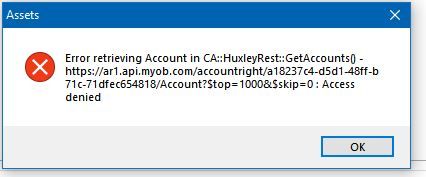
ContributionsMost RecentMost LikesSolutionsCant load a client in AO - Configuration I am having trouble loading a clients data file into AO. I click 'Edit configuration details' select the product (online version), find the client, enter user name, password, etc and I get the error Error retrieving account in CA ... as per screen shot. I have tried various user names/password options, ie Administrator, my user name, password, no password... I have full advisor + administrator access in the data file. This client has two data files that I have issues with. (AccountRight - current desktop version) I tried adding another new business client to AO, no issues, connected immediately. Re: Unauthorised Invoice Online Payments Selection the surcharge is 1.8% on the total payable invoice. On a $2000 invoice that is $36.25 for the privilege of using MYOB secure invoicing. That is well above the standard service charge. From what I could see there was no option to promote Bpay or direct deposit or Bank PAY ID. Does MYOB secure invoicing still charge the 1.8% if the client chooses to Bpay/DD or pay ID? This becomes expensive for retail customers, giving the option to pay 1.8% surcharge, or using Bank Pay ID, I know I wouldn't be paying the 1.8% surcharge. EInvoice is for those who use an accounting package and so do their clients, as the invoice is emailed directly into the clients accounting package. (secure) Usually the bank details are already set up, either in MYOB or the bank Re: Unauthorised Invoice Online Payments Selection Extremely wrong, if the MYOB system automatically made changes without the subscribers permission, Myob should be refunding the cost incurred for the transaction and reimburse $$ towards the time it cost to correct the issue. Thankfully my client contacted me, this was only because he was stuck at part of the filling in process. I looked into it, and found the costs etc. Re: Unauthorised Invoice Online Payments Selection This is interesting, as I have just had a client contact me about some MYOB 'note' to upgrade within 10days to the MYOB secure invoicing. Looking into it, the client or customer is charged 1.8% of the total payment amount plus a transaction cost. Wow! Not worth the extra cost. And it can take two days for the payment to come through. I have set my client up using EInvoicing instead, free, gov supports it. As his customers all pay via Bpay, they can upload a ABR file to the bank, or have his bank details set up with their bank, again free. Re: Changes Isnt the so called 'traditional accounting terminology' still being taught at Uni, college, tafe? So instead of improving your learning centre to help 'non bookkeeping users' to understand accounting terminology, Myob changes the accounting terminology to suit a small percentage of users. Simplify the language, um how hard is it to understand 'Chart of Accounts'? As Robyn pointed out - Accounts and Chart of Accounts are the basic fundamentals of Accounting. Re: Jobs not pulling through all timesheet job coding Earl_HD Thanks, it seems that 'Time & Billing, activity sheets, and being able to view reports is limited to desktop and not available on Pro. Is this correct.? Jobs not pulling through all timesheet job coding Well this seems to be working now.. Trying to run some Job reports and have noticed that job numbers that have been applied in the timesheets are not showing under the job code correctly. [on business pro] Example on one timesheet for one employee for one job he did 22hrs standard + 16hrs overtime but the job only has 8hrs standard. another employee for the same job 47hrs standard but the job only has 23hrs standard This same pay week it has left of 2 other employess that have timesheets coded to this job I have the report dates set for the full financial year 1.7.23-30.6.24 Job Profit & Loss comparision report. and it is not just one job code. All the jobs seem to be this way. hit and miss with the employee timesheets not pulling the job code through. Are suggestions or solutions. SolvedRe: Spend Money Window will not open I have the same issue, spend money, receive money I open bank register, make it full screen, then click 'split' and it will open a full screen spend money. I get this a bit and have found making another window/screen full screen will allow me to open others.(But has to be full screen) Also I have noted this happens more with two screens and moving myob from one screen to another. Sometimes just closing myob and opening leaving on one screen helps. Re: attach documents to Receive money I agree. it would be a great option to have on the desktop version. Re: MYOB Teams Hi I fixed this 4 weeks ago. Apologies I should have mentioned.