CloudMindAccUltimate Cover UserJoined 12 years ago1949 Posts330 LikesLikes received234 SolutionsView All Badges
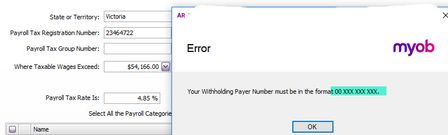
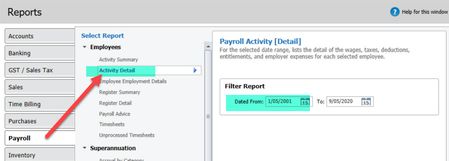
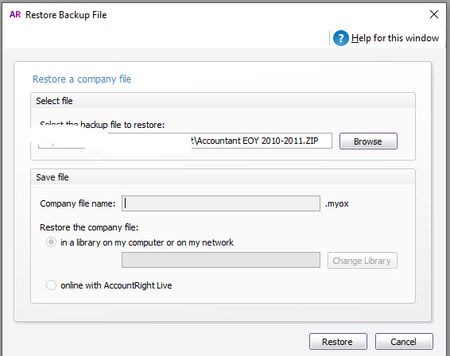
ContributionsMost RecentMost LikesSolutionsYour withholding payer number must be in the format 00 XXX XXX XXX Hey does anyone know what I am doing wrong? Upgraded file from V19 to ARL. Cant set up Payroll Tax or save get this message. Tried 002346722 - 2346722 - 023464722 nothing works? Even tried 1111111111 to see if I could at least save my changes. Tried leaving blank. I can't save my changes anyway I go. Also will not allow me to add spaces. SolvedRe: MYOB Account Right Std Lost Data Recovery S-DS I am presuming the file was not stored on the MYOB cloud services (online). 1. How do I get access to this file on My Practice? It sounds like they don't have an active MYOB subscription. What version were they using ARL or ARL Classic and what version number? 2. How do I regain lost financial data (the most recent transactions that have disappeared?) This will be difficult if there was NO current back up. If the file is ARL and on the cloud, MYOB might be able to help restore, otherwise you will need to re-enter data, unfortunately. Sounds like it is time to get them on the cloud version as it would have been easily resolved. Re: Importing Items with Commas anywhere in description automatically adding Quotation marks " " at both ends of the description. Imports in MYOB generally don't like commas or characters in general. I normally do a find and replace and replace the commas with a space and then import in the data Re: Long Service Leave Calculation MaryV glad I could help you :smileyvery-happy: thanks for marking off the solution as well :smileyhappy: Re: Long Service Leave Calculation Hi MaryV This is always tricky this is how I would proceed to update MYOB with accurals: The best report to run in MYOB ARL is the Payroll Activity Detail Report. This report will give you the total hours they have worked from the start of employment to date. From there you set up the Long Service Leave Category and do a dummy NIL payrun to bring in all the accured hours. Put in the total hours in a dummy payroll that the employee has worked to date. Then enter the accured hours calculated above and delete out all the other values so the payroll is NIL. See below Re: Upgrade to ARL went to cloud when it was suppose to go to desktop?? Thanks Steven_M that was a rookie error on my part:smileyfrustrated:. What was I thinking.. I missed the step to actually upgrade the file. I am worried it will override the LIVE real file now. I have sent you a PM can you please kindly stop the file from restoring at the back end? Upgrade to ARL went to cloud when it was suppose to go to desktop?? Hi MYOB, SN XXXX 6778 ABN XXXX 8037 A client has asked me to upgrade some old V19 back ups for prior FY to ARL and then have them open as read only. This is so the client has all the historical data if they need to look back on any history. Anyway I upgraded the file (this is the screen shot below) looking back on this there is no company file name and the boxes are greyed out. I didn't notice this at the time and now the file upgraded online.. but I didn't tick that option? Just tested it on the next file and the same issue on this screen below? What is going on? SolvedRe: Bank feeds and using "find" features Hi marshlad Trying to understand what your issues is here with the FIND transactions. If you go into the bank reconcilation screen have these transactions been ticked already manually? If they are ticked MYOB thinks they are matched already so won't find them. I suggest untick the bank transactions and refresh the bank feeds place and they will match? You also mentioned you have just started using bank feeds so prehaps you have already reconciled these transactions manually? Let me know if you need further assistance. Re: Time to be a Superhero! bungy15 47 solutions what a legend! Thanks for helping :smileyvery-happy: Re: Your withholding payer number must be in the format 00 XXX XXX XXX Solution: WPN's format is: 00nnnnnnnnn By that it'd be: 00 nnn nnn nnn which is probably why ARL is validating it that way. Pretty sure the same formatting was needed in v19. If you copy and paste this: 00 111 111 111 it will work.