Issue Generating Reports
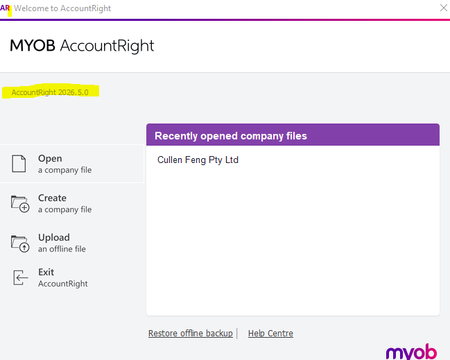
Hi Team, Since installing MYOB AccountRight 2026.6 PC Edition on our Remote Desktop Session Hosts, we have encountered issues generating/exporting reports that use AccountRight's Excel template files. According to the following MYOB article, for AccountRight PC Edition 2021.1 onwards the template files should be located under: C:\Users\<user.name>\Documents\MYOB\AccountRight\Current\Reports\Spreadsheet https://www.myob.com/au/support/myob-business/reporting/exporting-reports/microsoft-excel-templates?productview=Browser We have deployed AccountRight 2026.6 using the new .exe installer with the -allusers switch, as documented for managed/terminal server environments. When attempting to export the General Ledger Summary report, AccountRight returns the following error: C:\Users\Public\Documents\MYOB\AccountRight\Current\Reports\Spreadsheet\GENJRLS.XLT This indicates that AccountRight is attempting to locate the template under Public Documents, rather than the per-user Documents path described in the article. On the server, the 2026.6 installer has installed the template successfully under: C:\Program Files (x86)\MYOB\MYOB AccountRight 2026.6\app-2026.600.10011\Reports\Spreadsheet\GENJRLS.XLT However, no corresponding template files appear to be created under either: C:\Users\<username>\Documents\MYOB\AccountRight\Current\Reports\Spreadsheet or: C:\Users\Public\Documents\MYOB\AccountRight\Current\Reports\Spreadsheet As a test, I copied GENJRLS.XLT from the 2026.6 application directory into the exact Public Documents path shown in the error. After doing so, the General Ledger Summary export completed successfully. Could you please clarify: With a 2026.6 PC Edition -allusers installation on a Terminal Server/RDS environment, where are the Reports/Spreadsheet templates expected to be stored? Is the installer expected to populate these templates into each user's Documents folder, or into Public Documents? Is this a known issue with the AccountRight 2026.6 .exe installer using -allusers? Is copying the Reports / Letters content from the 2026.6 application directory into the expected Documents location a supported workaround? Environment: AccountRight 2026.6 PC Edition Installed using the .exe installer with -allusers Windows Remote Desktop Session Host environment FSLogix Profile and Office Containers Thanks.156Views0likes3Comments
Electronic Payments Register
The Electronic Payments Register does not generate an Excel export file, I have tried to export to excel, CSV & TSV and nothing happens. Reports> banking> cheques & deposits> Run Electronic Payments Register Report correctly displays on screen. Select Export> Excel/CSV/TSV. Nothing happens !! I have even gone to MYOB online to see if I can export from there but the report isn't available. Thanks Simone216Views0likes1Comment
Missing Report File - secaudit.xlt doesn't exist in reports folder
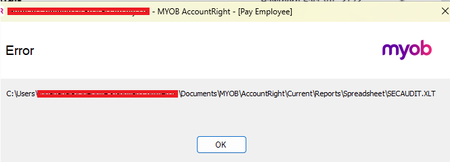
One of our users are getting the following error when trying to generate a report. They see the preview but when they try to export to Excel they get the following the below error This specific report is a security audit. The following article suggests there is no template(?). https://www.myob.com/au/support/myob-business/reporting/exporting-reports/microsoft-excel-templates?productview=Browser#:~:text=Journal%20Security%20Audit A previous search suggested tried adding the reports folder as a trusted location in Excel. The reports folder is in their documents so they have full control. Copying an existing template and naming it secaudit.xlt results in a successful export but the headings obviously don't match because its the wrong template. I've done a fresh install of MYOB on my own system and that specific file is still missing. I've also checked the reports folder for other MYOB users and none of them have the specific report template secaudit.xlt where do I find it?149Views0likes1CommentUser Role to access only job reports in accounts tab
We have an employee who has sales & purchases user roles in Accountright but we also would like them to have access to only the Job reports in the Accounts Tab in the reporting section. I'm not sure this is possible. We don't want them to be able to view payroll information though. If they have access to the Accounts tab in reports, will they be able to drill into a general ledger etc to see payroll info?404Views0likes7CommentsCustomer sales report
Hi All I have a customer who requires a sales report including their purchase order number. I add their PO Number on every invoice but can not find where to add it to the report/statement. I use AccountRight, Appreciate your help. Regards David ZukerSolved320Views0likes2Comments
Inventory and cost of orders
Good morning MYOB community, I’m hoping someone here can help me. I’m trying to find my true inventory value. The issue I’m having is that when I look at the Inventory Value Reconciliation report, orders that are pending invoicing are showing up. What I really need to know is the value of inventory I actually have available to sell—i.e., not yet committed to a customer prior to invoicing. Does that make sense? Thanks in advance for any help! Cheers, MYOB_rookieSolved258Views0likes6Comments
Report unit sold by Custom List (either Customer List, Identifier or Price Level)
Hi, We've got sales for 2x businesses in the same MYOB file (bad idea I know). I'm trying to generate 3x sales revenue reports for business A (FY23, FY24 & FY25). This isn't a problem as there's a report for that. The problem is, business B sells some of the same products & I need to add the value of that to Business A's revenue. To do this I need to calculate how many products business B has sold for the 3 financial years. I found two reports that could work but require a lot of manual data work to get the end result: Sales Reports > Customer > Sales [Customer Detail]. Lists sales by customer name, not customer type. ie I get a list of every customer name rather than simply Does anyone have any bright ideas how to generate a report that shows qty of product sold by customer type, ie Customer List, Identifier or Price Level. Report unit sold by custom Customer List, Identifier or Price Level need to run a reportSolved178Views0likes2Comments