A new home for our Community is on the way
A new home for our Community is on the way Our Community is moving to a new platform in early November Hi everyone, For the past 19 years, this Community has been a place where members share knowledge, solve problems and support each other. That's a remarkable history, and it's built entirely by you: the members who ask questions, share advice and keep the conversation going every day. Thank you. We're writing to let you know that, in early November, the Community will be moving to a new platform, Higher Logic Vanilla. What isn't changing The platform may be new, but the Community itself is the same. Its purpose, the peers you learn from and the expertise you rely on are all coming with us. Your member profile will be migrated to the new platform. Existing Community content, including the discussions and answers built up over the years, will be migrated too. The URLs & your bookmarks, we will still be community.myob.com A short read-only period To move everything across safely, the Community will be read-only for approximately 3–4 business days while the changeover takes place. During this time you'll still be able to browse and search existing content, but you won't be able to post, reply or send messages. If you have a time-sensitive question, we'd recommend posting it ahead of the read-only period. We'll confirm exact dates in a follow-up announcement. What you need to do Nothing right now. Keep using the Community as you normally would. We'll share everything you need to know well before the change. What to expect from us We'll keep you updated every step of the way: Before the end of October: a post explaining what will be different on the new platform. Before the Community goes read-only: an announcement confirming the dates and what to expect. Once the new Community is live: welcome videos to help you get started. Looking ahead We're looking forward to what the new platform makes possible, including improved search that brings Community content and Help articles together, and better ways for us to share announcements and keep you informed. Questions or feedback? We'd love to hear from you. Please share any questions, thoughts or feedback about the move in the comments below. We'll be monitoring this post and responding as quickly as we can. Thank you for being part of this Community, now and for the next chapter. Mike Community Manager, MYOB43Views1like2CommentsA simpler way to upload, review and record documents
We’re introducing Uploads (Beta) in MYOB Business - a simpler way to upload, review and record bills, receipts and other documents. The beta is actively improving, and your feedback can help shape it. How to switch it on Sign in to MYOB Business in your web browser. Open Uploads. Look for the in-product banner inviting you to try Uploads (Beta). Select Try it now and follow the prompts. Uploads (Beta) is available to eligible customers on MYOB Business Lite, Pro and AccountRight when using the browser platform. AccountRight desktop is not included. What you can expect Uploads (Beta) brings your document and extracted details together for review. You can create a bill or Spend Money transaction, link a document to an existing transaction, match suppliers and use line-item matching as it becomes available. The beta is actively improving, so features will continue to be released progressively. You can switch back to Classic anytime, in either direction, with no lost work. Need help or want to share feedback? For product guidance, check the in-product release notes in Uploads. If you’re using the beta, we’d also like to hear what’s working well and where the uploads workflow could be easier. Your feedback helps us shape what comes next.42Views0likes0CommentsEasier AccountRight upgrades
Upgrading AccountRight is now simpler with our latest release. When an older version of AccountRight is decommissioned, we’ll upgrade your company file for you. When prompted, just update the AccountRight app - there’s no need to manually upgrade your company file or manage a file-version change. Once the app is updated, you can continue working as usual. What you need to do: When prompted, click 'Update now' to install the latest version of the AccountRight app. That’s it - we’ll take care of the company file upgrade for you.95Views0likes0CommentsMYOB Capture and Invoice apps will stop working on 29 September 2026
On 29 September 2026, MYOB retired the MYOB Capture and MYOB Invoice apps in Australia. The new MYOB Assist app replaces both apps, bringing mobile receipt capture, quoting and invoicing together in one supported place. It is included at no extra cost with eligible MYOB subscriptions. What you need to do Download MYOB Assist from the App Store or Google Play. Sign in with your MYOB email and password For more information about this change, including frequently asked questions, head to our support page to learn more.81Views0likes0CommentsSurvey: How would the proposed WFH legislation affect your business?
Hey all! The Victorian Chamber is seeking feedback from businesses on potential impacts of the proposed work-from-home legislation in Victoria. Your input will help inform and ensure the views of employers are represented in discussions with government and policymakers. If you are a small business in Victoria, now's the chance to share your opinion and insights! You can complete the survey here!59Views0likes0CommentsRBA card surcharge changes are coming
You may have seen the recent announcement from the Reserve Bank of Australia (RBA) about changes to surcharging that will affect how businesses manage card fees. If you accept card payments, here’s what you need to know and how we’ll help you prepare. What’s changing From 1 October 2026, eftpos, Visa, Mastercard and Amex will be introducing new rules to no longer permit businesses to surcharge card fees on domestic payments, including debit, prepaid, and credit cards. For businesses, this means card fees can no longer be passed on to customers as a surcharge on any payments made after the changes take effect. Get across the changes in our free webinar Join our free webinar, RBA surcharge changes: what to expect from 1 October 2026, to understand what these industry changes mean for your business. We'll walk through practical steps you can take to prepare, what to expect in MYOB, answer common questions, and share resources to help you get ready. Date: Thursday 10 September 2026 Time: 12pm AEST Where: Online webinar Save your spot What this change means for MYOB Business and MYOB AccountRight We're updating the invoicing and payment workflows to ensure our invoicing feature remains a simple, secure and compliant way to accept payments online. This includes removing surcharging functionality, enhanced reporting how your customers pay you, and edge case handling (as with recurring invoices). This change is worth planning for, and we’ll keep you updated as more details become available. We’ll share guidance on what it may mean for your MYOB settings and payment experience. Keep an eye on the Community or visit the Surcharge Change hub for updates. We’ll keep things clear, practical and focused on what your business needs to do next. For more information, you can also see the ACCC guidance on card surcharges and the relevant MYOB Invoicing Service Terms and Conditions or MYOB Tap to Pay Terms and Conditions.530Views0likes8CommentsMYOB Connector: Ask Claude or ChatGPT about your business
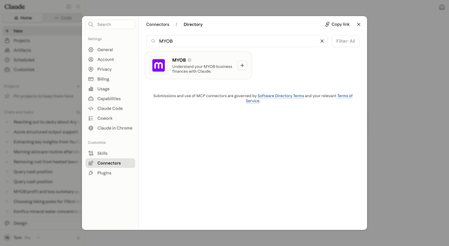
Hi everyone! Great news! You can now ask Claude or ChatGPT questions about your business and get read-only answers straight from your real MYOB data, right where you are already working. It’s rolling out now to selected customers. What is our connector in Claude and plugin in ChatGPT? The connector/plugin is a way to link your Claude/ChatGPT account to another platform like MYOB, so it can look up real information for you and answer questions directly, instead of you having to copy and paste details back and forth. It's entirely optional to make the connection, but if it's useful to you, connecting means your MYOB numbers show up right there, in context, so you can get insights about your business whenever you need them. Once connected, ask things like "what's my profit and loss looking like?", "what are my expenses this month?", or "who owes me money?" No exporting reports, no screenshots, no switching apps. It adds up to real time back for you. Every minute not spent hunting for a report, re-uploading a CSV, or flicking between apps is a minute back in your day. How to connect: Connect MYOB to Claude Navigate to the Connectors directory in your Claude account. Find and open MYOB, then click Connect. Enter your MYOB username and password. Click Continue. Connect MYOB to ChatGPT Navigate to the Plugins in your ChatGPT account. Find and open MYOB and then click Connect. Enter your MYOB username and password. Click Continue. A few things worth knowing: Staged rollout - The connector in Claude and plugin in ChatGPT are both in beta for customers in Australia. If you are interested in trying this before the wider rollout, join the waitlist. Completely optional - If you are part of the beta you can connect whenever suits you, or skip it for now. Read-only - Claude or ChatGPT can see your data to answer questions, but can't make any changes to your books. No new login needed - connect with your existing MYOB details. Check out this pagefor more information. As always, we'd love your feedback as you try it - leave your comments on this post!787Views0likes13CommentsThe Holidays Act is being replaced – what we know so far
Hi everyone! You may have seen the news: the Holidays Act 2003 is on its way out. The new Employment Leave Act 2026 received Royal Assent on 6 August 2026 and will replace it, with most of the new framework coming into force on August 2028. We know that's a while off, but given how long this reform has been talked about, we wanted to get ahead of the questions. The short version: Annual and sick leave move to an hours-based accrual system, tied to standard hours worked Working hours are split into standard, additional and casual categories A new Leave Compensation Payment (12.5% of ordinary hourly rate) applies to hours that don't accrue leave in the usual way Public holiday tests, pay statements and record-keeping requirements are all getting clearer rules We've put together a full breakdown here: The Employment Leave Act 2026 – a replacement for the NZ Holidays Act 2003 Nothing changes in your payroll today – the current Holidays Act still applies until the new Act takes effect. Our product and payroll teams are already working through what this means for MYOB's payroll solutions, and we'll post updates here as the guidance from MBIE and Employment New Zealand develops. Got questions? Drop them below and we'll do our best to answer, or point you to where the detail lives once it's confirmed.71Views0likes0CommentsEmail 2FA is being removed. Here’s how to stay ahead of it
Hi everyone! From September 2026, new customers and customers resetting their 2FA setup will no longer be able to use email as a 2FA method. If you already use email as a 2FA method today, you won’t lose access right away. We’re planning to fully decommission email 2FA for existing customers in 2027. We’re making this change because email is a weaker security option. If someone gets access to your inbox, they may also be able to access security codes or reset links. To avoid disruption later, we strongly recommend updating your sign-in setup now. The best setup is: a passkey for the fastest sign-in experience an authenticator app as your primary 2FA method SMS as your backup 2FA method If you use passkeys, you can set up to 5 across different devices. You can also make them platform-based, so if you save one in your password manager, iCloud Keychain or Google account, it can be available across multiple devices. That gives you more than one way back in if your main device is unavailable. If you’re using email 2FA today, now’s a good time to switch rather than wait for the 2027 decommissioning. Check out this page for more information and instructions!161Views0likes1CommentPasskeys now give you a faster sign-in experience
Hi everyone! Signing in with a passkey just got simpler. You can now use a passkey without completing a separate two-factor authentication (2FA) challenge after sign-in. That’s because a passkey is already a strong form of authentication, built into your device through Face ID, your fingerprint, or your device PIN. What this means for you: faster sign-in less to remember strong protection against phishing and account takeover A quick thing to know: you should still keep your other security methods set up in My Account. We recommend: an authenticator app as your primary 2FA method SMS as your backup 2FA method That’s important because you’ll still need 2FA to make changes to your security settings in My Account. If passkeys are available to you, now’s a good time to set one up. You can set up to 5 across different devices, which gives you more than one way back in if your main device is unavailable. You can also make them platform-based, so if you save one in your password manager, iCloud Keychain or Google account, it can be available across multiple devices. Reach out if you have any questions!397Views0likes6Comments