MYOB 403 Forbidden Error – Our Experience and How We Finally Resolved It
Hi Everyone, I thought I would share our experience from last week when we suddenly lost access to virtually everything MYOB-related. Hopefully, if anyone else experiences the same issue, this post might save them the absolute nightmare we went through trying to resolve it. How It Started On Friday, everything was working perfectly. We had full access to MYOB through the desktop application, website, and all associated services. After the long weekend, we returned to work on Tuesday to discover that the MYOB desktop application would no longer work. Every time we attempted to log in, it would simply return us to the home screen without opening the login page. We then attempted to access several MYOB websites: status.myob.com – 403 Forbidden MYOB Community – 403 Forbidden my.myob.com.au – 403 Forbidden Interestingly, when we accessed these same websites using our business mobile phones on mobile data, everything worked perfectly. We were also able to confirm through MYOB's status page that there were no reported outages. Investigating Our Network Initially, I suspected the issue might have been related to our Fortinet gateway or firewall, so we contacted our external IT consultant. After thoroughly checking our systems, they confirmed that the problem was not originating from our network. All seven devices onsite were experiencing the same issue, and our gateway was not blocking any connections to MYOB. Our IT consultant explained that a 403 Forbidden error is a response from the destination server, essentially saying, "We have received your request, but we are refusing access." He even logged into our gateway and showed me the network traffic, including the requests being sent to MYOB and the 403 responses being returned. At this point, we had strong evidence that the issue was occurring somewhere on MYOB's side of the connection. The Nightmare That Is MYOB Technical Support This is where the real frustration began. I can confidently say that MYOB has one of the most useless technical support teams I have ever had the displeasure of dealing with. Worse than Telstra, and that's saying something! On the first day alone, my office manager and I spent a combined six hours on the phone with MYOB technical support. Despite explaining everything we had already investigated, their staff continually insisted the problem was on our end. They spent approximately 2–3 hours remotely connected to one of our computers, checking internet settings, Windows updates, firewall configurations, and just about everything else they could think of. Eventually, they concluded that the problem must be with our Internet Service Provider (ISP). So, despite already having our network checked by an IT professional, I contacted our ISP. Thankfully, they were extremely helpful. They confirmed that the 403 Forbidden response was being returned by the destination service and that our ISP was simply providing the connection. They even provided their findings in writing, which I forwarded directly to MYOB. Doing MYOB's Troubleshooting for Them That evening, frustrated with the complete lack of progress, I started researching the issue myself. I discovered that the error appeared to be associated with Amazon CloudFront, which is a content delivery network operated by AWS. CloudFront can also integrate with AWS Web Application Firewall (WAF), which can restrict access based on factors including public IP addresses. This raised a fairly obvious possibility: our business's static public IP address was being blocked somewhere within MYOB's infrastructure or its associated security services. The following day, I contacted MYOB technical support again. I repeatedly requested escalation to a higher-level technician, supervisor, or manager. Every request was denied. Instead, I spent another four hours going backwards and forwards with technical support while they continued blaming everything imaginable, except MYOB. I specifically asked them multiple times to investigate their CloudFront/AWS security logs and check whether our public IP address had been blocked. Rather than investigating this possibility, they continued suggesting issues that simply did not make sense. Some examples: MYOB: "It could be a Windows security update." Me: "Then why can't our Android devices access it? They don't run Windows." MYOB: "It could be your computer's firewall." Me: "We have seven different devices experiencing exactly the same issue, and our IT consultant has already confirmed our firewall isn't blocking it." MYOB: "It could be the VPN you use." Me: "Our VPN is used for remote connections INTO our premises. It has nothing to do with accessing external websites FROM our premises." Every time I challenged one explanation with evidence, another excuse was presented. Not once did anyone appear willing to seriously investigate the possibility that MYOB's own security infrastructure was denying access. The Solution – Changing Our Static IP Address By Friday afternoon, I had completely lost patience. I contacted our ISP again and requested that they change our business's static public IP address. This was something I had been strongly opposed to doing, as changing our IP address meant having to reconfigure numerous external systems, including: Offsite backup services Remote sales access Security systems Other remote connections and services However, after spending countless hours dealing with MYOB support and getting absolutely nowhere, I decided we had little choice. And would you believe it? The moment our public IP address was changed, MYOB started working again. The desktop application worked. The websites worked. Everything was accessible again. No changes to Windows, no firewall adjustments, no computer updates, and no changes to our internal network. Just a different public IP address. While I cannot confirm the exact rule or system responsible without access to MYOB's logs, this strongly indicates that our previous public IP address was being denied access somewhere within MYOB's infrastructure or its associated security services. Exactly what I had been asking their technical support team to investigate for days! The Takeaway for Other MYOB Users If your business has a static public IP address and you suddenly start receiving 403 Forbidden errors across multiple MYOB services, particularly when those same services work over mobile data, consider the possibility that your public IP address is being blocked. Before spending days troubleshooting individual computers, Windows updates, firewalls, or your ISP, try accessing MYOB from a completely different internet connection. If it works from another connection, ask MYOB to investigate whether your public IP address is being blocked by their security infrastructure, including CloudFront or AWS WAF. If you cannot get the issue resolved through MYOB, changing your public IP address may be a workaround, although businesses with static IP addresses should be aware of the significant inconvenience this can cause to other systems. My biggest frustration isn't necessarily that the issue occurred. Technical problems happen. It's that we spent days providing evidence, repeatedly requesting escalation, and explaining the same basic networking principles to a technical support team that appeared unwilling or unable to investigate the actual cause. Between my office manager, our IT consultant, our ISP, and myself, an enormous amount of time was wasted on an issue that was ultimately resolved by changing one IP address. For a business that relies on MYOB for daily operations, this level of technical support is simply unacceptable. Hopefully, sharing our experience saves someone else the same frustration.27Views1like0Comments
Unable to generate Sales/Purchases reports
Hi all, I am unable to load Unpaid bills, Unpaid invoices, Receivables reconciliation with tax, and Payables reconciliation with tax reports. Each time I attempt to run those reports, it shows an error message saying, 'failed to load'. When I try on desktop, it shows 'Operation Timeout'. I have tried clearing the MYOB Cache and refreshing the browser but it's still not working. Could someone help me check this matter asap? Thanks171Views0likes1Comment
Payrun>payroll data of a client is not loading unlike other clients which are getting loaded quickly.
I am having issue with only one particular client company payrun and payroll the web page after clicking payroll is not loading, In dev tools the chrome shows the error code 400 This is shown in network tab "BundleTime":17352864645} Failed to load resource: net::ERR_CERT_COMMON_NAME_INVALID { "statusCode": 400, "message": "The Threshold should not be null and requires a $ value.", "requestId": "******************", "errors": [ { "message": "The Threshold should not be null and requires a $ value.", "helpId": null, "helpLink": null } ] }207Views0likes2Comments
ERROR - SITE DOWN - CAN'T LOGIN
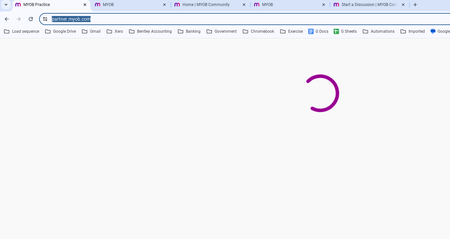
When logging into https://partner.myob.com/ after successfully entering the username, password and 2FA code, the page "loads" for an indefinite period without displaying anything. This also happened last weekend. Yet the status page shows that everything is running. Can MYOB please attend to this matter urgently and ensure honest and transparent communication with their customers about any errors with their services? See below (this has been the same for over 5 minutes):161Views0likes1Comment
CANNOT IMPORT SALES Error -25: Invalid amount.
Hi, We are attmepting to import data into a new MYOB AR file which is proving to be quite frustrating. While some files import without error, many of them are subject to "Error -25: Invalid amount." I have attempted to modify various variables/fields to no availl. I also attempted to identify how these failed imports differ from those that were successful. One potential problem cell was the 'discount field' which was filled with negative values. When removed the error message changes to Error -28: Item is not sold. Please see attatched exported file, and the import log. Any solution would be gretaly appreicated.622Views0likes2Comments
unable to access Print/Email Invoices list 'Unable to Connect' error message
Dear MYOB support We've been experiencing ongoing issues of being unable to access the print/email invoices function, Accountright error message displays 'Unable to Connect' (please see my previous posts regarding same issue). We have been dealing with this same problem for MANY months, with great frustration. While the print/email invoices list is not able to be accessed we've had no choice but to painstakingly email every single invoice individually = huge waste or our staff's time. About a month or so ago though & to our immense relief & amazement, this function miraculously started working again....hallelujha!! ...& we were once again able to access the Print/Email Invoices list so we could 'select all' & bulk email all invoices for the day. SO much quicker! However & incredibly frustratingly, as of TODAY the Print/Email Invoices function has stopped working again. It happens regardless of which user login is used & from whichever of our offices we login from & over various internet providers - as has been the case previously. All other functions continue working. Yesterday it was working...today it is not, and we have not done anything differently. All past suggestions from MYOB support regarding this issue have not been able to fix it. Given that the function recently started working again, without us doing anything differenty, but has now stopped working again, can someone from MYOB please explain what is going on? It is incredibly frustrating to be battling this issue with what is such a basic & necessary function. I look forward to a response.527Views0likes2Comments