MYOB assist does not give customer total due
The existing invoice app shows total balance due for a customer when you select Contacts. The new MYOB assist app does NOT show total balance due for a customer when you select Contacts. Please don't retire the invoice app before you have updated MYOB assist app to show total balance due for a customer. It would be even more useful if the app could show the amounts due in the different aged periods, current, 30, 60 and 90+ days = total.99Views0likes3Comments
Search Invoices By Keywords Within The Invoice Description
A feature that we would really like MYOB AccountRight to have is the ability to search the invoice description by keyword. We use the “Service” type invoice and often type something like “For the fabrication of custom mud guards” in the description on an invoice. Often we want to look up previous invoices and we know what the job was, such as fabricating mud guards, but we don’t remember what the invoice number or date was. If we could search for “mud guards” and all invoices with those words in the description would show up, then that would be very helpful for us. We did use a different accounting software program in the past and it was a feature that they had which was very handy!403Views8likes6Comments
ITEM SALES REPORTS
MYOB item sales reports default to the description stored in your inventory list rather than the customised line-item text entered directly onto individual invoices. This occurs due to the database structure. MYOB links item sales reports to the original item profile (Item Information) rather than the transactional line text of a specific sale. Furthermore, the reporting engine currently lacks a column to swap or override this default description with the customised invoice line description if you edit the text during data entry. It’s high time this shortcoming was rectified to save us all the hassle of manually exporting the fields into a new database and running tailored reports.
Send copy of invoice with reminder
It would be helpful if MYOB could attach a pdf of the invoice to the automatic reminder emails, as we are finding more and more customers have a policy of not clicking on links. We send all our customers a pdf copy with the original email, but they don't get anything with the reminder. Don't know how difficult that would be to achieve but it would save on admin time.194Views7likes3Comments
Remove view invoice link
Please remove the view invoice link from our emails. We do not use the online payments and our invoices are sent via outlook. Our customers are using the link and it takes them to a blank error page. This is unprofessional. I now have to send the invoices to myself and forward them after removing the link. I send a lot of invoices each day and this is time consuming.
Show the ACTUAL date not "three weeks" or "one month" ago when viewing the invoice activity in the invoice portal
Since statements and reminder emails don't add to the contact log, I have to collate that information with the 'sent emails' information and/or the 'view invoice activity'. It would be nice if EVERYTHING triggered a contact log so it's all in one place, and recorded the actual date so I can use it when chasing money from customers or referring them to debt collection.120Views1like2Comments
invoice items
It would be great to have an item list so it can be placed on a blank line. We have approximately 20 items that are provided for informational purposes only. I do not want them to have the amount or tax code, so selecting the required item and moving it onto a blank line would be great and save a lot of time. Cheers ColMake the action clearer when deleting a contact log entry
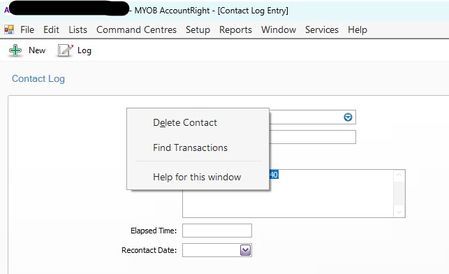
I have to really think hard before confirming that I do really want to delete the contact. I certainly don't want to delete the whole contact card, but if this message simply said "delete contact log entry" it'd be immediately clear and obvious what the action is going to be. It doesn't come up often, but when it does, I'm always hesitant to click on this.108Views1like3Comments