Forum Discussion

Earl_HD's avatar
Earl_HD
MYOB Moderator
2 years ago

Re: Shared Users

Hi dpwatson,

Thanks for your response. To resolve your issue, I recommend adding the user to your company file first. Please refer to this help page for detailed instructions Add a user to an offline fil. Additionally, ensure the new user installs the correct version of AccountRight Basics, as outlined in the help articles Install AccountRight/Downloads - MYOB Support. Then, utilize MYOB's OneDrive or FileUpload feature to share files. OneDrive enables you to create shareable links, while FileUpload supports anonymous or authenticated uploads. You can find more information about sharing files using MYOB solutions in this article. How to Share Files Using MYOB Solutions. 

Feel free to post again, we're happy to help!

If my response has answered your enquiry please click "Accept as Solution" to assist other users find this information.

Regards,
Earl

3 Replies

  • dpwatson's avatar
    dpwatson
    Contributing User
    2 years ago

    Hi again, so the confusion continues.  I already said I had added her as a User, so no need to be told that again.


    The sentence "ensure the new user installs the correct version of AccountRight Basics, as outlined in the help articles Install AccountRight/Downloads - MYOB Support." - well this link lists 279 possible files to download, but not one of them has the product title "AccountRight Basics"; maybe your support can be a little more specific? e.g. provide me with the link to this specific version of MYOB so it can downloaded?


    And no-one has bothered to address my query - "She already has another MYOB version on her own laptop (as the Treasurer for another NFP) but that one has a paid subscription servicice"; i.e. can she have two seperate versions downloaded on the same laptop?


    Surely MYOB should not be this hard to use/share?


    regards David


  • Earl_HD's avatar
    Earl_HD
    MYOB Moderator
    2 years ago

    Hi dpwatson,

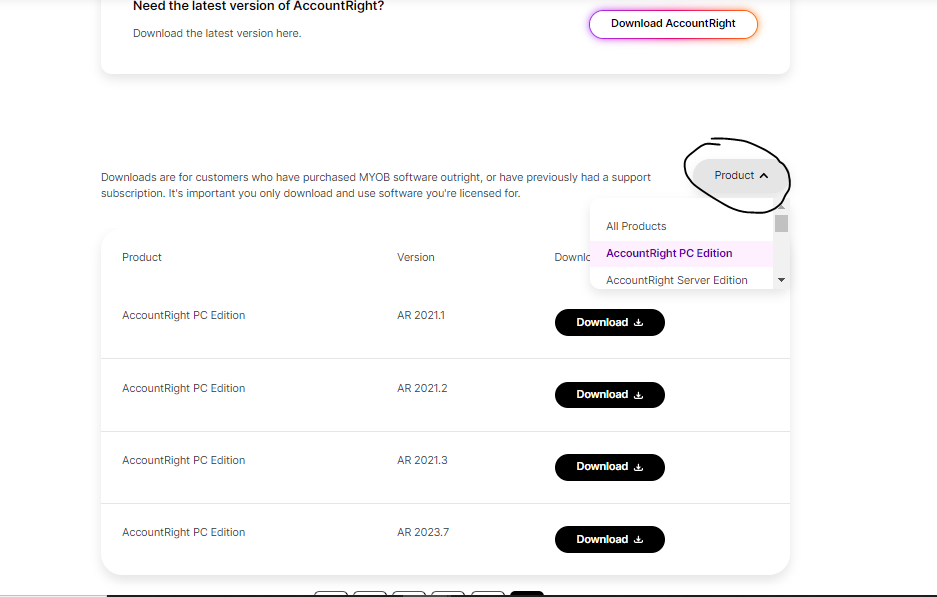
    My apologies for the confusion. The installer for AccountRight Basics, Standard, Plus, and Premier is the same. The specific AccountRight product and features you'll have access to are determined by the company file. To download the installer, visit this page: https://www.myob.com/au/support/downloads?page=4, then select the AccountRight PC Edition (refer to the attached image) and download the desired version.


    Regarding your second question, yes, you can have multiple versions running on the same PC. For more information, please refer to this posts.  Can you run 2 versions of MYOB?/Multiple versions of accountright


    Feel free to post again, we're happy to help!


    If my response has answered your enquiry please click "Accept as Solution" to assist other users find this information.

    Regards,
    Earl

  • dpwatson's avatar
    dpwatson
    Contributing User
    2 years ago

    Thanks Earl.


    As regard Can you run 2 versions of MYOB? when I click on the link in your message, it comes up with an error message  - ACCESS DENIED

    "You don't have access to this resource.

    It's likely that the page you're trying to access has been archived or that it's part of a private board. We apologise for the inconvience. Use our search page to find your topic or start a new topic."


    I used these words in the search page, but no relevant responses.

    Can you send me a link that works?


Looking for something else?

Search the Community Forum for answers or find your topic and get the conversation started!

Community home

Level up your skills using MYOB software.


Find help guides and technical solutions for all MYOB products here

Explore video tutorials for our software at the MYOB Academy here


Dig into MYOB Academy for free courses, learning paths and live events to help build your business with MYOB.