Forum Discussion


Princess_R
2 years agoMYOB Moderator
Hi Katie_P_,
Thank you for your response.
Apologies for the delayed response. I've replicated the situation on my end, testing all the reports you've specified. I can verify that the job numbers are indeed appearing. Could you kindly generate the Job slip summary report, then proceed to click on "Insert/Modify" and select the "show/hide" option?
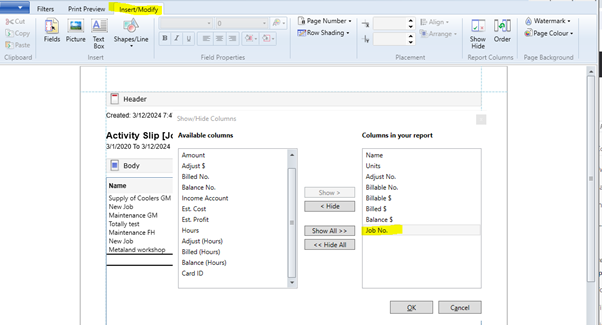
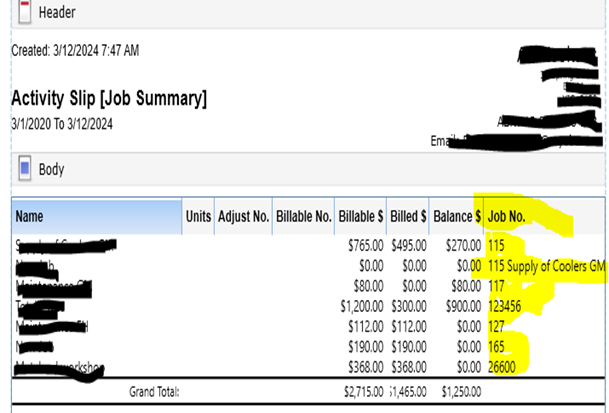
For further information, please refer to this Help article, Displaying a Report, which has detailed information to assist with this.
Please let me know if you need further assistance.
If my response has answered your inquiry, please click "Accept as Solution" to help other users find this information.
Cheers,
Princess

Katie_P_
2 years agoMember
Hi Princess,
That's great that you have been able to replicate it in a different file, I too can do that in other files.
My problem is that the file I am trying to generate the report in, is not working. As you can see from my original screen shot in which I have already used the 'Show/Hide' function to display the job numbers.
My original question still stands, is there a setting missing somewhere that is stopping these reports from working?
- Princess_R2 years agoMYOB Moderator
Hi Katie_P_,
Thank you for your response.
If the issue is only occurring with a specific file, it might be a more complex problem that requires further investigation. Could you please provide more details and screenshots of the list of jobs being allocated? This will help us to better understand the situation and look further.
Please let me know if you require further assistance.
Cheers,
Princess
Looking for something else?
Search the Community Forum for answers or find your topic and get the conversation started!
Learn, solve, grow
Level up your skills and find answers across all MYOB products


