Forum Discussion

WattsNet's avatar
WattsNet
Contributing User
1 month ago

Business API Item Bill no AccountID

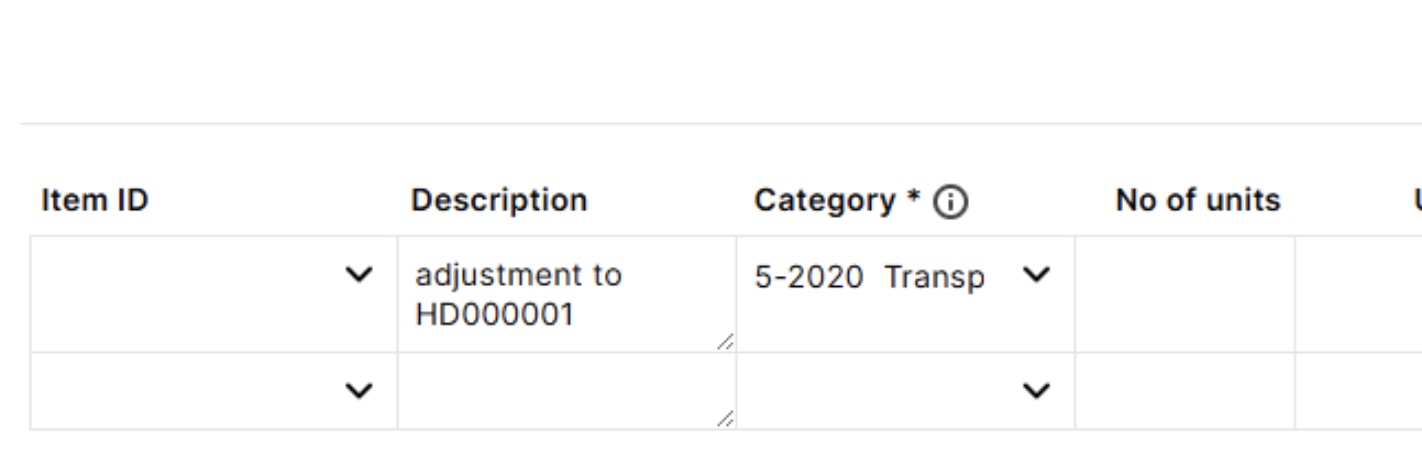
We are using the API to get Bills (amongst other things) from a client's MYOB file. The client has created an Item (type) bill. On their myob screen (see attached), there is no Item selected, but there is a Category selected, which looks like an Account ID (GL Code). We can successfully GET the Bills in question from the API. However, the Item (UID, etc) is empty, and the Account (UID, etc) is empty. It isn't clear how we get the Account ID for the line item. If an Item was selected by the client (on the myob side), we could source an Account ID via the Item. I'm assuming the Category on the myob page is different from the Category endpoint under the General Ledger.


Any help on how to source the Account ID (GL Code) on our side would be appreciated. 


TIA, Ian

6 Replies

  • WattsNet's avatar
    WattsNet
    Contributing User
    3 hours ago

    Hi Mike_James, I went to the API team and they seem to accept that is was an issue. They asked me to send in a request and response from the API end point. I haven't done that yet (it will take a bit to set up). Regarding the difference between the desktop and website: I think the flexibility on the web site is still there, I think that is what our client is saying (sorry, we are not active users of MYOB). Either way, I think the API end point should be able to provide an Account ID, even if it is a retro-fix to deal with historical item bills.

  • Mike_James's avatar
    Mike_James
    Ultimate Cover User
    3 hours ago

    Hi WattsNet​ , I wonder if the API team have resolved this for you. It looks like a program error, not an API issue. The item ID should be compulsory on an item layout. The API can only pick up an account/category ID via the Item ID.


    The item layout used to have flexibility that the desktop program does not have, in that you could choose an item ID (or not, it seems), and choose a different account/category. This latter feature was removed last year sometime, to tie the account/category to the item.

  • WattsNet's avatar
    WattsNet
    Contributing User
    1 month ago

    Thanks again Genreve, I've now submitted a dev request. I'm happy to mark this as the solution, given that it has reached a conclusion (of sorts) but anyone reading this will obviously need to track it to the developer forum.

  • Genreve_S's avatar
    Genreve_S
    MYOB Moderator
    1 month ago

    Hi WattsNet


    Thanks for bearing with me on this. I’ve had another look.

    In your case, the AccountId should be coming through: it’ll first try to use the account from the item, and if there’s no item on the line, it should fall back to the Category you’ve picked on that line. Because your bill clearly has a Category showing, but the API isn’t giving you an AccountId, it’s not behaving the way it should.

    The best next step is to get this in front of the API support team so they can dig into that specific bill and payload. You can log it here (as the developer or via your dev team):
    https://apisupport.myob.com/hc/en-us/requests/new


    Regards,

    Genreve 

  • WattsNet's avatar
    WattsNet
    Contributing User
    1 month ago

    Thanks Genreve, reading between the lines here: Via the API, the Bill Line on a Service Bill includes the Account ID. However, (via the API) the Bill Line on an Item Bill doesn't include the Account ID. The Account ID is available via the Item only if the the Bill Line includes a reference to one. I take it the "Category", that can be seen on the Items and Services Bill layout, isn't available via the API.


    Regards,

    Ian

  • Genreve_S's avatar
    Genreve_S
    MYOB Moderator
    1 month ago

    Hi WattsNet


    When the account code doesn’t auto‑fill from the API, it can definitely make things a bit confusing.

    In MYOB Business, there are only two bill layouts: Items, and services and Services. From your screenshot, it looks like you’re using the Items and services layout, which pulls the account from the item setup rather than from the bill line itself. The better option is to use the Services layout so you can choose the account directly on the line and have that flow through as the AccountID.


    Regards,
    Genreve