
Reconciliation of bank account
- 6 months ago
Hi Caroline5254,
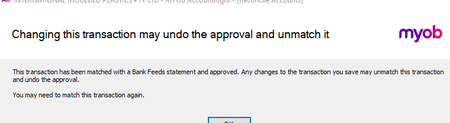
Thanks for sharing the screenshot. The message you're seeing is just a warning to let you know that changing the transaction could undo the approval and unmatch it from bank feeds. There's no need to change anything on the transaction itself. The older Online Banking Fees popping back up can make a tidy reconciliation report look a bit spooky. One thing that can help with odd behaviour like old transactions suddenly reappearing is doing a future-dated reconciliation. Reconciling into the future can effectively re-lock things and clear out some of those stray items so they stop showing as outstanding. To do a future-dated reconciliation,
- Open Banking > Reconcile Accounts > Choose Account
- In the Bank Statement Date field, enter "31/12/9998".
- Tick all transactions that appear in the list.
- Copy the Calculated Statement Balance amount into the Closing Statement Balance field. This should result in a $0.00 out of balance.
- Click Reconcile > Reconcile.
- Click Undo Reconciliation.
- In the "Undo Last Reconciliation" window, it mentions that the last reconciliation can’t be fully undone, so it’s best to make a backup of the file before clicking Undo Reconciliation.
- Enter the original statement date again and click Reconcile.
If that doesn’t fix the old transactions, it’s best to reach out to our team so they can take a closer look. You can contact them on Live Chat via our virtual assistant, MOCA, or by submitting a support case via My Account.
Cheers,
Doreen


