Forum Discussion


Isaiah_C
5 months agoMYOB Moderator
Hi ivanbarr,
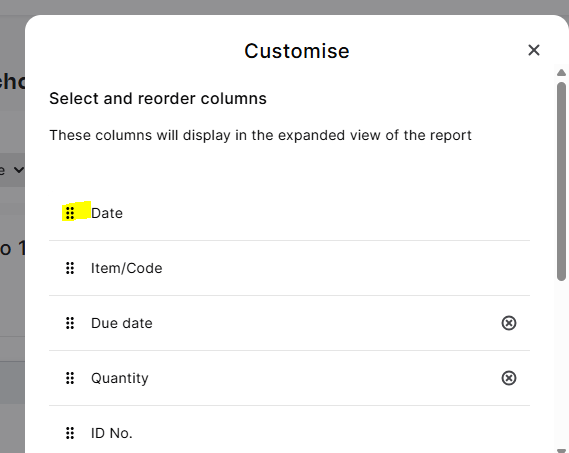
That default sort by ID can be a bit annoying when you're trying to follow things by date. In the Supplier purchases (detail) report, you can tweak this pretty easily. Just hit Customise, then in the columns section, drag the Date column up to the top of the list. That makes it the primary sort, so everything will show in date order instead.
Regards,
Sai
 ivanbarr5 months agoContributing User
thanks Sai. That is exactly what i thought and tried it, but whilst the first column on the left becomes "date" it is still sorting by ID. what am i missing?
Kind regrds
Ivan
- Princess_R5 months agoMYOB Moderator
Hi ivanbarr,
Sweet! Don’t worry, we’ll guide you through how to shuffle those columns around. Once you hit Customise, you’ll see all the options for what shows up first. Just grab the dots to the left of a column, drag it up or down to where you want it, then hit Apply to lock in your new column order.
Cheers,
Princess
- ivanbarr5 months agoContributing User
Thanks Princess

Looking for something else?
Search the Community Forum for answers or find your topic and get the conversation started!
Learn, solve, grow
Level up your skills and find answers across all MYOB products


