Forum Discussion

10 Replies
- Isaiah_C6 days agoMYOB Moderator
Hi ivanbarr,
Thanks for sticking with this one. I know it's not ideal when the report won't sort the way you expect. Since you've already tried the sorting steps and it's still defaulting to ID, it's best we get this properly checked from our end. At this point, I'd recommend jumping onto our live chat support through our virtual assistant, MOCA, or submit a case via My Account. The team there can dig a bit deeper and see if something's stuck behind the scenes or if it needs a quick fix on the file.
Regards,
Sai
 ivanbarr7 days agoContributing User
Can i please get a response to this - alternatively provide an email address of someone who can help
Kind regards
Ivan
- ivanbarr17 days agoContributing User
still waiting for reply to my follow up
- ivanbarr18 days agoContributing User
Thanks again - but that is exactly what i did but the report still sorts by ID
- Princess_R18 days agoMYOB Moderator
Hi ivanbarr,
No stress at all, you can skip hunting for the dropdown arrow and just hit the Customise button to see and tweak the column order. I’ll pop in a screenshot too so you’ve got something to refer to.
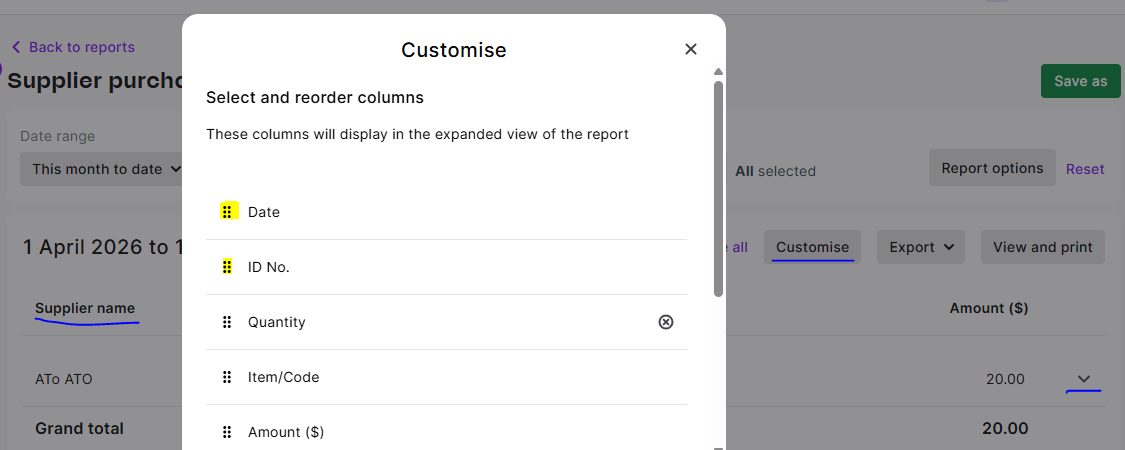
Cheers,
Princess
- ivanbarr18 days agoContributing User
i cant find a dropdown arrow alongside suppliers name - can you send me a screen dump please ?
- ivanbarr18 days agoContributing User
Thanks Princess
- Princess_R18 days agoMYOB Moderator
Hi ivanbarr,
Sweet! Don’t worry, we’ll guide you through how to shuffle those columns around. Once you hit Customise, you’ll see all the options for what shows up first. Just grab the dots to the left of a column, drag it up or down to where you want it, then hit Apply to lock in your new column order.
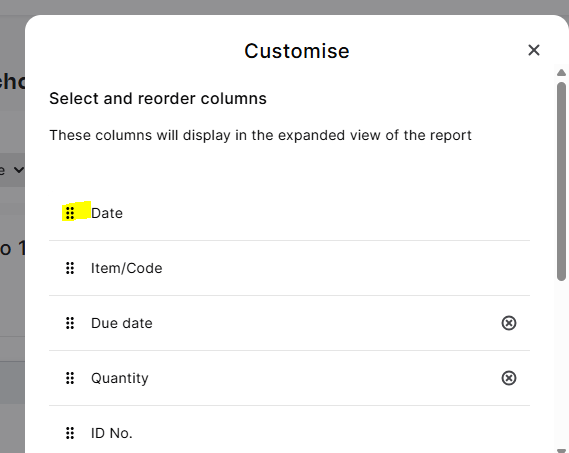
Cheers,
Princess
- ivanbarr18 days agoContributing User
thanks Sai. That is exactly what i thought and tried it, but whilst the first column on the left becomes "date" it is still sorting by ID. what am i missing?
Kind regrds
Ivan
- Isaiah_C18 days agoMYOB Moderator
Hi ivanbarr,
That default sort by ID can be a bit annoying when you're trying to follow things by date. In the Supplier purchases (detail) report, you can tweak this pretty easily. Just hit Customise, then in the columns section, drag the Date column up to the top of the list. That makes it the primary sort, so everything will show in date order instead.
Regards,
Sai


Looking for something else?
Search the Community Forum for answers or find your topic and get the conversation started!
Dig into MYOB Academy for free courses, learning paths and live events to help build your business with MYOB.


