Forum Discussion

PriyaSelvaraj's avatar
PriyaSelvaraj
MYOB Staff
2 years ago

How to Update Single Touch Payroll details

Hi All,


After setting up Single Touch Payroll (STP), there are some business and contact details you can update yourself.

Other details, like your ABN and Software ID, were recorded when you set up Single Touch Payroll. To update these details you'll need to go through the STP setup steps again.

Let's look at the details:


To update your...
Do this...
Business details (business name, ABN, ABN branch or address)
  1. Go to the Payroll menu and choose Single Touch Payroll reporting.
  2. Click the ATO settings tab.
  3. Enter your updated details.
  4. Click Update business details.
Business contact details (name, email or phone)
  1. Go to the Payroll menu and choose Single Touch Payroll reporting.
  2. Click the ATO settings tab.
  3. Enter your updated details.
  4. Click Update contact details.
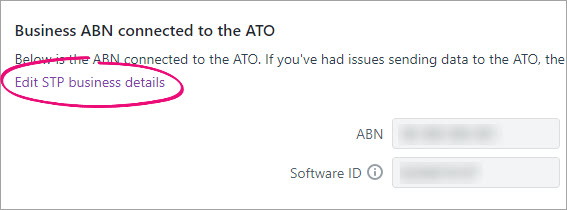
Business details connected to the ATO (Software ID, ABN, Agent ABN or Registered Agent Number)
  1. Go to the Payroll menu and choose Single Touch Payroll reporting.
  2. Click the ATO settings tab.
  3. Click the Edit STP business details link.
  4. At the confirmation, click Edit STP business details.


Cheers

Priya Selvaraj

Replies have been turned off for this discussion

Looking for something else?

Search the Community Forum for answers or find your topic and get the conversation started!

Community home

Level up your skills using MYOB software.


Find help guides and technical solutions for all MYOB products here

Explore video tutorials for our software at the MYOB Academy here


Dig into MYOB Academy for free courses, learning paths and live events to help build your business with MYOB.