Forum Discussion


talinga
2 years agoExperienced User
Hi Cel.
Thanks for getting back to me.
1. "I have noticed that you are currently in the 2024 financial year." -- Not sure, as I pointed out in my last reply, there is discrepancy on period between cloud baed version and desktop.
2. "If you are using an outdated browser version, you may lose some functionality in MYOB. " -- We use up to date Chrome as attached, so browser should not be an issue.
It's just likely to be another issue with the cloud based system. But it's ok. Thank you.

Earl_HD
2 years agoMYOB Moderator
HI talinga,
Thank you for your patience in this matter. I've taken steps to address your concern by running a script to review your current financial year status. According to the results, it appears that you are currently in the 2024 financial year.
In the event that there's a discrepancy between the cloud-based and desktop versions, it's possible that you might be operating within two separate files. This differentiation could be the reason for the disparity in financial year details.
Feel free to post again, we're happy to help!
Regards,
Earl
- talinga2 years agoExperienced User
Hi Earl
Thanks for the follow-up.
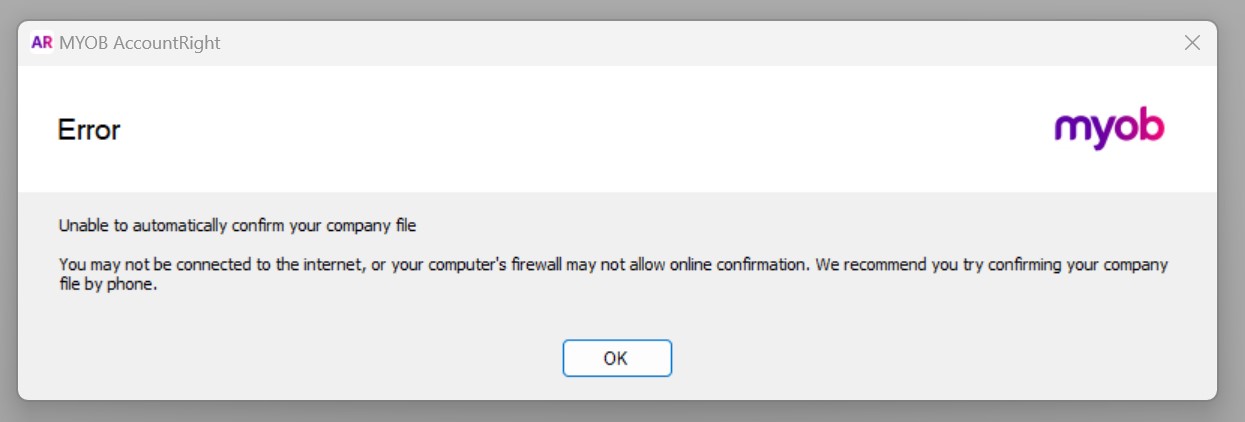
We do not use the desktop version often. When I opened it today, the ERROR message attached popped up.
"Unable to automatically confirm your company file. You may not be connected to the internet, oryour computer's firewall may not allow online confirmation. We recommend you try confirming your company file by phone. "
FYI - 1) internet connection is good, 2) computer configuration never changed so firewall should not be the problem.
Could you guide me to fix this problem?
The reason I opened the desktop version today is I want to figure out what you meant by "it's possible that you might be operating within two separate files." My understanding is that the cloud-based version and the desktop online version should always syn instantly. In the past, anything got changed in the cloud-based would be reflected in the desktop instantly, and vice versa. BTW, we always use online desktop version.
Thank you
- Earl_HD2 years agoMYOB Moderator
Hi talinga,
Thank you so much for reaching out and my apologies for the late response. I would be glad to help you with this, I have sent you a private message to gather more information that will help us resolve this issue.
Looking forward to hearing from you soon!
Regards,
Earl- talinga2 years agoExperienced User
Hi Earl
I was unable to send you private message. Not sure if it's another system's bug?
- Earl_HD2 years agoMYOB Moderator
Hi there,
Thanks for reaching out.
If you encounter an 'Unable to automatically confirm your company file' error when opening AccountRight, you'll require a license file to reactivate your file. The license file remains valid as long as you're using the same version of your software.
Regards,
Earl
Looking for something else?
Search the Community Forum for answers or find your topic and get the conversation started!
Learn, solve, grow
Level up your skills and find answers across all MYOB products