Base hours not reducing when paying AL or PL
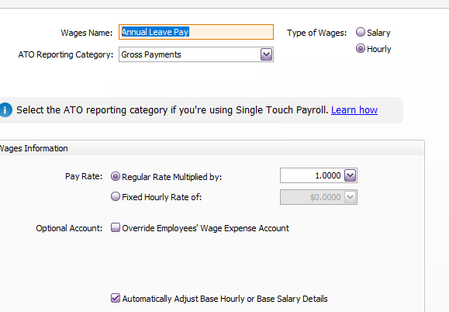


i have since discovered that there are a few different base hourly. When using the 1 location "Base Hourly Wongan Hills" and you enter AL leave taken, it works. But with new Base Hourly locations set up, ie Base hourly Corporate, it doesn't work. Is there a work around for this ?

Hi Chellie22051,
This is a known issue that our team is already working to fix. For further assistance, I recommend reaching out to our support team so they can mark your file as affected.
You can contact our support team for more help. The best ways to contact them are through live chat (via our virtual assistant MOCA) or by raising a support ticket through myaccount.myob.com. Live chat is available Monday to Friday from 7 AM to 7 PM (AEST). If live chat is unavailable, you can submit a support request, and one of our agents will get in touch via email
Regards,
Earl
im unable to chat online it won't allow me

Hi Chellie22051,
Are you getting any error messages when you try to reach our live chat agent? When you're on our virtual assistant MOCA, just type "Get help from a support agent," and you'll get a link to connect to our live chat agent. If live chat isn't working, you can also call us directly using the phone number on our website.
Cheers,
Princess
When starting the live chat when i click on payroll it goes no further. Unsure if im able to chat or call as im new to the company. Can you please check and advise ?
Search the Community Forum for answers or find your topic and get the conversation started!
Level up your skills and find answers across all MYOB products


