MYOb Accountright Superannuation Payment Error
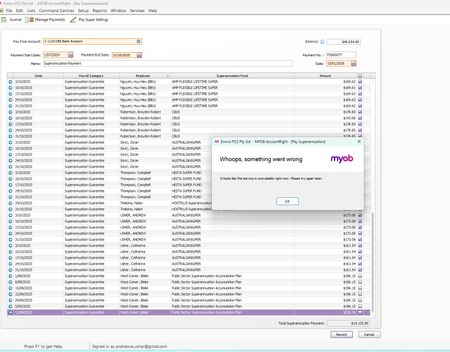


Hey everyone,
Yes, there’s a known issue with recording super payments and we’re aware of it. Our developers are already investigating. If you haven’t submitted a support case yet, we recommend creating one via My Account so your account is tagged as affected and you’ll be notified as soon as it’s resolved. If you’ve already got a case lodged, you’re all set and don’t need to create another.
Cheers,
Doreen

Im having same issue
Hey CJ-Jube,
A workaround that’s helped other users is changing the super payment threshold, which you can try using the steps in this link. If that still doesn’t sort things out on your end, we’re already across this issue with recording super payments and our developers are digging into it. If you haven’t logged a support case yet, it’s worth creating one through My Account so your file gets tagged as affected and you’ll be notified as soon as there’s a fix. If you’ve already lodged a case, you’re all good and don’t need to submit another.
Cheers,
Doreen
Thanks Doreen_P I did try changing the limit but that made no difference, i still had the error. I have lodged a support case also. It is happening on two of my files.

I was given a suggestion from MYOB support to increase the threshold for the payment & I believe that was the problem for me. Payment has now been processed.
Thanks Traci, you're a legend. That fixed my problem too.
hi Doreen
I am responding to your post from 3 months ago. this issue appears to still be a problem. I have been trying to pay my quarterly super and keep getting this message. I have to have it done today as I only work part time and I need to avoid the Super Guarantee charge
thanks
Wendy
Hi Ezial,
Sorry to hear about the persistence of your super payment error. If you are seeing the message “Whoops, something went wrong. Employee is inactive” when you try to pay super, I recommend checking that any employees included in the batch are active in your file and not terminated for the period you are paying. Reactivate the employee or remove them from the batch, then try the Pay Super run again.
You can also update any Pay Super payment limits. This help article steps through the options in AccountRight: https://www.myob.com/au/support/myob-business/payroll/superannuation/set-up-pay-super/changing-your-pay-super-payment-details?productview=Desktop
If the error keeps coming up after going through those steps, you can reach out to our support team so we can take a closer look. You can do this by creating a ticket in My Account or connecting with our live chat team through MOCA, our virtual assistant.
Regards,
Genreve
Hi, I am getting the "Whoops, something went wrong...it looks like this service is unavailable right now. Please try again later." error message. This has been happening for 3 days now?????
Search the Community Forum for answers or find your topic and get the conversation started!
Level up your skills and find answers across all MYOB products


