Allow changes to entries in locked periods with a password override per transaction instead of having to unlock the period through settings
There are sometimes legitimate reasons why something needs to be changed on a transaction in a locked period. It's all well and good going in and changing the locked period date to an earlier date to allow this, but I've lost count of the number of times I forget to go back and change it back to the correct date after making the change. If we could just type in a password to override the warning for the specific transaction, it would be soooo much more secure, and noone else could accidentally slip a new transaction through while the period is unlocked. This would need to have a separate permission in user role setups - unlike the generic access to "preferences" as a whole so we can REALLY keep this permission locked down to the bare minimum number of users.209Views6likes5CommentsAccountRight Bank Feeds - In the Spend Money menu could there be an option to use a Recurrent Transaction ?
Situation at present: I go to the Banking command centre and select Spend Money - then select Use Recurring Transaction, find the payee and record the new instance of that payment (e.g. my monthly phone bill). Next, I go to Bank Feeds, find the payment (often a direct debit) and match it to my new payment. To save time, when I go into Bank Feeds - Spend Money, could there be an option to open the Recurrent Transactions list and select a recurrent transaction, to allocate the Bank Feed payment ? (Kym in Palmerston, outer Darwin - a MYOB Certified Consutant since 2007 and AR user since 1995)309Views3likes10CommentsRemove messages once dismissed
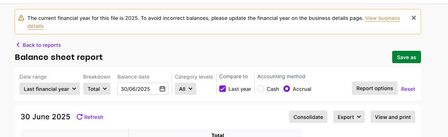
I have a Business ledger in which I am finalising the 2025 year and I keep getting this pointless message: This message is just wrong. PLEASE, to base this message on the computer's system date rather than the date that has been selected for the report is not only wrong but must be creating problems for any user who is not very experienced. AlanT186Views2likes1Comment
PLEASE STOP WITH THE TWO FACTOR VERIFICATION CODE!!!!
Youre honestly driving me crazy with this. There is absolutely no need! STOP!!!! Think about it: If someone has hacked my account, do you not think i would know within 24hrs??? If they have, thats great! They can have my Debt! Youre being ridiculous! Once a month i have no problem with. Every **bleep** 24hrs over multiple PC's however! Where do i send MY invoice for wasted time???? Got an E-Mail?219Views2likes3Comments
Surcharge from online payments not shown on invoice
When a customer pays for an invoice using the MYOB online payment system and the fee payment is set to be paid by the customer, the invoice doesn't update to show the service fee or surcharge that the customer paid. My customers then need to have a copy of the invoice showing this surcharge amount. Can the invoice please be updated to show the surcharge that both I can view as the supplier and the customer can view? This link refers to the issue commonly in the MYOB Community: Provide receipt showing surcharges | MYOB Community Thanks.212Views1like3Comments