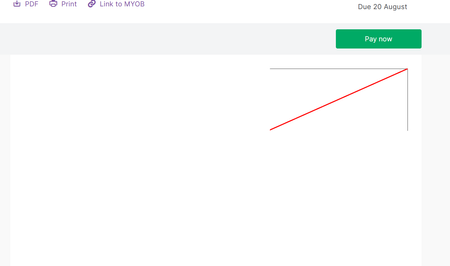
Emailed invoices not showing on page - red line
Today I have had a customer reply to my invoice email that when you click on the View Full Invoice Details button in the email it takes you to the invoice in browser but the invoice isnt displayed, it just shows a cut off red line. See screenshot. I try opening and get the same issue from the email.145Views0likes4Comments
Client Complaint re Unpaid Invoices
My client was complaining that the Unpaid Invoices Summary she received did not contain the pdf of the Statement or Invoice. She is the manager and has to approve and forward the pdf to her accounts person. So it didn't save me any time as I still had to physically email her what she was requesting. Can that feature be incorporated into the Summary? This is the screenshot she sent me. (They had changed their email address, so had not received previous invoices or Statement.) ThanksSolvedGST Number not showing on invoices
Hi, I notice our GST number isnt showing on the invoices now im using the Browser and templates. I have tried clicking the GST number in the template settings and hitting save but nothing changes, I have tried using a different browser to do it as well. Im in NZ and we are meant to display our GST number.223Views0likes6Comments
MYOB payment on hold
Hi there, I recently sent an invoice to a customer, and he paid online with his credit card by clicking the MYOB pay online button. However, I could see there are transaction records of his payment (Found in the find transaction function), whereas there is no related deposit in bank feeds. At the end, I found that MYOB still "processes" such a payment. Could anyone explain to me the possible reasons why MYOB still "processes" the payment even though the customer finalised the payment last week? Kind regards, JohnHow to modify the customer payment after applying it to an invoice?
Hi there, I recently encountered a question. For example, when this sale order is still a sale order (i.e., not an invoice), I can easily delete or modify the customer payment I apply or match to it. However, once I invoiced this sale order, I found that I was unable to delete or modify the customer payment. Does anyone have a solution to the above issue? Thanks. Kind regards, JohnIn Tray bug with certain file names - Hyphens
I have noticed since one of our suppliers has starting naming their PDF invoices they send us to include a date - so a file name such as inv34343-25-03-26.PDF that when the file gets emailed to MYOB it bounces back. I found that removing the hyphens in the file name fixes the problem. Can this be fixed please? I use to notice this on certain government (vehicle rego reminders) files sent to us as well in the past and couldn't figure out why they keep rejecting. Causes a problem with their invoices getting missed and not paid. Thanks116Views0likes2CommentsHow do I pay suppliers and easily in Browser
I have just started using the Browser version instead of the Desktop. Main issue I am having is when I want to pay my suppliers, it doesnt look like I can bulk pay multiple suppliers like I could with the ToDo list in Desktop. Then the other large issue is if I have to pay each supplier one by one, when I am in the Record Supplier Payment window when I select the drop down of suppliers to pay it shows all my suppliers whether I owe them money or not, and also doesnt show an amount next to there name before selecting. I would basically have to guess who I owe money to and select them and likely miss some. So the only way I see it is each month when I pay my bills I have to create a report of unpaid bills in another window, then go through and pay each one individually reading off that report? If thats the case its probably fast to just use the Desktop Accountright when I pay my bills? Thanks193Views0likes3Comments
Purchase bills can be posted to locked period via online in-tray
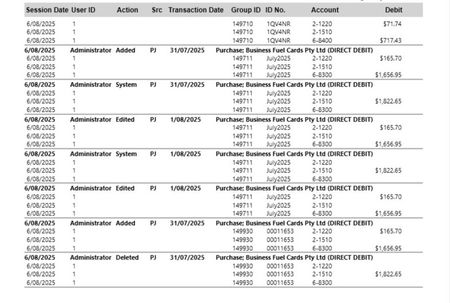
Hi all, Due to reporting purposes, we always lock the priod after finalising month end. However, I recently found out that with Myob browser version when uploading bills to in-tray and let the system populates the info from the bill, the bills can be posted to locked period. If the bill is entered mannually, the system locks it. However, It doesn't seem like the locked period function works for browser in-tray function. For example: we locked the period up to July 2025 (no transactions can be posted prior 31/07/2025) morning on 05/08 and yesterday 06/08, a purchase bill were posted to myob via in-tray function dated 31/07/2025. I even tested myself and the system let the bill recorded. I've attached the screenshot of security audit report showing when the bill got recorded, then I have to change the date to Aug and the last 2 were my testing. Is there anything else I can do to prevent this to happen?
Online payments-view customer invoice in email
Our business has been verified. When we email an invoice which has payment terms of 7 days or 30 days, the customer gets confused when he wants to print a pdf invoice and the email says "Pay securely". The customer has to select "Pay securely" in order for him to get to the next screen where he can select "View full invoice". It would make more sense if the email shows "View full invoice" and "Pay securely". That way the customer has a choice and it is less confusing for a customer that does not want to pay an invoice, only print it.Solved