Forum Discussion

3 Replies
 Genreve_S6 months agoMYOB Moderator
Hi Hateworkin,
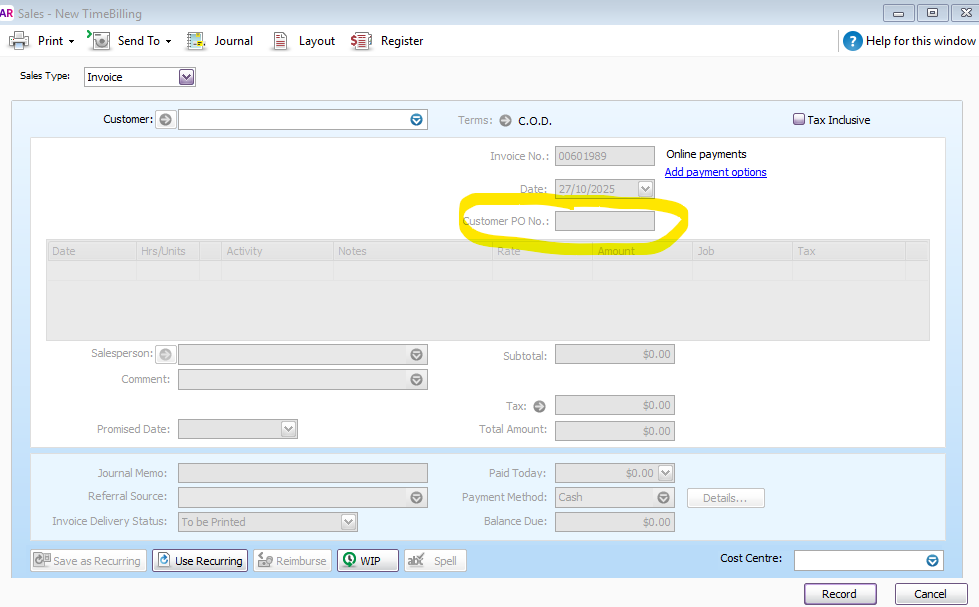
Thanks for sending through the screenshot. Looks like it’s a screenshot of the Enter Sales window right after you open it (or after you record an invoice), so it won’t really show any invoice details in that window.
You can check the invoices you’ve recorded by heading to the Sales Register window, opening the invoice directly, and making sure the PO number is included.
Regards,
Genreve- Hateworkin6 months agoContributing User
yes it is I did not want to screenshot with my customer details in it.
My issue is that when I create an invoice I need to put the purchase order in the box which I do manually but when I send the invoice to the customer is not there, they will not pay the invoice without the PO Number
I have previous got away with it by putting the details into a header line on the invoice but that is no longer allowed, see attachment - Isaiah_C6 months agoMYOB Moderator
Hi Hateworkin,
That does sound a bit tricky. When the PO number doesn't come through the way you need it to, especially if it means your customer won't pay without it. You've been pretty clever finding that little workaround before. Let's try clearing your AccountRight cache first. That usually sorts out odd little glitches like this one. If it's still giving you grief after that, best to jump onto our live chat support through our virtual assistant, MOCA, or submit a case via My Account so the team can take a closer look and get it sorted for you.
Regards,
Sai

Looking for something else?
Search the Community Forum for answers or find your topic and get the conversation started!
Dig into MYOB Academy for free courses, learning paths and live events to help build your business with MYOB.