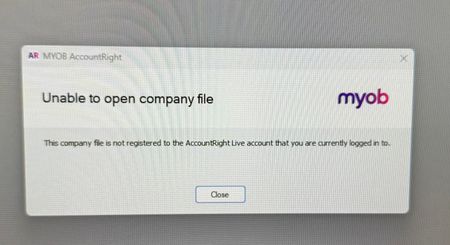
Unable to open company file AR Desktop


Hi Liz_A,
Thanks for explaining what’s happening and for sending through the screenshot. The error means the MYOB account the employee is signed in with isn’t currently linked to the company file they’re trying to open. This can sometimes happen when multiple company files have been opened on the same computer and appear in the Recently opened company files list in the AccountRight Welcome window. Please ask the employee to select the file from the Company file online list after choosing Open a company file. They may also need to sign out of AccountRight and sign back in using the email address that was invited to access the file. For more information, see our help page: Error: “Unable to open company file”
Cheers,
Princess

Hi Princess
I have tried this again today without success. I have cleared the cache and I have logged in with the owner's Administrator access to delete the user and invite the user with a brand new email address created today and still no success. I have been able to log in as myself as well as the owner on the terminal and I have tried a different browser and it won't allow access - says cannot login on a browser screen. What else can we do?
Regards
Liz
Hi Liz_A,
Thanks for the update. It sounds like you’ve already worked through everything we’d normally recommend for an account access issue. Since the problem seems to be linked to access to this particular file, our support team will need to take a closer look. You can get in touch with them through any of the options on our Contact page, and they’ll be able to investigate this further and work through it with you.
Cheers,
Princess
Search the Community Forum for answers or find your topic and get the conversation started!
Level up your skills and find answers across all MYOB products


