Error -25: Invalid amount when importing invoices
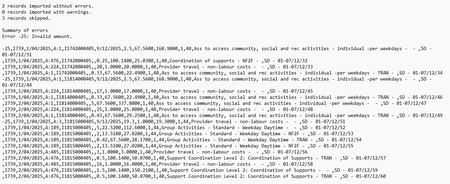


Hi donna-r,
Thanks for providing the screenshots. This error occurs because Microsoft Excel adds double quotation marks to values when you save as a text file (Tab Delimited) or CSV, especially when a value contains a comma.
Before importing again, remove the quotation marks or change the column format in Excel so the values are saved without them; then re‑save and import the file. There are several ways to do this, the simplest is to adjust the column format in Excel and re‑save.
Please see image attached:
Before.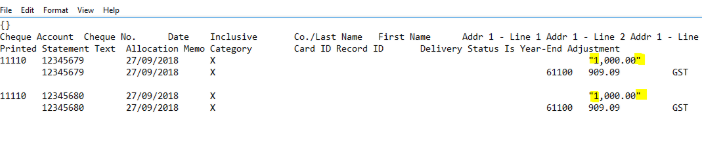
After.
I hope this helps!
Regards,
Earl

Thank you Earl however that doesn't appear to be the problem.
I have removed any and all quotation marks no matter where they were, also any commas and unnecessary spaces and I am still getting the same error.
I have attached the file I am using and the error log for you to review please.
Any assistance will be greatly appreciated, this is doing my head in!!
Hi donna-r,
Appreciate for providing the screenshots. This would need further assistance on the backend, make sure to reach out to our team directly. You can reach them on Live Chat via our virtual assistant, MOCA or by submitting a support case via MyAccount.
Regards,
Earl

Hi donna-r , a few things to consider:
Search the Community Forum for answers or find your topic and get the conversation started!
Level up your skills and find answers across all MYOB products


