Forum Discussion
donna-r
2 months agoContributing User
Thank you Earl however that doesn't appear to be the problem.
I have removed any and all quotation marks no matter where they were, also any commas and unnecessary spaces and I am still getting the same error.
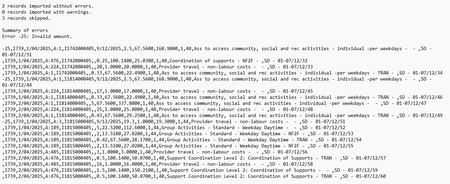
I have attached the file I am using and the error log for you to review please.
Any assistance will be greatly appreciated, this is doing my head in!!
Mike_James
2 months agoUltimate Cover User
Hi donna-r , a few things to consider:
- if the import file is formatted for current AccountRight program, then you need curly braces on line 1 ( like {}, on their own).
- Put the fields in your import file in the same order as per the list of fields required.
See Import and export fields. Different field orders have been known to cause this error and others. - The import file requires a tax amount field, not just a tax code field.
- If your preferences include items on time billing invoices, then you may need to include Freight tax code and Freight tax amount fields
Looking for something else?
Search the Community Forum for answers or find your topic and get the conversation started!
Find technical support and help for all MYOB products in our online help centre
Dig into MYOB Academy for free courses, learning paths and live events to help build your business with MYOB.